


Key Takeaways
- Check visibility settings to ensure videos are set to Public, not Private or Unlisted.
- Optimize metadata with searchable keywords in titles, descriptions, and tags.
- Design clickable thumbnails using high contrast, faces, and bold text overlays.
- Analyze retention graphs in YouTube Studio to spot where viewers drop off.
- Promote strategically on platforms like Instagram Reels, Reddit, and email lists.
- Test and iterate by tracking one change at a time through Studio analytics.
10 Reasons For Low YouTube Views & How to Fix Them
You uploaded a video. You refreshed the page. Still zero views. That frustration is common. Many creators face stalled growth, even with solid content. The problem usually comes down to visibility, metadata, or retention issues that the algorithm notices before viewers do. Understanding the cause is the first step toward recovery. Most low-view problems stem from technical missteps, weak discoverability, or algorithmic penalties that creators overlook.
1. You’ve Set Your Videos to Private or Unlisted
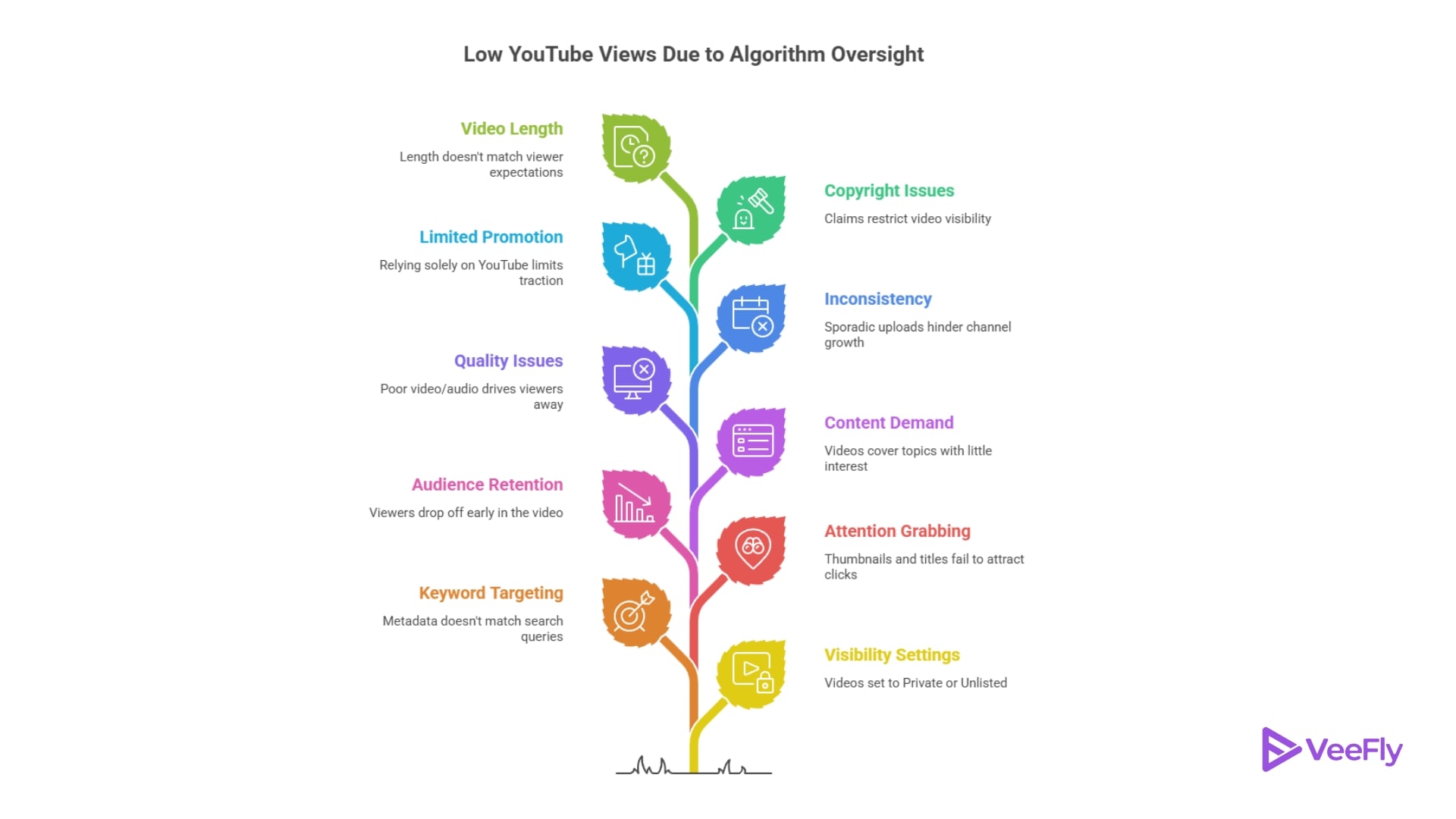
One of the simplest yet most overlooked reasons for low views is that your videos aren’t publicly visible. If your video is set to Private or Unlisted, no one outside of specific users can find it.
How to Fix It: Go to YouTube Studio and check the visibility status of your videos. Change any Private or Unlisted videos to Public. This quick fix often solves the question of “why are my YouTube videos not getting views” almost immediately.
2. You’re Targeting the Wrong Keywords
If your titles, descriptions, and tags don’t match what people are searching for, your videos won’t appear in search results or recommendations.
How to Fix It: Use tools like YouTube’s Research tab or free keyword planners to find relevant keywords with good search volume. Then, optimize your metadata, by including your main keywords prominently in your title and description, and add a few targeted tags. It makes it easier for the algorithm to connect viewers with your content.
3. Your Thumbnails and Titles Don’t Grab Attention
Even if your video appears in search or suggested feeds, low click-through rates (CTR) will stop YouTube from recommending it further.
How to Fix It: Create thumbnails with high-contrast, clear images and concise text overlays. Use expressive faces where possible; humans are drawn to emotional expressions. Rewrite titles to be clear but intriguing, ideally under 60 characters. Test different designs and words by checking CTR in your analytics.
4. Your Audience Drops Off Early
If viewers leave your video within the first 15-30 seconds, YouTube considers it low-quality and stops promoting it.
How to Fix It: Hook viewers immediately by stating what value they’ll get in the first few seconds. Avoid long intros or filler talk. Add engaging visuals or tease exciting moments early on to keep attention high.
5. You’re Uploading Content With Little Demand
Posting videos on topics that few people search for naturally leads to fewer views, no matter how good the video is.
How to Fix It: Research trending topics and popular niches within your industry using keyword tools or social listening platforms. Tailor your content toward subjects with proven interest but lower competition, niche down rather than going broad.
6. Poor Video or Audio Quality Drives Viewers Away
Blurry footage, bad lighting, or muffled sound can cause viewers to leave quickly, hurting retention metrics.
How to Fix It: Aim for at least 1080p resolution and clean audio using an external microphone if possible. Even simple lighting improvements can boost quality significantly without expensive gear.
7. Lack of Consistency Hurts Channel Growth
Sporadic uploads make it harder for both viewers and the algorithm to engage with your channel regularly causing YouTube videos with no views.
How to Fix It: Set a realistic upload schedule, weekly or biweekly, and stick to it. Consistency builds viewer habits and signals reliability to YouTube’s algorithm, increasing chances of recommendations.
8. You’re Not Promoting Your Videos Outside of YouTube
Relying solely on YouTube’s algorithm can limit early traction, especially if you’re a new or small channel.
How to Fix It: Share teasers on Instagram Reels, post links in relevant Reddit communities (without spamming), or send announcements through an email list if you have one. External traffic boosts initial views, which helps the algorithm recognize your video’s value.
9. Copyright Claims or Community Strikes Limit Reach
If your video has copyright issues or strikes, YouTube may restrict its visibility without you realizing it.
How to Fix It: Check the Restrictions column in YouTube Studio for any warnings. Address claims by disputing false flags or editing out problematic sections if necessary.
10. Video Length Doesn’t Match Viewer Expectations
Overly long videos without structure cause viewers to drop off early; too short videos might not satisfy viewer intent depending on the topic depth.
How to Fix It: Analyze retention graphs for each video length range on your channel. Break up long videos into parts or add timestamps so viewers can jump around easily. Tailor video length based on audience preferences revealed in analytics.
How To Diagnose Low View Counts In YouTube Studio?
Running through a four-step analytics walk-through reveals exactly where your videos underperform and which fix to apply first.
1)Check Reach And Impression CTR: Impressions measure how many times YouTube showed your thumbnail. Views measure clicks. Low impressions mean YouTube is not recommending your video. Low CTR means your thumbnail or title is weak. Navigate to Reach in Studio, then compare impressions to views. If CTR falls below 2%, redesign your thumbnail and rewrite your title to be more specific or curiosity-driven to avoid YouTube videos with no views.
2)Analyse Audience Retention Graphs: Retention graphs show when viewers leave. Click Engagement, then Audience Retention. A healthy curve holds 50% of viewers until the midpoint. Sharp drops in the first 30 seconds signal weak hooks. Gradual declines suggest pacing issues. Use this data to cut dead air, add B-roll, or restructure your script. YouTube Shorts getting fewer views often trace back to retention dips unique to vertical video, where viewers swipe faster than they would close a long-form tab.
3)Review Traffic Sources And Click Through Rates: Traffic sources break down views by Browse, Suggested, Search, External, or Direct. New channels often see high External percentages from self-promotion. Established channels see 60% or more from Suggested. If you rely heavily on external traffic, optimize for internal discovery by creating series playlists and using end screens to drive binge-watching.
4)Compare Performance Against Similar Videos: Use the Compare feature in Advanced Mode. Select two of your videos with similar topics and compare CTR, retention, and traffic sources. Identify which elements the higher performer used and replicate them. This iterative approach beats guessing every time. Now that you know what is broken, here is how to fix it. These tactics map directly to the diagnostic metrics you just reviewed.
Final Thoughts
Understanding why your videos aren’t getting views helps you apply targeted fixes instead of guessing mindlessly. Start by checking visibility settings, then dive into analytics, focusing on keywords, thumbnails, retention, and promotion strategies in turn. Small changes compound quickly, consistent effort will get your content in front of more eyes sooner than you think!
Most creators treat low views as a mystery. It is not, questions like ‘Why are my YouTube views going down’, and ‘why did my YouTube views go down overnight?’. Both have measurable answers in your Studio analytics. Track results over three uploads before wondering why YouTube videos with no views are surfacing. Growth comes from iteration, not guesswork.
Frequently Asked Questions
Q1) How Long Does It Take For A New Video To Start Getting Views?
Most videos see initial impressions within the first 24 hours. If you hit zero views after 48 hours, check visibility settings and confirm the video is Public. The algorithm tests new uploads with a small audience first, so early retention and CTR determine whether it expands reach.
Q2) Can Deleting Underperforming Videos Hurt My Channel?
Deleting videos removes their watch time from your channel totals, potentially lowering overall metrics. Instead, unlist poor performers and focus on creating better content. Only delete if the video violates guidelines or contains outdated information that damages credibility.
Q3) Why Did My YouTube Views Go Down Overnight?
Sudden drops often trace to algorithm shifts, seasonal interest changes, or a viral competitor drawing traffic away. Check your traffic sources in Studio. If suggested views drop, your recent uploads may have lower retention than usual. Adjust the hook and pacing of your next video.
Q4) Does Re Uploading The Same Video Reset Its Performance?
Re-uploading treats the video as new, resetting all analytics and comments. YouTube may also flag duplicate content. Instead, update your existing video’s metadata, thumbnail, and first 30 seconds, then re-promote it through external channels.
Q5) Are Paid Views Ever Safe Or Effective?
Google Ads campaigns through platforms like VeeFly deliver real, targeted views from actual users. Avoid services that promise thousands of views for a few dollars. Those who use bots or click farms, which YouTube detects and penalizes. Safe promotion targets real audiences interested in your niche.