


Key Takeaways:
- Learn multiple safe methods to extract sound from YouTube for personal use.
- Master desktop software like VLC Media Player for high-quality audio rips.
- Discover fast online tools to extract audio from YouTube video links without installation.
- Understand the legal boundaries and copyright considerations of ripping YouTube audio.
- Optimize your files by choosing the right bitrate and format for your specific needs.
If you want to save a podcast, reuse background music, or study spoken content, learning how to extract audio from YouTube video can be very useful. Many creators, marketers, and students rely on this process to access audio without repeatedly streaming the full video. The good news is that you do not need advanced technical skills to extract sound from YouTube. With the right tools, the process becomes quick and efficient while maintaining decent audio quality.
How to Extract Audio from YouTube Video Using Desktop Software?
Using desktop software is often the most reliable way to rip audio from YouTube if you are concerned about file quality and security. Unlike online converters, desktop apps don’t bombard you with intrusive ads.
Using VLC Media Player
VLC is more than just a video player; it is a powerful transcoding tool. Here is how to pull audio from YouTube video files using VLC:
- Open VLC and navigate to Media > Open Network Stream.
- Paste the YouTube URL and click Play.
- Under the Tools menu, click Codec Information and copy the “Location” URL at the bottom.
- Paste that URL into your browser, right-click the video, and “Save Video As.”
- Once downloaded, go back to VLC, select Convert/Save, add your video file, and choose “Audio – MP3” as the profile.
4K Video Downloader
This is a dedicated tool specifically designed to extract sound from YouTube. It allows for bulk downloads and can even extract entire playlists into high-quality MP3 or M4A formats. It preserves the original quality of the upload, ensuring you get the best possible sound. In addition to extracting sound from YT videos, explore more online tools to convert YT videos to MP3 to repurpose your content.
How to Extract Audio from YouTube Video?
Online tools are one of the easiest ways to extract audio YouTube content without installing anything on your device. These platforms work directly in your browser and usually require just a video link.
Use Online Audio Extraction Tools
Popular tools include YTMP3, Y2Mate, and OnlyMP3.
- Copy the YouTube video URL that you want to convert
- Paste it into the tool’s input field
- Select the desired audio format, typically MP3
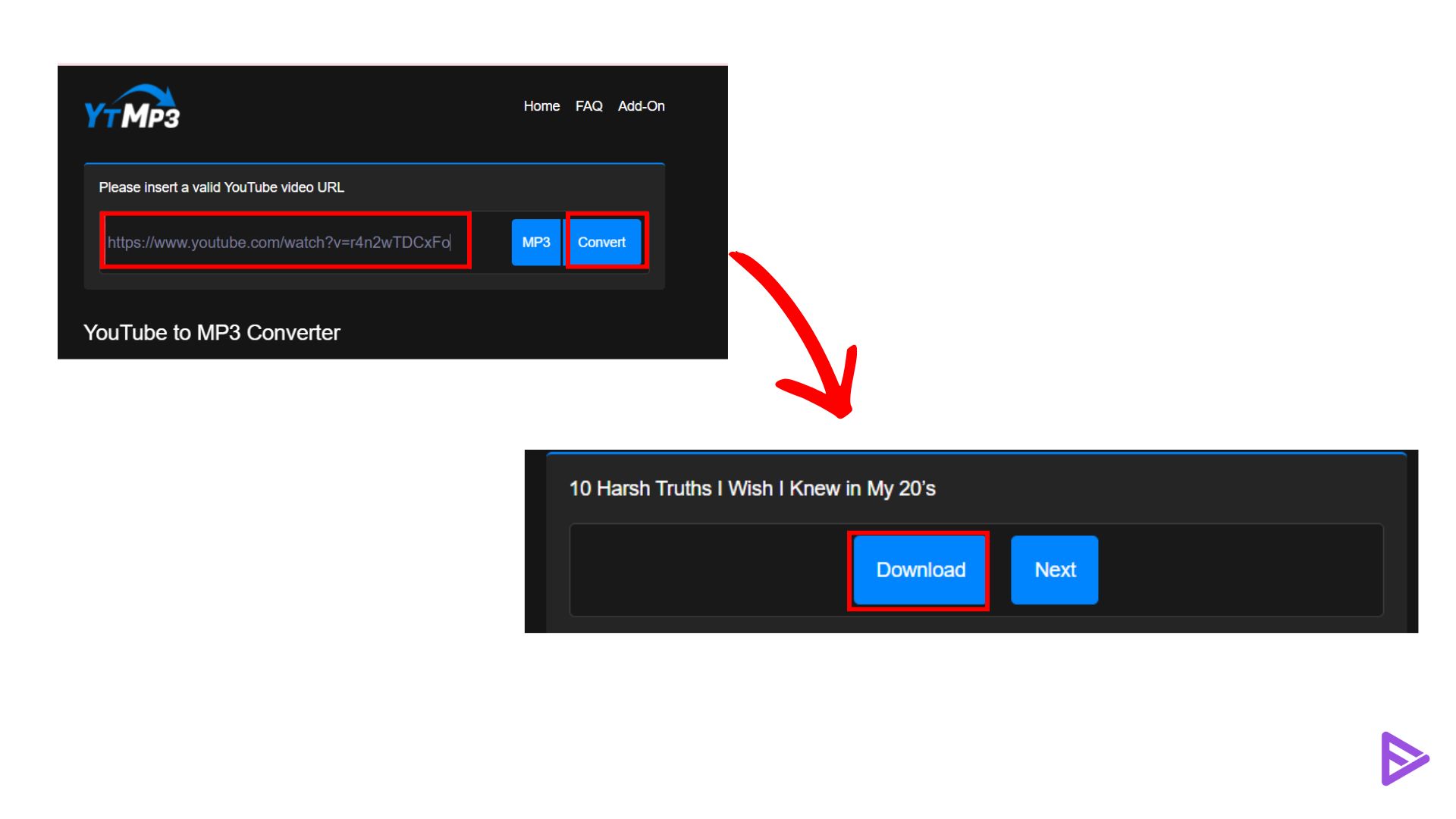
- Click convert and download the file
- These tools are useful when you need a quick solution without worrying about installation. However, the output quality may depend on the original video and the platform’s limitations.
How to Pull Audio from YouTube Video on Mobile Devices?
In today’s mobile-first world, you might need to extract sound from YouTube directly on your smartphone. The process differs slightly between iOS and Android.
For Android Users
Android users have more flexibility. Apps like TubeMate or InsTube let you browse YouTube in the app and select “Download as MP3.” Note that these apps are usually found as APKs rather than on the Google Play Store due to Google’s terms of service.
For iOS Users
Apple’s ecosystem is more restrictive. To extract audio from YouTube video files on an iPhone, you typically need an app like Documents by Readdle. You can use the built-in browser within the app to visit an online converter, download the file to the app’s local storage, and then move it to your Files app.
Choosing the Right Audio Format and Quality
When you extract audio YouTube creators have uploaded, you will often be prompted to choose a format.
- MP3: The most compatible format. A bitrate of 320kbps is recommended for high quality.
- WAV: Uncompressed and lossless. Choose this if you plan to use the audio for professional editing.
- AAC/M4A: Often provides better quality than MP3 at the same bitrate and is the native format used by YouTube.
Things to Keep in Mind
Before you extract sound from YouTube, there are a few practical points to consider. Always check whether the content is free to use or requires permission, especially if you plan to reuse it for commercial purposes. Avoid tools that ask for unnecessary permissions or redirect you to suspicious pages. It is also important to choose the highest available quality during conversion to avoid poor audio output. A reliable tool combined with a high-quality source video will give the best results.
When selecting video audio extraction and conversion tools, focus on speed, output quality, format flexibility, and ease of use. Avoid tools with hidden downloads or security risks.
Final Thoughts
Understanding how to pull audio from YouTube video gives you more control over how you consume and reuse content. Whether you choose an online tool for speed, desktop software for quality, or an extension for convenience, each method has its own advantages. Focus on using safe, reliable tools, and always ensure you respect content ownership rights. With the right approach, extracting audio becomes a simple and effective process.
Frequently Asked Questions
Q1. Is it legal to extract audio from YouTube videos?
It depends on the context. According to YouTube’s Terms of Service, downloading content without a “download” link provided by YouTube is prohibited. However, under “Fair Use,” extracting audio for personal, educational, or transformative purposes is often a gray area. Always seek permission for commercial use to avoid copyright infringement.
Q2. Will extracting audio reduce the sound quality?
If you use a high-quality converter and select a high bitrate (like 256kbps or 320kbps), the quality loss is negligible. However, you cannot “improve” the quality beyond what the original uploader provided. If the video has poor audio, the extracted file will also have poor audio. You can use audio-enhancing AI tools to improve audio quality.
Q3. Can I extract audio from a YouTube playlist all at once?
Yes, tools like 4K Video Downloader or premium online converters let you paste a playlist link. They will then process every video in that list and let you extract audio from YouTube video batches, saving you significant time.
Q4. What is the safest way to extract audio without getting a virus?
The safest method is to use reputable open-source software such as VLC Media Player or Audacity. These programs are installed on your computer and do not rely on the ad-heavy scripts often found on free online conversion websites. If you must use a website, ensure your browser’s ad-blocker is enabled.
