


Key Takeaways:
- Unique viewers on YouTube measure is the estimated number of distinct people who watched your videos, counted once per person, even across multiple views.
- YouTube tracks both logged-in and logged-out viewers across devices and automatically deduplicates repeat sessions.
- The metric appears in YouTube Analytics under the Audience tab with a 90-day maximum reporting window.
- Use unique viewers to gauge true reach, separate from total views, and identify whether your audience is growing or simply re-watching.
- Low unique viewer counts often result from processing delays or loyal audiences watching multiple videos.
What Are Unique Viewers On YouTube?
Unique viewers on YouTube measure how many distinct people watched your content, with YouTube deduplicating the same viewer across multiple sessions, devices, and videos. Unique viewers on YouTube count each person once, while total views count every watch event, including re-watches and multiple videos viewed by the same person.
For example, if 25 people watch your channel and collectively generate 100 views in a week, you have 25 unique viewers and 100 total views, giving you an average of 4 views per viewer. Unique YouTube viewers include anyone who watched your content, whether they were subscribed or not, and whether they were signed in or browsing anonymously. YouTube processes this data in batches, so YouTube analytics unique viewers typically update with a 48- to 72-hour delay.
For stable comparisons, use weekly or monthly date ranges instead of tracking hour-by-hour changes. Short-term spikes or sudden drops often reflect incomplete data rather than real audience shifts. The 90-day reporting cap means you cannot view unique viewers beyond that window. Export your data monthly if you need historical records.
Unique Viewers vs. Total Views: Key differences
Unique viewers are the number of distinct individuals who have accessed your content within a specific period, counting each person only once, regardless of how many times they engage. This metric helps you understand the actual size of your audience and how many different people your content is reaching.
Total views, on the other hand, count every single instance your content is viewed, including multiple views by the same person. It measures the overall volume of engagement and indicates how often your content is being watched or accessed, reflecting both reach and repeat consumption.
How Does YouTube Calculate Unique Viewers?
YouTube calculates unique viewers for any date range you select in Analytics, up to 90 days maximum. Your monthly audience is the total number of unique viewers over the last 28 days. To find average views per viewer, divide your total views by your unique viewers. A ratio above 3 suggests a YouTube loyal audience returning for multiple videos. A ratio below 2 indicates broad reach with minimal repeat engagement.
Further, YouTube estimates unique viewers by analyzing signals from logged-in accounts, logged-out sessions, device IDs, and IP addresses, then deduplicating them to count each person once. The platform tracks when the same account watches a video on a phone, then later on a laptop, and merges those sessions into a single unique viewer.
Logged-out traffic also contributes to the count, so viewers who browse without signing in still count toward your reach estimate. For YouTube Shorts, the platform derives unique viewers YouTube from engaged views and corresponding watch time rather than counting every impression.
Where To Find Unique Viewer Data In YouTube Analytics
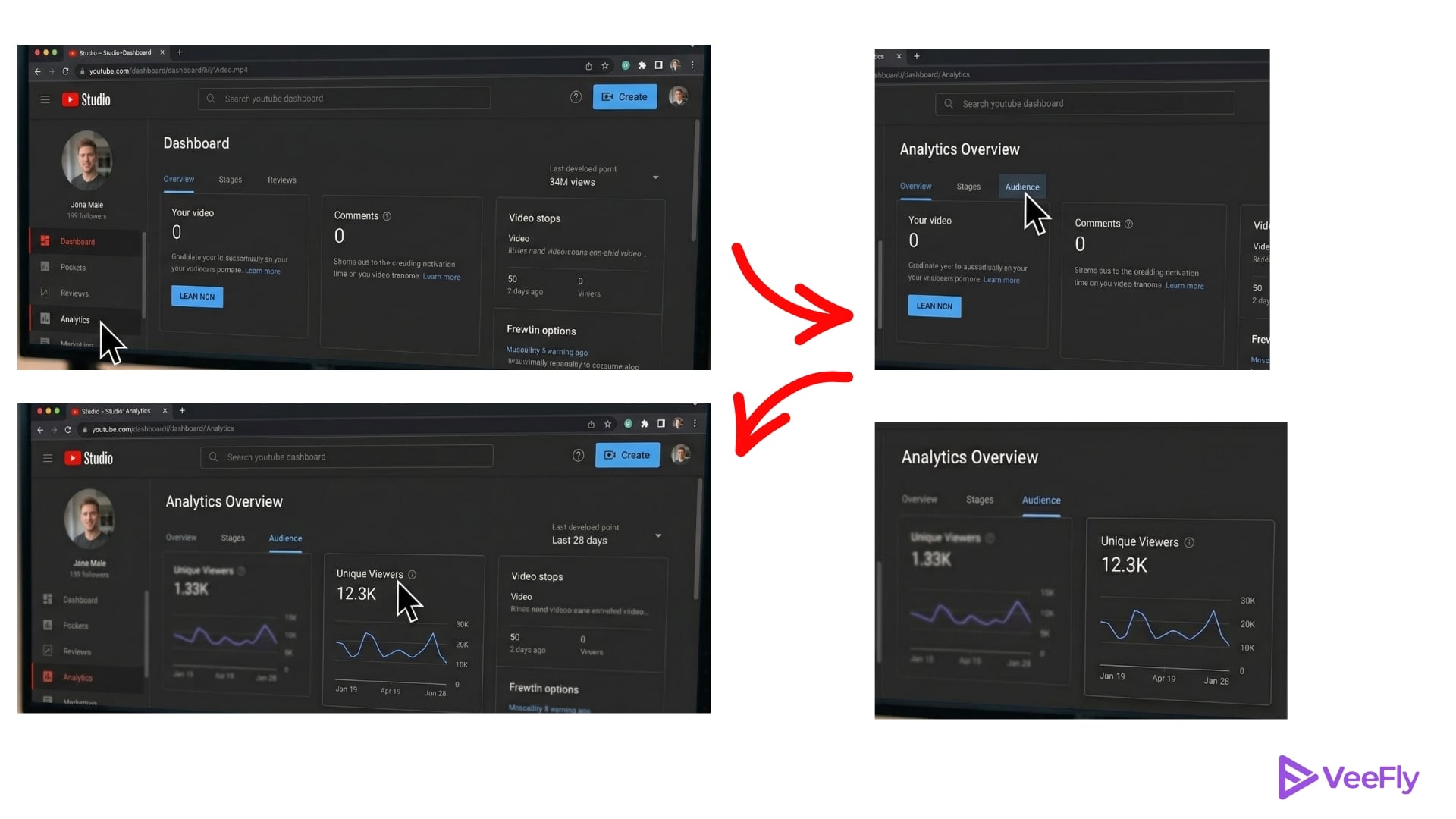
YouTube analytics unique viewers data lives in YouTube Studio under the Audience tab, accessible through a few simple steps:
- Open YouTube Studio and click Analytics in the left sidebar.
- Select the Audience tab at the top of the Analytics dashboard.
- Scroll to the Unique Viewers card to view your count for the selected date range.
- Click Advanced Mode at the top right to customize columns and add comparison metrics, such as total views or subscribers gained.
- Use the date-range selector in the top-right corner, capped at 90 days, to adjust your analysis window.
- Add comparison columns in Advanced Mode to cross-reference unique viewers with total views and watch time. It reveals whether your reach is expanding or your existing audience is simply watching more content.
- Export your data from Advanced Mode as a CSV file if you need to track trends beyond the 90-day limit.
Why Unique Viewers Matter For Your Channel Strategy?
Unique viewers on YouTube measure audience reach, the total number of distinct people you brought to your channel, while repeat views and watch time measure audience loyalty. Creators negotiating brand deals often present unique viewers as proof of reach, since sponsors pay for exposure to new eyeballs, not just devoted fans re-watching.
Compare your unique viewers to your subscriber count each month. If your subscriber total exceeds your 28-day unique viewers, many subscribers are inactive or browse logged out, a common pattern that YouTube confirms in its documentation. Calculate your engagement ratio by dividing average views per viewer (total views ÷ unique viewers) by your YouTube average view duration in minutes. High unique viewers with low watch time signal broad discovery but weak retention.
In this scenario, optimize your thumbnails, titles, and first 15 seconds to convert casual clickers into engaged viewers. Low unique viewers with high total views means your loyal audience watches multiple videos or re-watches favorites. Focus on expanding reach through new topics, collaborations, or cross-platform promotion.
Tips To Increase Unique Viewers in 2026
“What does unique viewers mean on YouTube?” In practice, it’s a reach diagnostic that works alongside engagement metrics to shape your content strategy.
- Expand Reach: Widen your topic keywords and search terms to reach audiences outside your subscriber base. Target question-based queries and trend-related phrases that new viewers search for, rather than niche jargon only fans recognize. Optimize thumbnails and titles for click-through rate by testing bold, high-contrast designs and front-loading curiosity hooks in the first five words of your titles.
- Cross-Promote: Post 15-second YouTube Shorts teasers with strong hooks that funnel viewers to your long-form content, a strategy YouTube highlighted in March 2023 when fan-created Shorts grew artists’ average unique viewers by more than 80% in January 2023.
- Collaboration: Collaborate with creators in adjacent niches to tap into their audience pools. Each collaboration video introduces your channel to their unique viewers, expanding your reach beyond your current subscriber network.
- Performance Testing: Test one content variation this week and monitor the change in unique viewers over the next 90-day period. Compare your baseline 28-day unique viewers before the test to your 28-day count four weeks after the change.
- Optimize: Track which videos drive the highest ratio of new viewers using the Returning vs. New Viewers chart to identify discovery-friendly topics and formats.
Final Thoughts
The unique viewers YouTube meaning extends beyond a single number in Analytics. It reveals whether your channel is growing its audience base or simply serving the same loyal viewers repeatedly. Track unique viewers on YouTube alongside total views and watch time each month to build a complete picture of channel health.
Benchmark your progress quarterly, as the 90-day metric limit prevents long-term historical comparisons without manual exports. Implement one growth tip from this guide this week and review your Advanced Mode data in 28 days to measure impact. Expanding your reach starts with understanding who watched, not just how many times they clicked play.
Frequently Asked Questions
Q1) Do Private Or Unlisted Videos Count Toward Unique Viewers?
Yes, YouTube Analytics unique viewers include private and unlisted videos when you select “All videos” in your Analytics filter. Change your filter to “Public videos” to exclude private content from your reach totals.
Q2) How Often Is The Unique Viewer Metric Updated In YouTube Analytics?
YouTube processes unique viewers in batches with a typical delay of 48 to 72 hours. Data from the last two days is often incomplete, so use weekly or monthly windows for accurate trend analysis.
Q3) Can Bot Traffic Artificially Inflate Unique Viewer Counts?
YouTube filters known bot traffic before calculating what unique viewers are on YouTube, but sophisticated bot networks may temporarily inflate counts until detected. Sudden spikes that disappear within days usually indicate filtered bot sessions.
Q4) Why Are My Unique Viewers Lower Than My Subscriber Count?
Many subscribers browse while logged out, stay inactive for months, or skip videos that don’t interest them. Your 28-day unique viewers reflect only those who watched during that window, while your subscriber total accumulates over the years.
Q5) Does Watching Your Own Video Count As A Unique Viewer?
Yes, you count as one unique viewer if you watch your own content while logged into your creator account. Your single view does not skew totals meaningfully for channels with established audiences.
