



Key Takeaways
- Either create your podcast playlists within YouTube Studio or upload an already existing podcast through its RSS feed.
- Learning to launch a YouTube podcast with no equipment investment means making use of your own computer mic, such as the Samson Q2U.
- Make use of free software programs like Audacity and GarageBand to create professional-quality podcasts at no additional cost.
- For YouTube, success lies in the production of Visual Soundbites, which generate 7 times more interaction on social media channels than audio clips alone.
- In order to succeed in 2026, a “drill-down approach” will be necessary for niche podcasts.
Getting Started with YouTube Podcast?
How do I begin a podcast on YouTube? This is something you might have wondered about before. YouTube has become the main platform where people listen to podcasts, even overtaking Spotify. The bottom line for those creating podcasts, therefore, is that you should not only be thinking about videos but also how to use podcasts.
Why Should You Have a Podcast on YouTube?
Let us begin by explaining to you the benefits of why and how to setup a podcast on YouTube:
- Your podcast will be available on YouTube Music for free, enabling your fans to listen even without subscribing to the platform.
- Your podcast may get featured on YouTube’s dedicated podcast page.
- YouTube can also give you special Podcast badges for your videos and playlists.
- YouTube can also make it easier for viewers to discover your podcast playlist. The search discovery will be easy.
- YouTube’s algorithm can recommend your podcast to new viewers with similar interests.
- The podcast videos will also benefit from enhanced search visibility, keeping your viewers engaged with your podcast.
How Can You Create a Podcast- Two Ways to Start a Podcast on YT
Let us address the elephant in the room: how can I start a podcast on YouTube? Let us clarify that you do not need a separate YouTube channel to create a podcast. There are two simple ways to do it.
1. Make a Separate Playlist for Your Podcast
This is how you should do things if you prefer to keep everything inside YouTube Studio.
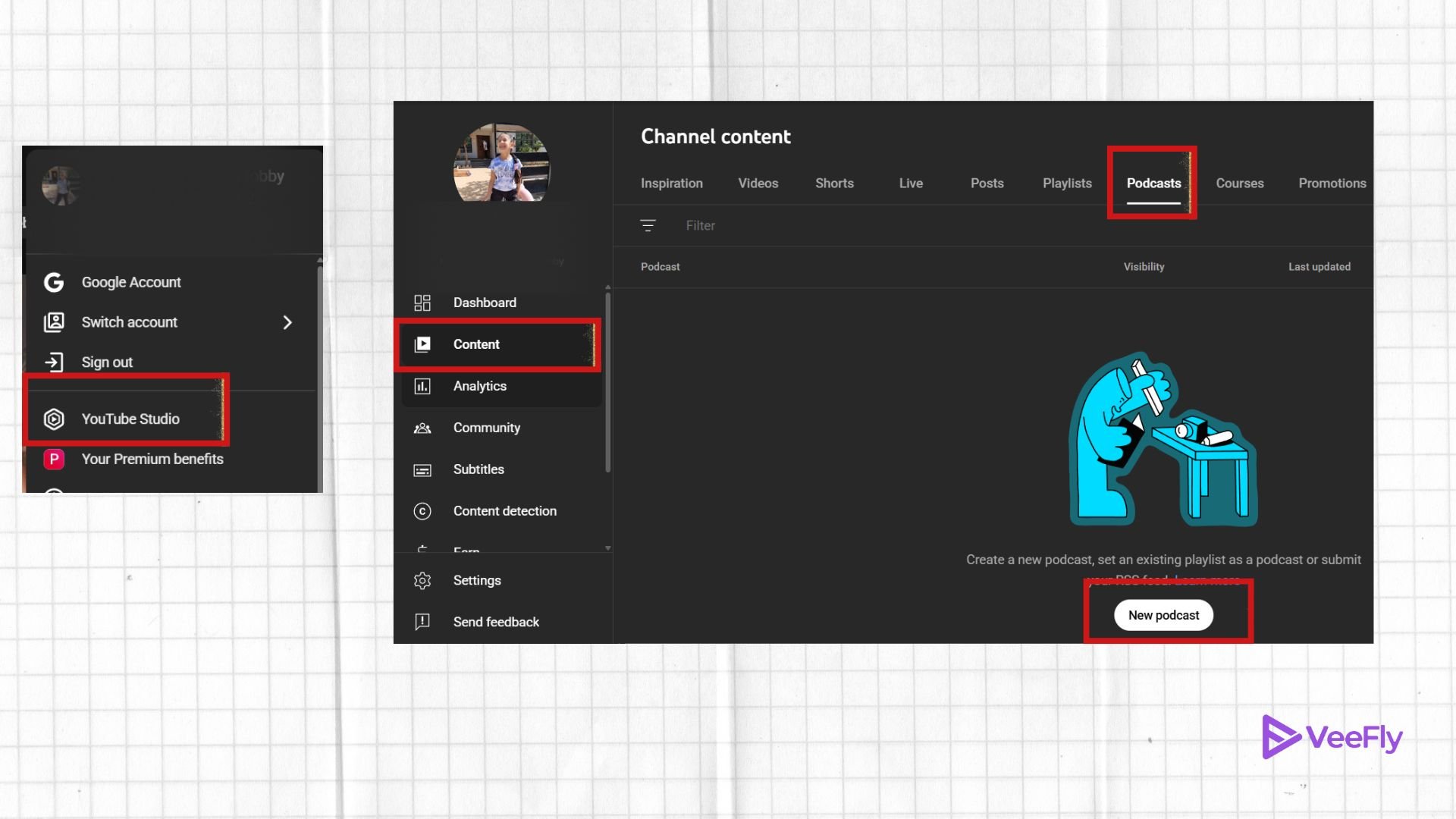
- Go to Content: Click on “Content” under YouTube Studio and click on “Podcasts”.
- Create Your Playlist: Decide whether you will set up an existing playlist or make a new one. Add a title and description that contains keywords like how can I make a podcast on YouTube?
- Upload Your Episodes: Upload your videos into your playlist. If you do not have any videos but just audio, make sure to create your Visual Soundbites.
2. Creating an RSS Feed For a Podcast
If you already have a podcast hosted elsewhere, on platforms like Spotify, Apple Podcasts, or RSS.com, you don’t need to manually re-upload your episodes. Follow these steps to create an RSS feed for a podcast on YouTube:
- Go to YouTube Studio: Log in to your YouTube channel and open YouTube Studio from your profile menu.
- Navigate to the “Content” Tab: On the left panel, click Content, then find the Podcasts section.
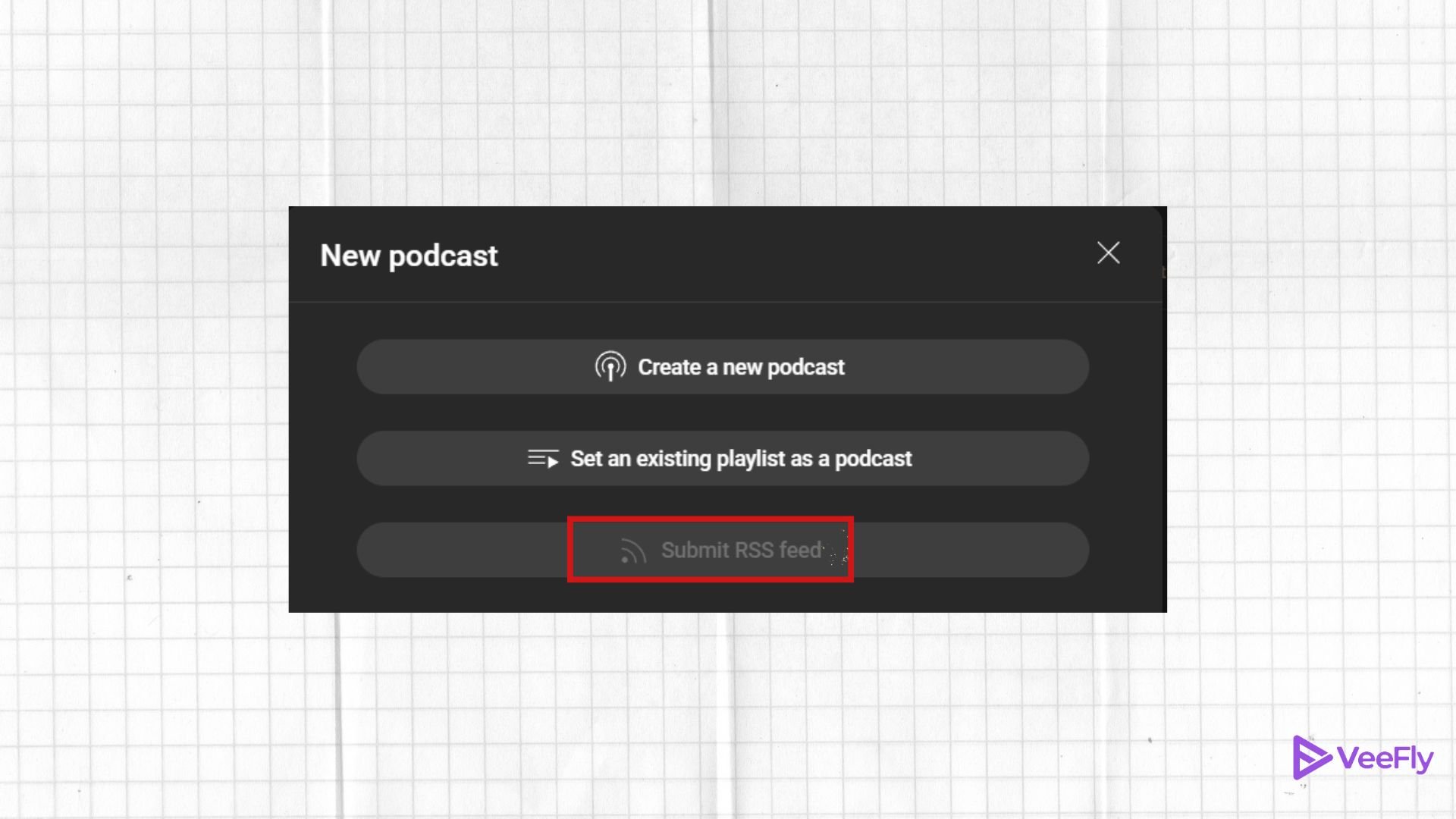
- Click “New Podcast”: Select Create > New Podcast, and you’ll see an option to “Submit RSS feed.”
- Enter Your RSS Feed URL: Paste the RSS feed link from your podcast hosting platform (like RSS.com, Spotify for Podcasters, or Podbean).
- Verify Ownership: YouTube may request that you verify ownership of the feed, typically through a quick confirmation email.
- Review Podcast Details: Check that your podcast’s title, cover art, and description look correct; YouTube automatically imports them from your feed.
- Publish and Sync: Once confirmed, YouTube will sync all existing episodes and automatically upload future ones whenever you publish through your podcast host.
- Find It on YouTube Music: Your podcast will now appear on YouTube and YouTube Music, making it accessible to both video and audio listeners.
How to Get Started Making Podcasts for Free on YouTube: Equipment & Software
Podfade happens to many people because they make it overly complicated. The reality is that you could get started right now without spending any money.
Budget-Friendly Essential Equipment
- The Microphone: Whereas studio-grade microphones cost $400, the $70 Samson Q2U is the industry’s choice for being able to record via USB and XLR simultaneously.
- Recording Environment: Rather than investing in a sound booth, all that’s required is a quiet space with carpets and furniture which will reduce “echo.”
Best Free Production Software
Making a podcast on YouTube becomes a lot simpler when you use the following best-of-free software:
- Audacity: Open-source and available for Mac, Windows, and Linux operating systems with professional-level editing capabilities.
- GarageBand: Already installed on Apple computers and phones, it is among the easiest pieces of free software to use.
- Adobe Podcast: Offers generous limits on the free version, which captures very high-quality local audio even at distant locations.
How Can You Promote Your Podcast Video to Attract More Listeners?
Now that you have a podcast video online, focus on growing your audience. Learning about how can I start a podcast on YouTube will not be enough; you need to learn how to shift potential listeners from browsing to actually listening. To promote your YouTube Video Podcast.
Use Visual Soundbites
Posts that include visuals receive an average of seven times more engagement than plain text. Utilize the tool “Visual Soundbites” provided by Buzzsprout to create short video snippets that include your audio track. Place these videos on platforms like TikTok, Instagram, and YouTube to serve as trailers for your full episode.
Cross-Promotion Works Like a Charm
Promote together, because success does not happen alone. Connect with a promotion platform such as VeeFly and start promoting.
The Strategy of Launching Your Podcast Video
- Grand Opening: Create hype about your podcast for several weeks before launching your first episode. It is effective when you have an established channel on YouTube.
- Soft Opening: Publish your podcast episodes secretly to make sure everything is okay and to deal with “imposter syndrome.”
Final Thoughts
Launching your podcast through YouTube at no cost goes beyond mere entertainment because it becomes an avenue to establish your brand identity and achieve global recognition. Selecting a certain topic of interest, making use of free tools such as Audacity, and ensuring you promote yourself through visual sound bites become crucial ingredients in building a successful career. It is important to note that the only thing you need to do is get started by writing a script and recording your first sound bite, as the algorithms take care of everything else.
Frequently Asked Questions
Q1. Do YouTube podcasts make money?
Knowing how to make a great podcast helps you to build trust and grow faster on YouTube. Podcasting can generate revenue through ad revenue, sponsorships, and memberships.
Q2. How to start a YouTube podcast for beginners?
If you’re wondering how can I start a podcast, begin by choosing a topic you love and creating a simple recording setup. Use YouTube Studio to setup a podcast playlist, upload your episodes, and optimize titles with keywords.
Q3. How much do podcasts with 10,000 listeners make?
Podcasts with around 10,000 listeners can earn $200 to $1,000 per month, depending on engagement and sponsorships. If you know how do you record a podcast and maintain good sound quality, you’ll attract more listeners.
Q4. Should I start a YouTube channel or a podcast?
If you love visuals and interaction, go for a YouTube channel. But if you enjoy storytelling and conversation, learn how to make a podcast script and start podcasting. You can even combine both, creating an RSS feed for a podcast, which lets you share episodes across YouTube Music and other platforms, giving your content maximum reach.
