



Are you serious about being a YouTuber? Then you can’t overlook even the smallest details, even your YouTube subtitles. To drive engagement even without the sound, you need to add subtitles. Additionally, it helps with SEO and portrays the channel’s professionalism, and helps you reach a global audience. Since subtitles matter, you need the right tools to produce them, and with AI in assistance, you can make it quick and accurate. In this blog, we’ll see YouTube subtitle generator free ones, along with the latest AI capabilities.
Top 10 AI tools for YouTube Subtitles in 2026
Let’s begin by exploring AI tools that can make your work easy.
YouTube Studio (Best for Automatic Captions)
- Go to YouTube Studio
- Subtitles
- Select Video
- Add a language
- Save
A built-in YouTube free tool to generate automatic subtitles. The subtitles’ll be processed after the video is uploaded. They are generated using a speech recognition system. However, there might be an inaccuracy because the system needs high audio quality, no background noise, and the ability to recognize accents, slang, or catchphrases. The problem with using YouTube auto-captioning is that it needs to be reviewed manually and can take time for long videos.
Veed.IO
It uses an AI feature to translate video audio into subtitles with maximum accuracy. It even lets you choose custom fonts, colours, and animations. You can download the files and create subtitles for free. Nonetheless, if you want more fonts and animation options, you might consider upgrading to a higher-tier version.
VeeFly
The web-based tool promotes YouTube videos and includes built-in AI tools. You can generate subtitles along with title, description, hashtags, etc. The AI pricing is minimal; you get 100 credits for $10. Compared to other tools, it is lower-priced. The tool is best for a YouTube growth manager or someone who is in their initial phase.
Kapwing
Users can add a video or an audio file and get 99% translation accuracy in a suitable file format (SRT). The platform is prominently used for social media video, making it quick to create and edit. The tool is free and integrates AI capabilities.
Descript
If you are a podcaster/YouTuber, Descript provides labels and time codes for each speaker while analyzing the audio file. The tool makes it easy to develop a transcript of a podcast video. In addition to translation, multiple file format options are available for download.
Assembly AI
If you like to build everything from scratch, then you can use AssemblyAI. It’s a developer-friendly tool that helps you avoid word errors and hallucinations. With API keys, you can build your own speech-to-text model. The tool is best for YouTubers who create high-end animation, gaming, developer, and production content, as well as podcasts.
CapCut
It is a famous app among social media influencers. Used to generate auto captions in trendy styles, with no watermark on your videos. The CapCut mobile app is used more often than the web-based tool. It comes under the free version. However, for some advanced features, you can opt for a paid one.
Happy Scribe
You can add your video manually, or upload from Drive or Zoom. The audio file will be generated. The tool is well known for its multilingual support. Best for YouTubers who have a global audience. The editor is also easy to use for precise editing. The drawback is that the AI version is a pay model.
Subly
The tool includes an interactive editor that lets you refine subtle fonts, colours, and animations across multiple layers. The AI models are priced and give only a 7-day free trial; the free ones also come with a watermark. The pros are that it works best for long videos and has an easy web interface.
Maestra
The tool instantly translates the video into your preferred language. You can convert them into more than 125+ languages in Maestra. Along with subtitle styling and downloading in various file formats. The AI pricing is 60 credits (60 minutes of transcription) for $12. Which seems costly, although the premium version has API access, 900 hours of transcription/month, and more.
Tips for Choosing an AI YouTube Subtitles Generator
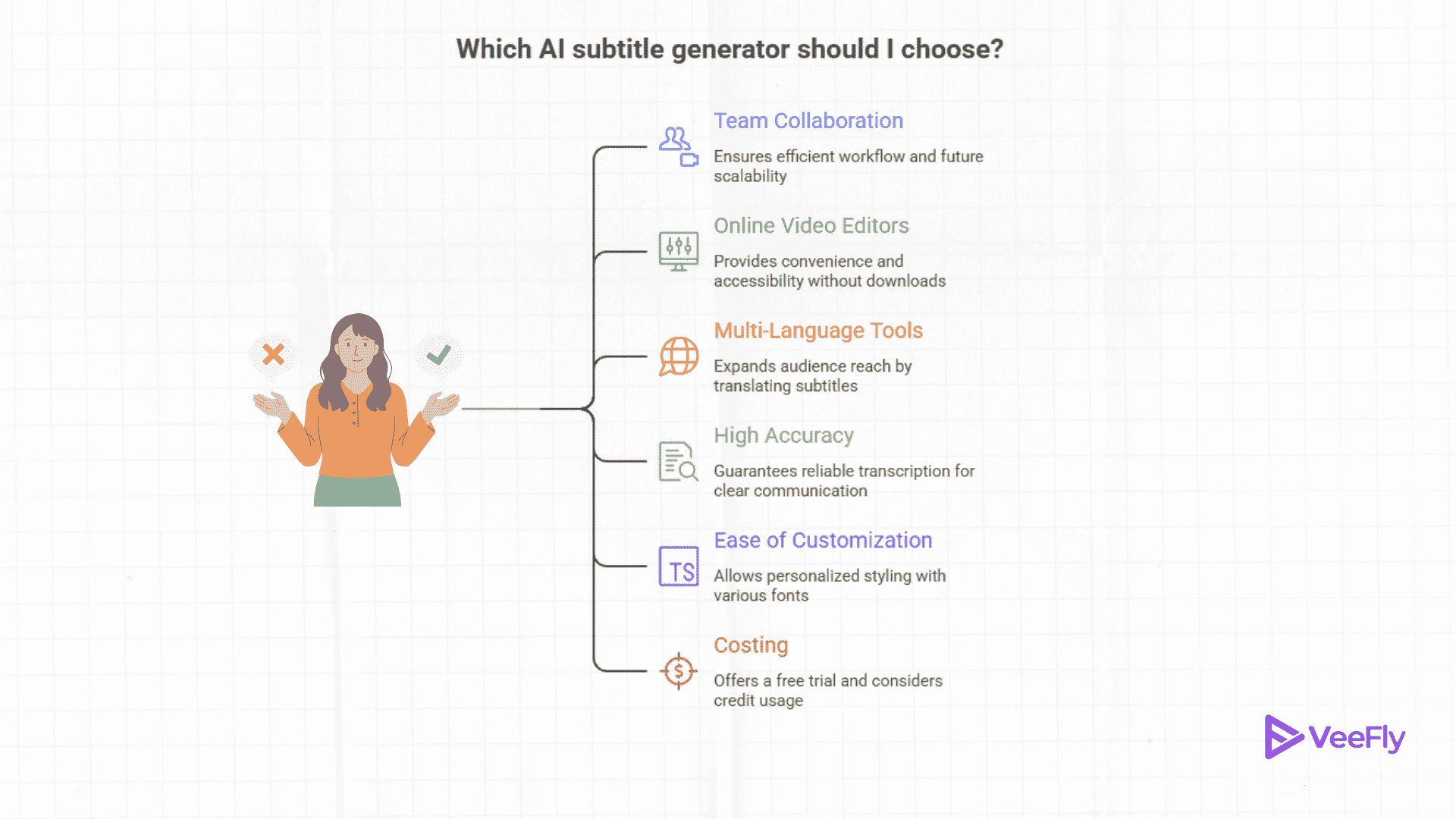
Now that we have given you a list of tools for YouTube subtitle transcription. Let’s see some tips that you consider before committing to a particular tool.
Team Collaboration: Look for a tool with 2-3 team collaboration features so work can be done efficiently and doesn’t fall to one person. Even if you are the sole owner of the channel. Look to the future, as you will need a team to consistently produce high-quality video.
Online Video Editors: In the list above, most tools are web-based and work well without requiring a download. So choose a tool that supports web-based editing.
Multi-Language Tools: Choose a tool that can convert your audio file into multiple languages. For example, some tools can translate it into 100+ languages.
High Accuracy: Look for accurate transcription of audio into subtitles. Use tools to verify accuracy, such as ScreenApp Transcript Checker and Opus Subtitle Verification.
Ease of customization: You might want to add custom or trendy fonts. Choose a tool that has options for various styles with customizable editing.
Costing: Start by looking for a free trial. You might need credits to use AI’s capabilities. Shifting to a new platform might hurt your productivity.
How will the AI Subtitle Generator Tool Help Creators?
As you research these tools and plan to spend your money, you need to understand how subtitle generation helps in channel growth.
Reaching the global audience
The YouTube videos are reaching a global audience. You need to localize your YouTube videos for better engagement. By adding subtitles in native and regional languages, you increase traction, resulting in higher watch time, engagement, and audience retention.
Better YouTube SEO
The subtitles are also added to the YouTube video. Then the YouTube algorithm reads them and understands them. They are called metadata. These help videos get more discoverable and increase visibility. For example, the keywords in subtitles will be used to find a relevant audience.
Accessible for everyone
In addition to the global audience, the videos are accessible to people who are deaf. This builds a sense of community. Additionally, many people prefer to watch muted videos while standing in busy places. The subtitles also clarify technical terms, accents, slang, and fast spoken dialogue.
Ease of work
YouTube awards consistency, and AI tools will help automate the subtitle transcription to reduce manual work. The accuracy will also be improved for non native languages. The AI tools better understand the context and transcribe it perfectly.
Channel professionalism
A professional channel is always well optimized from SEO to pre-upload checks. The content looks polished, and with accurate and stylish subtitles, the audience perceives the channel as professional.
Conclusion
The free tools for the YouTube subtitle generator can help you reduce manual work and quickly deliver subtitles in multiple languages. The tools will help you generate a transcription and check the accuracy of the content.
In this blog, we have seen a list of 10 AI tools for subtitle generation, along with their AI capabilities and best use cases. Make sure to consider the tool that follows the parameters that we have mentioned. Lastly, we aim to explain how using AI tools can help your YouTube career.
Frequently Asked Questions
Q1. Is the YouTube subtitle generator online free without a watermark?
Yes, you can use third-party software such as FrameNet and CapCut, or YouTube’s built-in subtitle generation tool.
Q2. Give me a free YouTube subtitle extractor and generator?
You can use DownSub, DVDVideoSoft, 4K Video Downloader (free tier), FreeAISubtitle, CapCut, HappyScribe, etc, to extract YouTube subtitles.
Q3. What are the tools that extract YouTube video transcripts?
The tools to extract YouTube video transcripts are NoteGPT, ToolerBox, Tactiq.io, Recapio, and YouTranscript.com
Q4. Is YouTube captions extractor legal?
You can’t extract captions and use them for commercial purposes or for your own YouTube channel. You can extract for learning purposes, research, or fair use.