


Key Takeaways
- Creating videos alone isn’t enough; understanding audience perception is crucial for growth
- Real YouTube feedback helps improve content quality, engagement, and audience retention
- Not all feedback is valuable; focus on honest and actionable insights
- Identifying useful feedback can be challenging, but essential for improvement
- Using the right strategies can help you gather and apply meaningful YouTube feedback effectively
Why Real Feedback Matters in YouTube Videos
A good feedback loop is one of the fastest ways to improve without wasting months trying to guess in the dark. It helps you identify the things you’re too close to your content to notice, such as:
- A Weak Hook: A hook that doesn’t quite match what the video actually delivers.
- Poor Pacing: Moments where a good idea begins to feel slow or “draggy.”
- Confusing Messaging: A message that just needs one concrete example to really click for the viewer.
- Distractions: Captions, visuals, or sound effects that take away from the point instead of adding to it.
If you learn how to get YouTube feedback, you’re saving your motivation. You’re stopping yourself from overcorrecting due to one nasty comment and instead making informed changes.
How Do You Get Real Feedback on Your Videos?
Many content creators have turned to YouTube feedback to help improve their content, and that is because they help you identify the things you can’t see. They can help you create a better, more consumable, and thus more profitable content piece. But how do you get this without offending your sensibilities or getting bogged down in conflicting information?
To get real feedback on videos, you need to be specific with your questions, use specific tools to gather feedback, especially from people you trust or dedicated feedback tools. The strategies to get actionable video feedback are as follows:
Strategies for Actionable Feedback
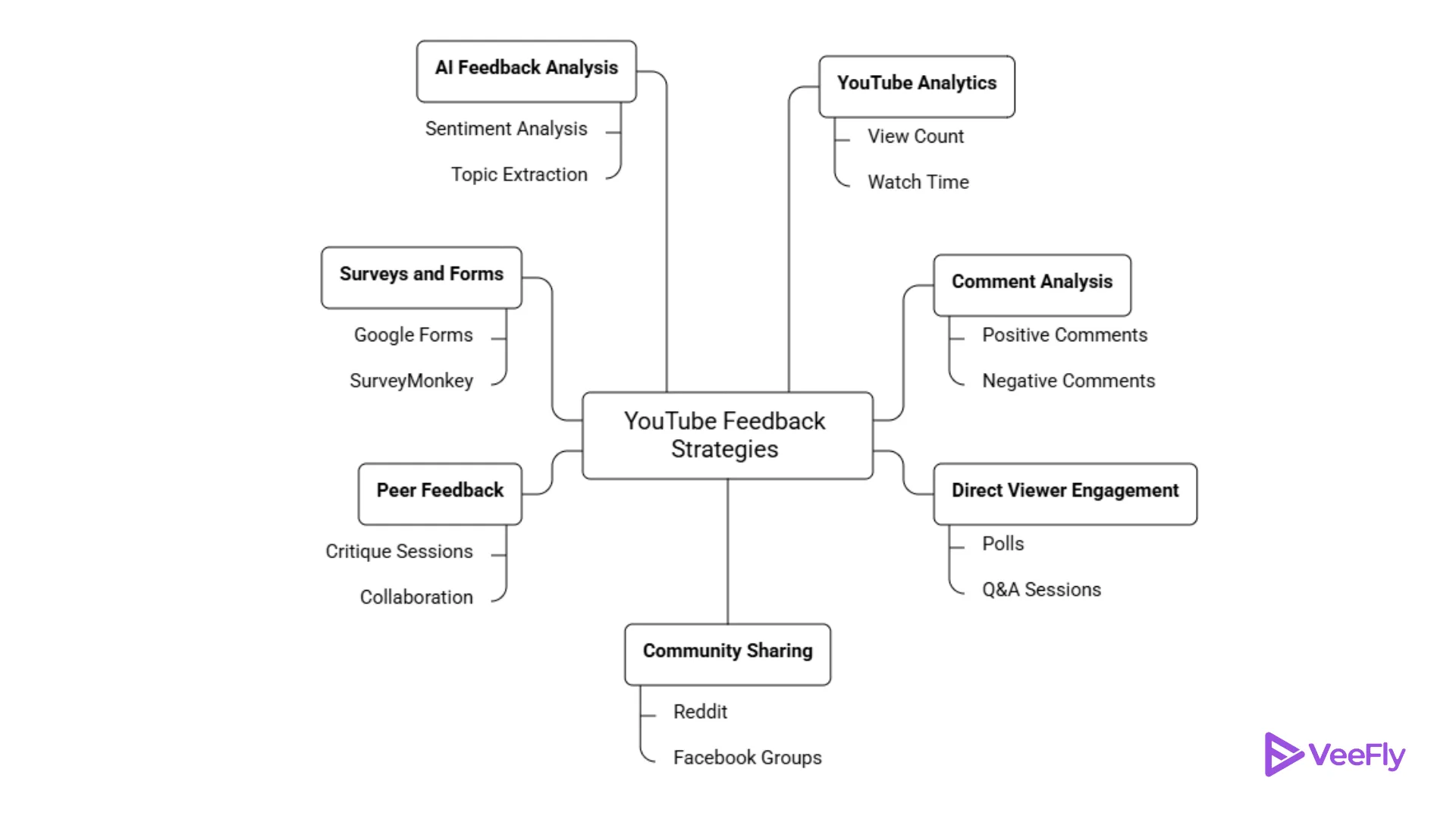
1. Utilize YouTube Analytics for Honest Insights:
Make the most out of YouTube’s retention graphs and watch time to get a clear view of when viewers tend to lose interest in the video.
2. Analyze the Comments to Identify Trends
Don’t just read the comments; look for trends. If numerous people mention the same thing in their comments, such as the video’s pacing or content’s clarity, it’s time to make some serious changes.
3. Ask Your Viewers
Instead of asking generic “What do you think?”-style questions in the video’s comments section, try to get specific by asking:
“Was the intro too long?”
“Was the call to action natural?”
4. Share Your Video in Niche Communities
Share your video in communities such as Reddit’s r/youtubers. Members in these communities tend to be more constructive in their criticism.
5. Seek Feedback from Other YouTubers
Collaborate with other YouTubers. They understand the craft and may spot issues that others would miss.
6. Use Surveys and Feedback Forms
Make use of Google Forms to get feedback. This way, you can get clear and unambiguous feedback.
7. Use AI to Analyze Feedback
Utilize AI to analyze the video’s comments and feedback. This way, you can get a clearer view of the trends in the feedback.
The Real Challenge: Noise vs. Signal
Seeking feedback isn’t the problem; getting the right kind of feedback is. Have you ever asked someone what they thought of your video? I bet they would have said, “It was great!” That’s nice, but not very helpful, right? On the other hand, they might have said something like, “I don’t know, it was okay, I guess,” or even worse, “It was awful, what was wrong with you?”
You want to get the kind of feedback that is straightforward, yet doesn’t destroy your self-esteem at the same time. How to get useful feedback on YouTube requires moving away from general opinions. General opinions don’t really translate to action, by the way. “I loved this!” doesn’t help you know what to repeat, and “I thought this was boring!” doesn’t help you know where they clicked away.
Validating Feedback with Data
After deploying YouTube feedback, it’s time to check your analytics data. Did it really help extend your average view time? Were there instances where, despite the feedback indicating that your video had too many jump cuts, your view times went down? This could mean that the feedback was wrong.
Final Thoughts
Becoming better at creating content is not a sprint but a marathon. The fact that you are looking for ways to get feedback on YouTube means that you are treating your channel like a real YouTube creator. By creating a circle of 3-5 people and asking targeted questions, you turn “guessing” into “growing.” Don’t let your ego get in the way of a better edit and a better channel.
Frequently Asked Questions
Q1. How often should I analyze feedback on my videos?
The best practice is to review YouTube feedback regularly for each upload. The early analysis will help you find the gaps early. Helping you in brainstorming the next videos without mistakes.
Q2: What tools can help analyze YouTube feedback?
Primarily YouTube Analytics for watching retention graph, watch time, comments, and use Ask Studio AI to summarize your comments and make sense out of it. Additionally, use comment analysis, survey tools, etc.
Q3: What mistakes should I avoid when collecting feedback?
Common mistakes include being vague in questions, ignoring negative feedback, relying on friends and family for critique, and overreacting to negative YouTube feedback.
Q4. Can live streams help in getting real feedback?
Yes, you can go to YouTube Live and do real-time interaction with your audience. Not only will they provide YouTube feedback, but they will also explain the context behind it.