

WELCOME OFFER! Get 50% Extra Views On Your First Campaign with VeeFly. Use Promo Code - FIRST50 Get Started
Home » YouTube Marketing » YouTube Title Character Limit for Creators: Best Length 2026

YouTube Title Character Limit for Creators: Best Length 2026

YouTube titles work best between 40 and 60 characters. Titles over 60 characters often trim on mobile devices and in search results.

Key Takeaways:

  • The ideal YouTube title length is 40-60 characters for maximum cross-device visibility.
  • The hard YouTube title character limit is 100, but pushing it to the limit actively hurts discoverability.
  • Primary keywords must be placed at the beginning of the title so they remain visible if the title is shortened.
  • Keep titles under 60 characters to boost mobile CTR while keeping them readable.

How Does Title Length Affect Click-Through Rates?

Shorter, more concise YouTube titles yield higher click-through rates, especially between 40 and 50 characters. CTR drops as titles exceed 60 characters.
  • Many creators believe that including every possible keyword up to the 100-character limit will help them rank for more search terms in the algorithm.
  • However, when titles are too long, crucial information gets cut off in search results and the suggested video feed.
  • If a scrolling viewer cannot quickly understand the video’s premise, they will not click, telling the algorithm that your content is irrelevant.
  • To answer exactly how long YouTube titles should be to maximize growth, you must optimize for the human click first.
  • A concise, fully visible title drives higher CTR, which is the strongest signal YouTube uses to push your content to broader audiences.

What Is the Ideal YouTube Title Length?

Data aggregated from millions of top-performing videos reveals that the ideal YouTube title length is between 40 and 70 characters. This specific range is considered the Goldilocks zone for digital video marketing. It is long enough to provide descriptive context, but short enough to avoid trimming across the vast majority of devices and browsers.
While this range works well overall, certain niches may benefit from a slight adjustment. For example, gaming channels often use shorter, punchier titles for quick impact, while educational channels might see higher engagement with slightly longer, more descriptive titles. Creators should experiment within this range and tailor their approach to best fit their audience and content type.
When a video ranks in a standard Google Search result, Google usually trims the best YouTube title to around 40-60 characters. If your primary goal is to rank in both YouTube search and traditional Google search, staying under 100 characters is absolutely essential for cross-platform discoverability.
However, there are exceptions where shorter or longer titles have performed well. For example, a particularly unique or viral phrase can succeed even if it is shorter than the optimal length, while a descriptive or keyword-rich title might rank better despite going slightly over 70 characters.
YouTube Creators should not be afraid to experiment outside the recommended range if there is a strategic reason to do so, keeping in mind that results may vary depending on the content and audience. If you are constantly struggling to determine how long YouTube titles should be for your specific niche. This strict constraint forces you to be concise. It eliminates useless filler words and leaves only the most compelling, high-impact phrasing for your audience.

How to Optimize the Best YouTube Title Length?

Knowing the platform limits is only half the battle. Structuring your words effectively within that 40 to 60 character window is what actually drives viral views. Here are the tactical steps to write high-converting headlines that beat the algorithm. Here are some of the best practices:

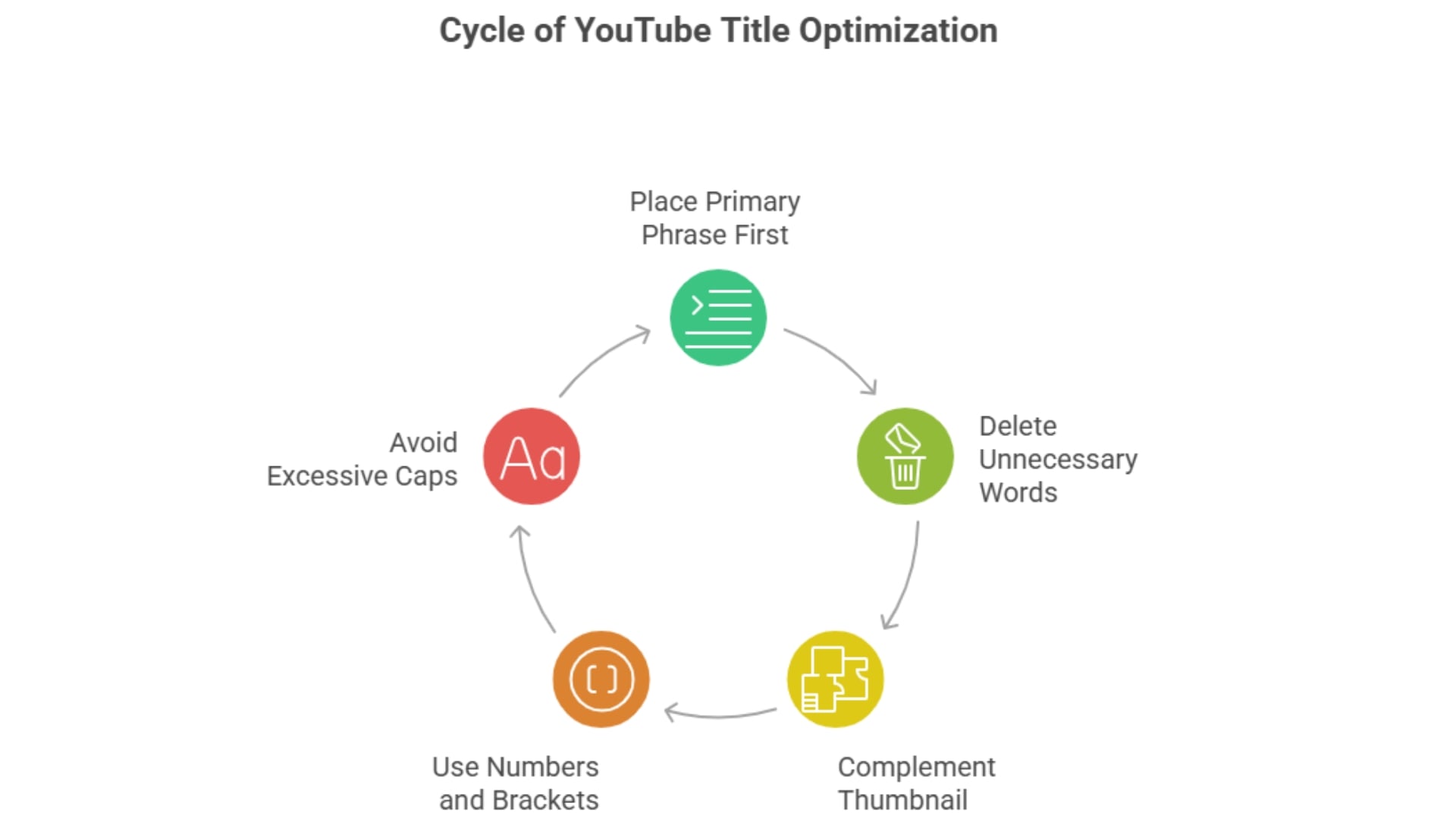
1)Because trimming is a constant threat on mobile, you must place your primary search phrase as close to the beginning of the title as possible. If your video is about home gym setups, write Home Gym Setup: 5 Essential Items rather than 5 Essential Items You Need for a Home Gym Setup.


2)Every single character counts toward your limit. You must ruthlessly delete words like “really,” “very,” “just,” and “basically.” These adverbs take up valuable space and push your important keywords further back, without adding any emotional or informational weight to your hook.

3)Do not waste your title characters repeating text that is already clearly visible in your thumbnail image. If your thumbnail explicitly says “My $10,000 Mistake,” your title should add new context, such as “How I Ruined My First E-Commerce Business.” They should act together as a two-part story.
youtube title character limit in 2026

4)Adding specific numbers or bracketed text breaks up the visual monotony of standard letters. This creates a psychological pattern interrupt, drawing the viewer’s eye as they scroll and increasing CTR without requiring dozens of extra characters.

5)Relying entirely on ALL CAPS to stand out can backfire. Capital letters physically take up more pixel width on a screen than lowercase letters. A title written entirely in caps will reach the visual boundary of a mobile screen much faster, triggering early truncation even if it is technically under the 70-character limit.

Final Thoughts

Don’t use all 100 characters in your YouTube title; aim for clarity and impact. Keep your titles between 40 and 60 characters so your message stays readable on any device. Put your strongest keywords at the front and cut all filler words. Tight titles prevent mobile truncation and boost your Click-Through Rate, the key metric for YouTube’s algorithm. When CTR rises, grow your reach further. Instead of waiting on organic growth, work with a quality YouTube title generator. Pair optimized metadata with targeted Google Ad campaigns to quickly build an engaged audience in 2026.

Frequently Asked Questions

Q1)Do longer YouTube titles perform better than shorter ones?

Not necessarily. Longer titles can include more keywords, which may improve search visibility, but they are often trimmed on mobile devices, reducing clarity.

Q2)Does YouTube SEO prioritize keywords at the beginning of the title?

Yes, placing keywords at the beginning of your title can improve both search ranking and visibility. YouTube’s algorithm and users both focus more on the first few words.

Q3)How long should YouTube titles be for Google Search?

If you want your video to rank organically on standard Google Search, keep your title under 40 to 60 characters. Google truncates search engine results pages (SERPs) much earlier than YouTube does on desktop.

Q4)Where should I place keywords in my YouTube title?

Always place your most important SEO keywords in the first 50 characters of your title. Front-loading ensures that mobile viewers see the main topic before any potential screen truncation.

Q5)Does capitalization affect the YouTube title character limit?

No, using uppercase or lowercase letters does not change the actual character count. However, using ALL CAPS makes a title physically wider on screen, which may occasionally trigger earlier visual truncation on smaller mobile devices.