



Paid vs. Free AI Tools List: Key Takeaways
- Start with free tools like ChatGPT, CapCut, and Canva to build scripts, edit videos, and design thumbnails.
- Upgrade strategy once you publish and need faster workflows.
- Improve retention with better audio from ElevenLabs when voice quality is a factor.
- Use Descript for transcription and scale long-form content efficiently by moving to paid plans.
The Top Paid vs. Free AI Tools List for YouTubers Breakdown
The tools below aren’t just good; they also offer a real chance for creators to be among the top-ranking YouTube creators. Here’s a list of best AI tools:
1)ChatGPT – Idea & Script
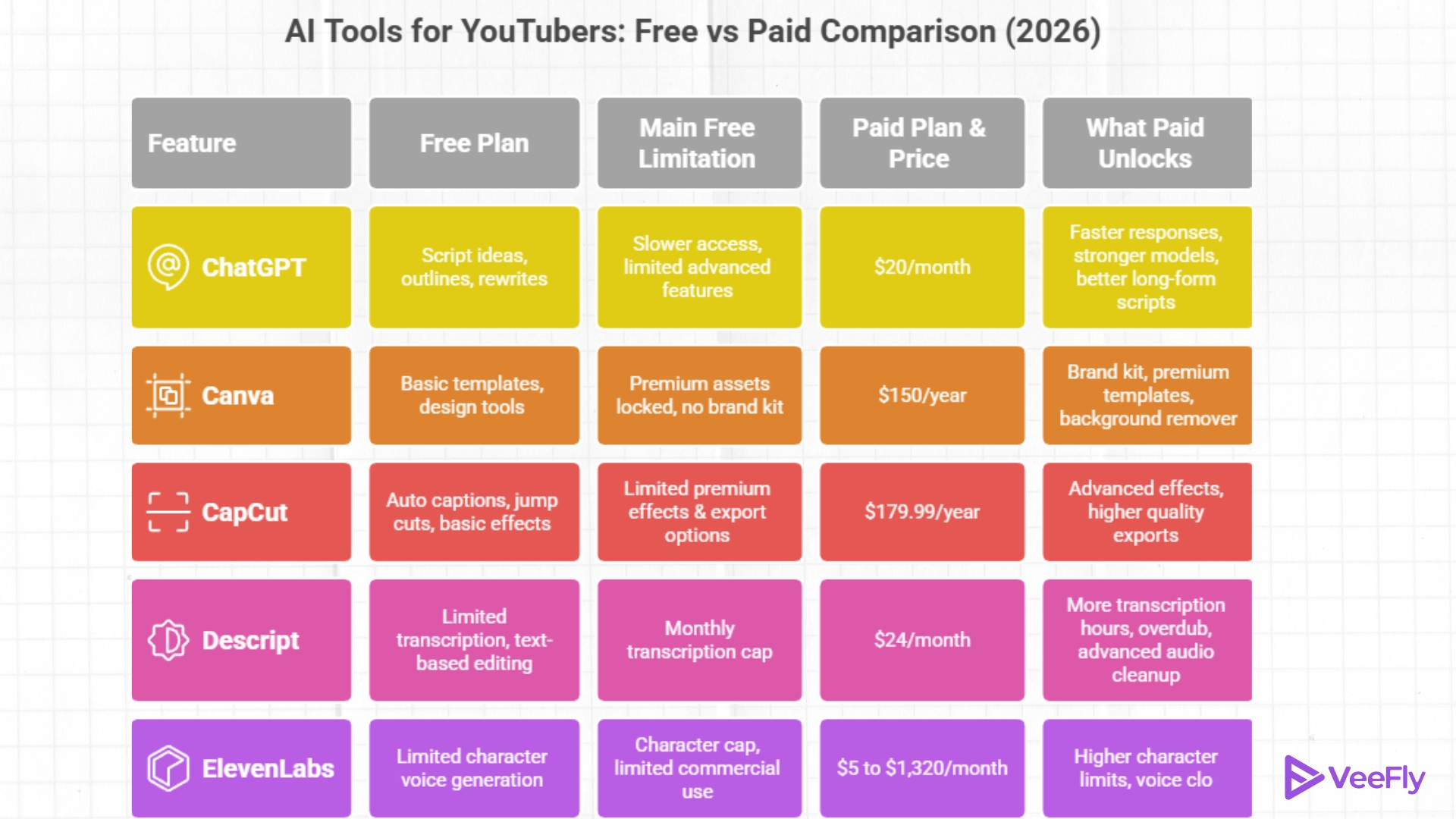
What You Get For Free: ChatGPT is highly recommended for the ideation stage. Creators can use it to brainstorm ideas, outline YouTube scripts, and even write full-fledged manuscripts.
What Paid Unlocks: ChatGPT Plus ($20/month) gives you faster responses, better collaboration, higher limits, and shared workspaces.
Who Should Use the Free Version:
- Understanding the target audience and validating video ideas based on it.
- Writing and reviewing scripts based on the structure
- Writing multiple hook options and spotting weak points.
When to Upgrade: If you publish weekly or more, you need better script accuracy, cost of AI tools like ChatGPT is worth it.
Creator Takeaway: You can start writing on AI to get instant feedback instead of using it as an afterthought. Free is great for occasional creators, while paid unlocks better reasoning and deeper context, which is valuable for regular uploading.
2)Canva – Visual Language
What You Get For Free: Canva ensures the messaging is clear, with a thumbnail that reflects the hook and idea. Canva helps creators create visually compelling content. Hence, good content with low clicks will never be an issue.
What Paid Unlocks: YouTube AI tools pricing of Canva Pro ($150/year) will give you access to premium templates, background remover, magic resize, and more stock assets.
Who Should Use the Free Version:
- Canva has over 3.6 million templates available on its platform.
- The AI tool helps design thumbnails that visually reinforce the video’s core idea.
- Quickly test text size, contrast, and focal points for mobile viewers.
- Maintain visual consistency so returning viewers have a clear brand association.
When to Upgrade: You can choose to unlock for more brand consistency and access to more graphics.
Creator Takeaway: A strong idea without a strong thumbnail wastes reach, and Canva ensures that the video gets a fair chance to be watched.
3)CapCut – Video Editing
What You Get For Free: CapCut functions as a professional editor, helping creators focus on pacing rather than mere perfection. After producing a video, its quality becomes important; hence, CapCut ensures the video is not cinematic but also watchable.
What Paid Unlocks: CapCut Premium ($179.99/year) unlocks advanced effects, export in higher quality, and more templates.
Who Should Use the Free Version:
- The free plan covers basic editing, which helps with slow, overcomplicated editing that kills momentum.
- Non-monetized channels with a limited budget
- Creators are testing AI tools for editing
When to Upgrade: If editing speed or output quality becomes a problem, upgrading to premium will enable a faster workflow.
Creator Takeaway: Use CapCut to shape pacing and retention first, and polish comes later.
4)Descript – Refinement
What You Get For Free: Descript helps with long videos that can feel overwhelming. Descript has become the refinement and scaling layer. The AI app ensures content is more efficient and not too long. Text-based editing is ideal for creators who want precision.
What Paid Unlocks: The paid version, Creator ($24/month), supports larger transcription and higher-quality audio cleanup. Further it helps with overdub voice cloning.
Who Should Use the Free Version:
- Remove filler words and tighten delivery at a large scale
- Consistently improve audio clarity.
- Repurpose long-form videos into bite-sized content.
When to Upgrade: If you repurpose long videos or produce multiple videos per week, the paid version is helpful.
Creator Takeaway: Descript is not for building content from scratch, but instead for enhancing it to its best ability. Free is good for trial and occasional edits, but paid lets you refine long videos.
5)ElevenLabs – AI Voiceovers
What You Get For Free: Low-quality and limiting voice recordings. Elevenlabs ensures audio quality heavily influences trust and professionalism. It ensures the Creator’s workflow post-production is seamless.
What Paid Unlocks: Creator/Pro tiers (starting at $5-$1,320) unlock bigger characters, commercial use, and voice cloning options.
Who Should Use the Free Version:
- Replace weak or noisy narrations with clean AI voiceovers.
- Maintain consistent voice quality across uploads.
When to Upgrade: If you are narrating frequently or want consistent audio quality.
Creator Takeaway: Improved video retention due to good YouTube audio quality. Free is useful for short narrations, but paid lets you produce professional voiceovers without recording yourself.
Conclusion
Choosing between free and paid AI tools isn’t about one side; it’s about timing. For budding creators, starting means a room for experimentation to reach the right YouTube target audience. When there is a setback, the risk of experimentation increases, with fewer opportunities to try and test. AI tools give enough freedom for new ideas and remove the biggest bottlenecks in YouTube growth, such as limitations.
Frequently Asked Questions
Q1)Are free AI tools enough for starting a YouTube channel?
Yes, free AI tools are more than enough to start a YouTube channel in 2026.
Q2)When should a YouTuber switch from free to paid AI tools?
A YouTuber can switch from free to paid AI tools when you publish more often, editing takes a long time, and you need consistent branding.
Q3)Do paid AI tools guarantee more views on YouTube?
Paid AI tools improve workflows, quality, and consistency, which, in turn, can improve consistency.
Q4)Which AI tool is most worth upgrading?
Upgrading AI tools depends on your purpose. In general, for scriptwriting, upgrade ChatGPT and edit CapCut; for poor audio, use ElevenLabs.
Q5)Can I use multiple free AI tools together?
Yes, many creators combine free versions of multiple tools to build a complete workflow.
