



YouTube, the world’s largest video-sharing platform, is today a vast place for YouTube creators to make easy money through their creative and entertaining content. There are many ways in which creators can monetize their channels. Today, YouTubers earn thousands of dollars for their content and make a living out of content creation on the platform. How can you earn on YouTube? In this blog, we will look at one of the essential factors that play a significant role in growing your channel – YouTube subscribers.
Let’s start with understanding why subscribers are essential for your channel’s growth.
Importance of subscribers on YouTube
If you are looking to monetize your channel on YouTube, you need to be a part of the YouTube Partner Program. To do so, you need to meet the eligibility requirements that state:
- A creator must have more than 4000 hours of watch time in 12 months and at least 1,000 subscribers.
Gaining more subscribers is a challenging task to achieve, and while some creators rely on their content and the different programs available on YouTube, others opt for services. You can find similar online services like Veelfy to promote your channel and bring in more views to increase your subscribers.
Once you have created a strategy to gain more subscribers, you need to track the number of subscribers you have on your channel. Here are the top 7 counters you can use to track your YouTube subscribers in real-time.
How Realtime YouTube Subscribers Trackers Work?
To track YouTube metrics such as subscriber count, you will need the YouTube API. The API will retrieve data from the channel, and you can use it in your app or website to see live subscriber growth. Although the data updates in real time, it might take a few seconds longer than the data visible in YouTube Studio.
How the YouTube API Key works
The official YouTube API key is used by every tracking and analytics software. The API helps communication software with the YouTube ecosystem.
You can set the fetching time, or the YouTube API automatically requests the real-time subscriber count. As said, the data is retrieved from the YouTube server; therefore, the latency occurs.
To get the API key, create a project in the Google Cloud Console and enable the YouTube Data API v3. Later, you can retrieve the key’s credentials by going to the API and services. Lastly, there is only a 1 million/-day quota for retrieving metrics. The API is generally used by every tech for a YouTube subscriber tracker, live counting.
Top 12 YouTube Subscriber Trackers
- Social Blade
- YouTube Subscriber Counter
- YT Count
- Realtime Subscriber Count
- Live Counts
- FreeWebTools
- MarketingHub
- VidIQ
- Viewstats
- Media.io
- TunePocket
- ChannelCrawler
How to Use YouTube Studio to Track Subscribers?
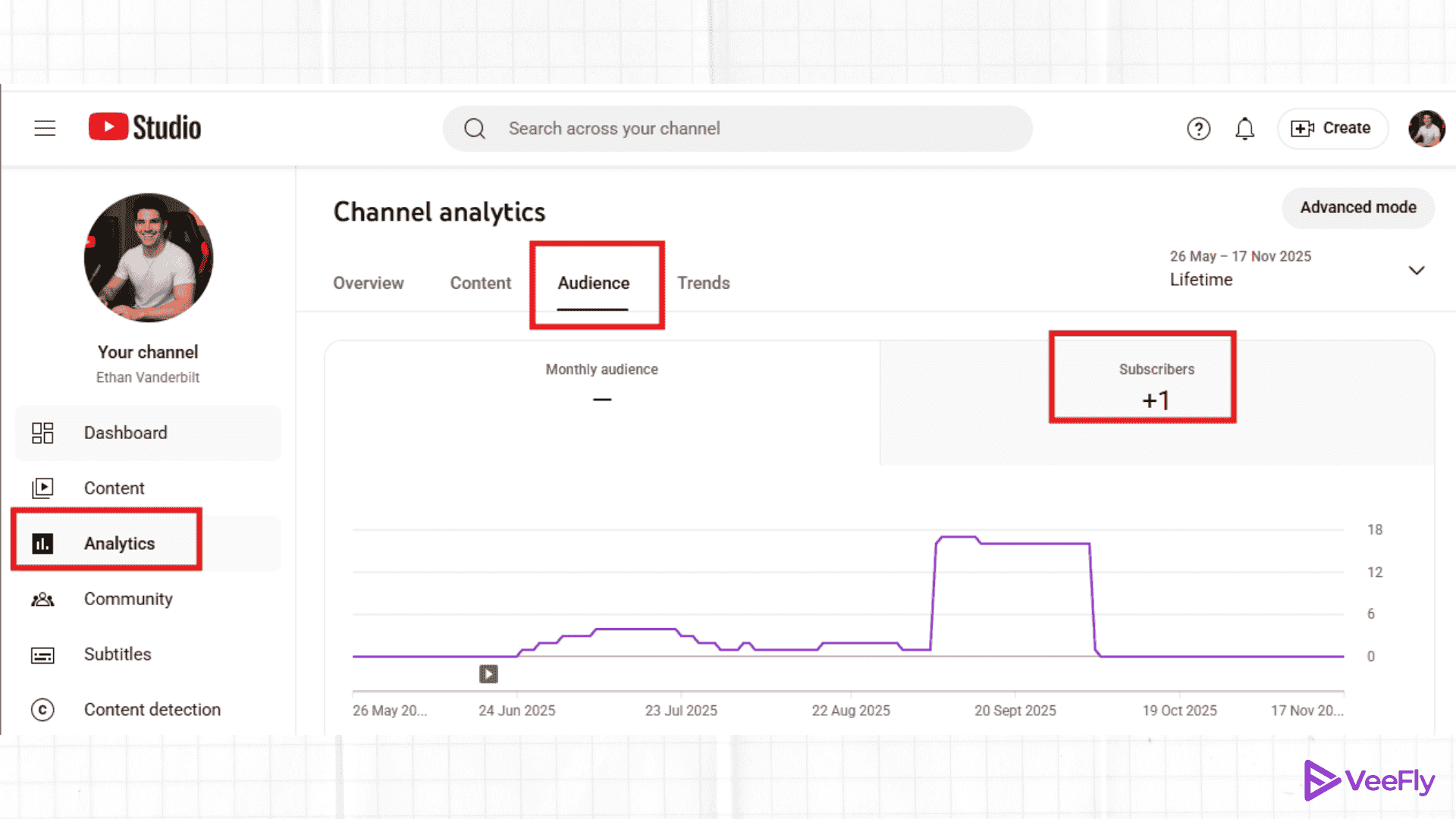
The in-house sub count tracker YouTube Studio is a robust tool for calculating and analyzing your channel metrics. To track subscribers, go to analytics > audience tab, and the total subscriber count will be visible.
Additionally, in the advanced tab, there will be multiple cards showing recent, new, and casual subscribers. You can download the Studio app to see instant changes, but if you are analyzing the data, the dashboard is recommended for a more detailed overview.
Best 7 ways to increase your subscriber count on your YouTube channel
We have seen how you can use the YouTube subscriber count tracker apps or tools for real-time analysis. Let’s look at some practices to increase subscriber numbers.
- Create a customized thumbnail for your channel.
- Create compelling titles and descriptions for your videos.
- Include end screens to promote your videos.
- Use branding like watermarks on your videos.
- Create interesting trailers for your channel.
- Include CTA buttons to keep your audience engaged.
- Engage with your audience via comments.
Conclusion
Now it’s time for you to go ahead and create great content to boost your views and increase your subscribers. In the blog, we have seen 12 trackers to make your analytics game easy. All you need is the YouTube API key to get real-time data. Additionally, I suggest these tips will help you monetize your channel through affiliate and sponsorship programs and keep track of your subscribers’ list. You also use YouTube’s tool called YouTube Studio to manage your channel efficiently and use it to brainstorm new ideas using the tips and updates it provides YouTube creators with.
Frequently Asked Questions
Q1. How to check if your YouTube subscribers are real?
The indicators can be huge subscriber count with low engagement rate, sudden rise or drop, many generic or spam comments, low view-to-subscribe ratio or vice versa, audience demographic, incomplete profile, etc.
Q2. Can I track competitors subscriber count?
Yes, you can track the competitors using live subscriber tracker tools such as SocialBlade, VidIQ, TubeBuddy, Semrush, Hootsuite, and Sprout.
Q3. Can I get notified when I gain new subscribers?
Yes, you can get notified. You need to enable notifications in YouTube Studio. However, you’ll not get real-time notifications, because it takes time to get update.
Q4. Why isn’t my subscriber count updating live?
The problems can be high traffic, API restrictions, API quota usage, bandwidth issues, delay due to an increase in spam, etc. The delay is usually up to 48 hours. You can use the subscriber tracker live tools for real time count.
