



Taking a Christmas break on YouTube doesn’t require much; all you have to do is stop uploading videos. However, it’s not that simple when you know the algorithm never stops.
Every creator wonders if their views will crash the minute they stop uploading videos. The fear is precisely why so many YouTubers experience burnout during the holidays, leading to fewer uploads. But you don’t have to choose between the seasonal holiday and YouTube. Here are some tried and tested tips to pause YouTube uploads without losing views:
What Happens if You Stop Uploading Videos on YouTube?
Since your newest videos rely on fresh engagement, when you stop uploading, that momentum is lost. While YouTube won’t punish you, it will simply prioritize more active channels. And since people watch what appears on their feed, someone else will fill your space if you don’t. Hence, it could slow your overall change growth.
However, the good news is that you can avoid all of these problems with the right strategy. So you can take your seasonal holiday break while still enjoying the views.
Top 10 Ways to Retain Audience During the Seasonal Holiday
Taking a Christmas break doesn’t have to destroy your views, kill your momentum, or banish you from the algorithm. With these strategies on board, you can simply turn things in your favour. It will not just help your channel survive, but rather thrive.
1) Schedule a Video in Advance – Consistency
The easiest way to maintain consistency is to pre-upload your content. YouTube will handle the rest while you enjoy your holiday break. Scheduling your Christmas video in advance gives you the freedom to plan content and post it at the right time.
2) Post Evergreen Video Before Holidays – Search Traffic
The best way to keep the channel running is to drop a highly searchable video just before logging off. It will continue to pull views while you are on break.
3) Promote a Playlist – Session Time
Nothing increases session time better than promoting multiple videos. A YouTube playlist is designed to make it easier for viewers and creators. Curate a binge-worthy playlist, you can either add a theme or create a compilation of your best videos. Upload it before you log off, and your viewers will have something to binge-watch.
4) Refresh Thumbnails and Titles – CTR
Optimization goes a long way, and a quick seasonal holiday will boost older videos just enough to carry your channel through the Christmas slow-down.
5) Use Community Post -Engagement Signals
YouTube communities are your strongest asset. On your good or bad days, you need a subscriber base that backs you. In return, you need to check in on them, too. Simply upload a poll or ask about their holidays, or redirect them to your videos.
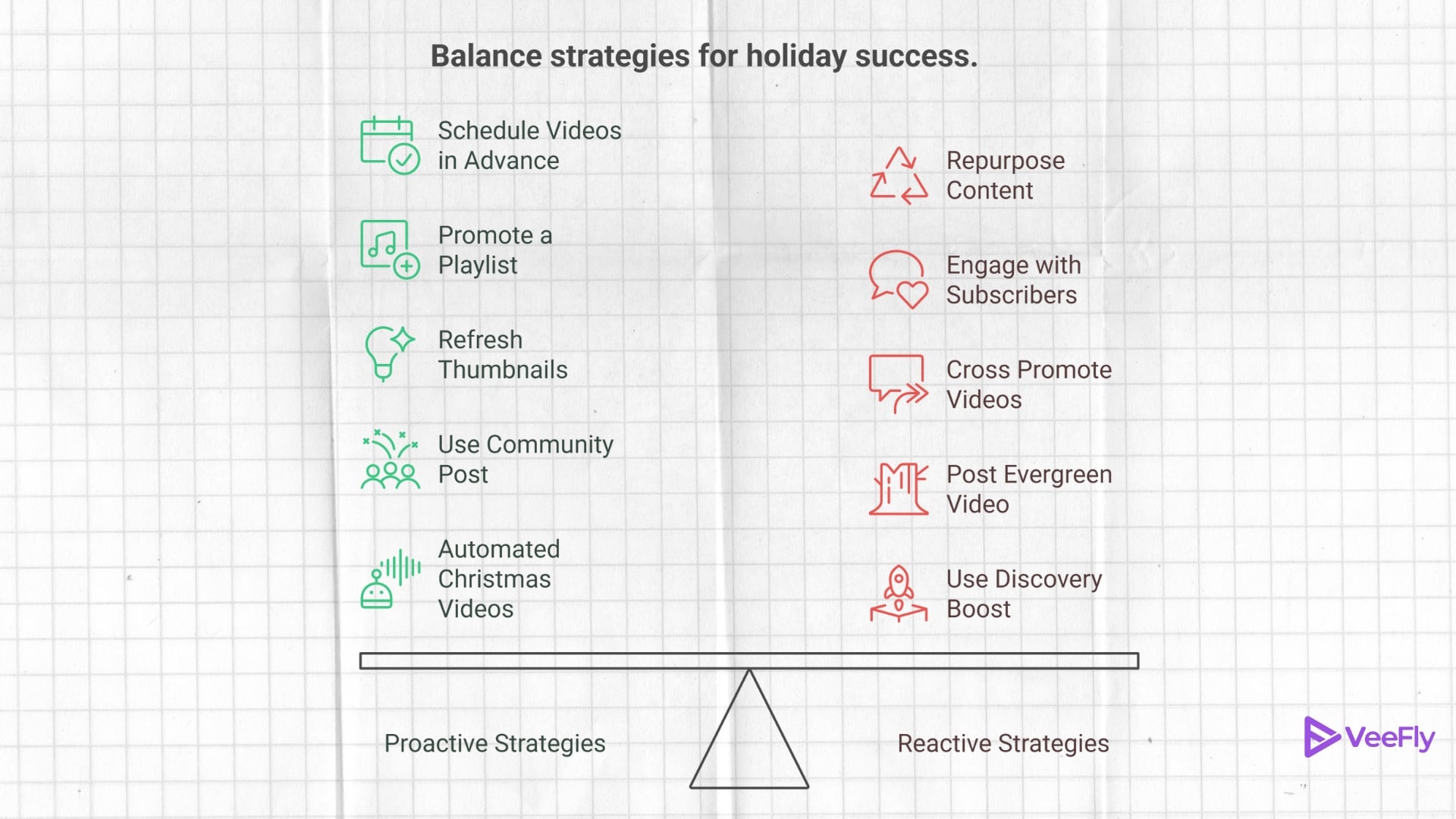
6) Engage With Subscribers – Repeat Viewers
Another great way to boost views is through engaging with your viewers. The entire upload journey consists of scripting, producing, and editing. On top of that, you have to engage with viewers, which sometimes becomes too much on your plate. Hence, during off time, you can simply reply to all the lovely comments your subscribers have left. It will make them return to your views, plus the algorithm will promote it too due to engagement.
7) Repurpose Content – Discovery
YouTube Shorts boosts your videos to the algorithm in the most effective way. Your next viral video need not be created, it simply exists in your library. You can create several engaging YouTube Shorts by simply rebranding it. All you have to do is scout the best one and convert it into bite-sized content.
8) Cross Promote Old Videos – External Traffic
All it takes is one click to bring your old videos back to life. When you cross-promote, you invite a new audience to existing content. It doesn’t take much effort and yet keeps the channel alive.
9) Use Discovery Boost – Traffic Stability
Taking a Christmas break doesn’t mean your views have to drop. If you want, you can trust your newest upload to discover growth boosting platforms, they will keep the traffic flowing and prevent your analytics from crashing, even when you are not promoting a video.
10) Automated Christmas Videos – Presence
Several platforms help you create a video from scratch without much effort on your end. Additionally, you can customize and add prompts as needed.
Conclusion
Every minute, more than 500 hours of video are uploaded to YouTube, making visibility increasingly competitive. Hence, the creators who plan, especially during the holidays, can maintain a steady momentum. YouTube never punishes breaks, it punishes creators who disappear without a plan. Once in a while, you need to take a break to recharge your creative energy. With the right strategies at your disposal, you can stay visible without doing much. Use these simple ideas to transform your channel for long-term growth.
Frequently Asked Questions
Q1) How to stay active on YouTube during a break?
You can stay active on YouTube during a break by simply scheduling videos in advance and engaging with your viewer base.
Q2) How to take a break on YouTube while promoting YouTube videos?
You can cross-promote your YouTube videos on other social media during holidays to reach a different audience.
Q3) Are there any tips to pause YouTube uploads without losing views?
Yes, the best tip to pause YouTube uploads without losing views is to cover evergreen topics and schedule them before logging off for a break.
Q4) Is taking a break from YouTube good for long-term growth?
Yes, taking a planned break on YouTube supports long-term growth and helps you improve content quality by avoiding creator burnout.
Q5) What should I post before going on holiday?
Before taking a Christmas break, you can upload a high retention topic that will get traction on YouTube even in your absence.
