


Key Takeaways
- Discover two proven methods to identify your first subscriber using official tools.
- Only public subscribers appear in the YouTube Studio. If your list is empty or starts months after you launched, your actual first subscriber likely kept their subscription private.
- Access step-by-step guides for YouTube Studio, Google Takeout, and third-party API viewers.
- Troubleshoot missing data with practical fixes you can apply in minutes.
Every creator remembers the excitement of hitting that first subscriber milestone. This guide shows you three reliable ways to see who you first subscribed to on YouTube and track down your first subscriber using YouTube’s own tools. You will get clear steps for desktop and mobile, privacy warnings, and bonus tips for viewer-side subscription tracking. Each method works with official Google systems, so you avoid third-party risks.
Understanding How YouTube Stores Subscriber Data
YouTube Studio displays a Recent Subscribers card that defaults to a 28-day window, but you can expand it to a Lifetime view. YouTube does not provide a built-in chronological audit that returns every subscriber for all accounts. Only subscribers who set their subscriptions to public will appear in your Studio list. Most Google accounts default to private subscription visibility, so many early subscribers remain invisible by design.
Deleted accounts, spam removals, and brand-account quirks add more gaps. Desktop and mobile offer similar access, but mobile requires the YouTube Studio app. Hence, you need multiple methods because no single tool guarantees a complete historical record. That context prepares you for the first method, which uses Studio’s native interface.
Method 1: Use YouTube Studio’s Recent Subscribers List
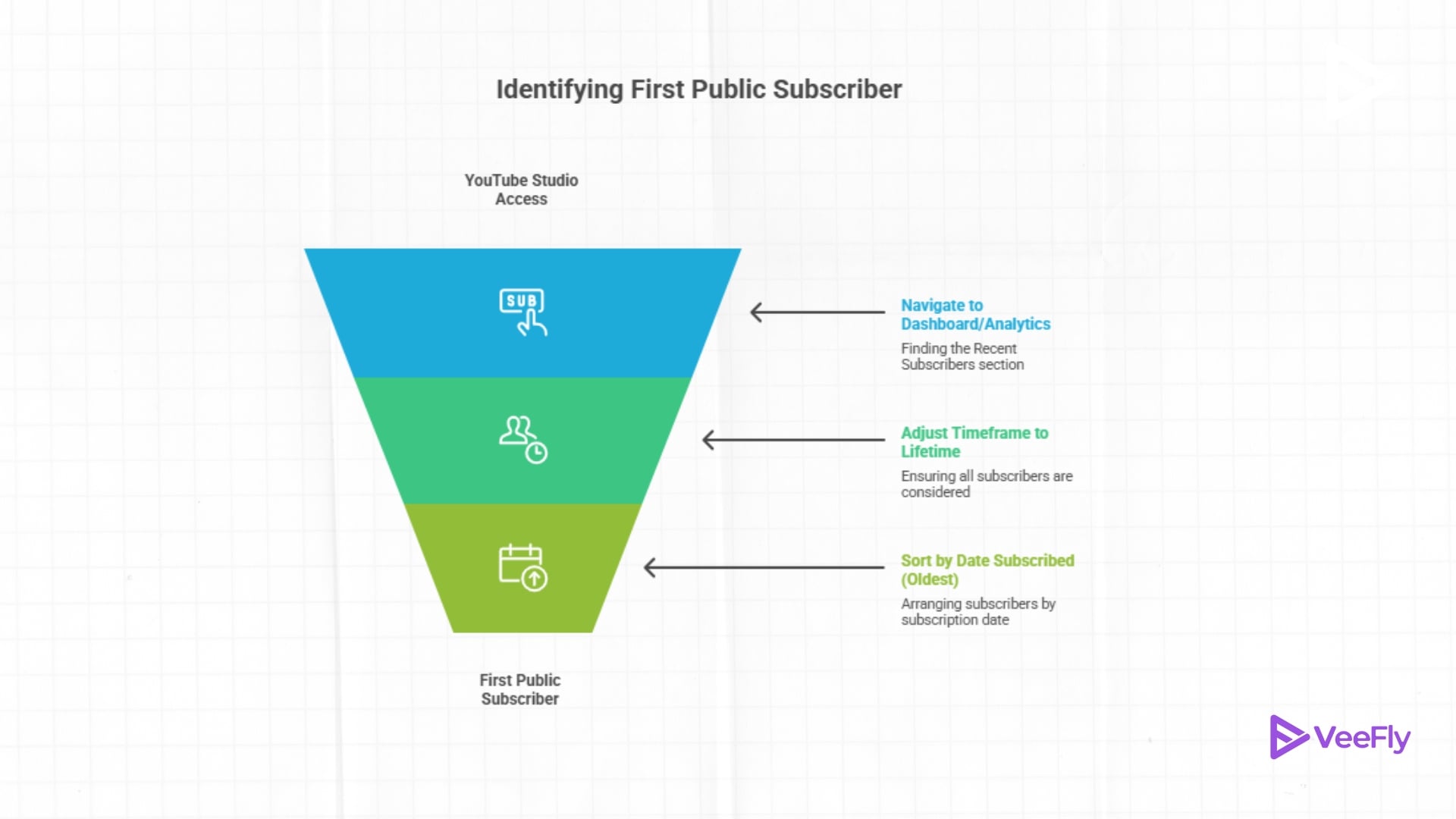
Studio’s Recent Subscribers list is the fastest way to see your first subscriber on YouTube if that person made their subscription public. Here’s how to see your first subscriber on YouTube:
Desktop Steps
- Go to studio.youtube.com and sign in to your channel.
- Click Dashboard on the left sidebar.
- Scroll to the Recent Subscribers card and click See All.
- Change the timeframe dropdown from Last 28 Days to Lifetime.
- Click the Sort button and select Date Subscribed (Oldest).
- The top entry is your first public subscriber, assuming they have not unsubscribed.
Mobile Steps
- Open the YouTube Studio app on iOS or Android.
- Tap Analytics at the bottom.
- Tap Audience at the top.
- Scroll to Recent Subscribers and tap View More.
- Adjust the timeframe to Lifetime and sort by the oldest date.
Method 2: Download Your Full Subscriber List
Google Takeout exports your YouTube data, including subscriber records, as a downloadable archive. This method captures any subscriber information YouTube has stored, even if it no longer appears in Studio. Here’s how to see your first subscriber on YouTube:
- Visit takeout.google.com and sign in.
- Click Deselect All at the top.
- Scroll to YouTube and YouTube Music, check both boxes.
- Click Next Step at the bottom.
- Choose your delivery method (email link, Drive, etc.) and export frequency (export once).
- Click Create Export and wait for the email notification (usually 10 minutes to 2 hours).
- Download the archive and unzip it.
- Open the subscribers folder and locate the CSV file (often named subscriptions.csv or a similar name).
- Open the CSV in Google Sheets, Excel, or any spreadsheet app.
- Find the SUBSCRIBED_DATE column and sort it in ascending order (oldest to newest).
- The top row shows your earliest recorded subscriber, including their channel name and URL.
Takeout only exports the data that YouTube currently stores. If a subscriber deleted their account years ago, the record may no longer exist. The CSV columns typically include channel URL, channel name, and subscription date. File sizes vary, but most creators keep archives under 50 MB unless they have a massive YouTube live subscriber count. Keep this data private. It is for your eyes only.
Common Issues When Searching for Early Subscribers
If you cannot find your first subscriber after trying all three methods, one of these scenarios is likely at play:
- First subscriber set to private: You will never see their identity. Privacy settings override all creator tools.
- Account deleted or flagged as spam: YouTube removes spam subscriptions retroactively. Your true first legitimate subscriber may be the second or third entry in the chronology.
- Data not refreshing in Studio: Wait 48 hours after a new Studio subscription before it updates. Check again.
- Brand account vs. personal account confusion: Ensure you are signed in to the correct channel in Studio and Takeout.
- Takeout export incomplete: Some brand accounts produce partial exports. Try exporting again with only YouTube selected.
Final Thoughts
Finding your first YouTube subscriber requires patience and multiple tools because YouTube privacy limits, account deletions, and data retention gaps make a single audit impossible. Use Studio for quick public checks, Takeout for archival records, and third-party tools for instant sorted lists. Remember that subscriber anonymity is a core platform value, so some of the first subscribers remain forever hidden. If you do find yours, consider leaving a comment on one of their uploads to say thanks. That personal touch reinforces the community spirit that drives YouTube growth.
Frequently Asked Questions
Q1) Why Can’t I See My First Subscriber?
Your first subscriber likely set their subscription to private, which hides their identity from all creator tools. YouTube respects user privacy above creator access.
Q2)Is it safe to use third-party tools to see subscribers?
Yes, it’s generally safe to use third-party tools to see YouTube subscribers. Only use tools from developers with transparent privacy policies. Avoid any service asking for more than read-only subscriber access. These tools streamline the process, but troubleshooting missing data requires its own set of fixes.
Q3)Does Unsubscribing And Resubscribing Reset The Date?
Yes. If someone unsubscribes and resubscribes later, YouTube records the new subscription date. The original date is lost.
Q4) How Accurate Is Google Takeout Data?
Takeout exports current server-side records. If YouTube deletes a spam subscriber or a user closes their account, that entry is removed from the export.
Q5)How Do I Find My First Subscriber On Mobile Only?
Use the YouTube Studio app. Tap Analytics, then Audience, then Recent Subscribers. Change the timeframe to Lifetime and sort by oldest. If that subscriber is private, they will not appear.
