


Key Takeaways:
- Attention-grabbing changes dominate the vertical video feed. Independent creators spend hours analyzing why a perfectly edited short-form video stalls at a few hundred views. They are unaware that their opening framing is the issue.
- If your content looks like every other generic video on the feed, mobile users will swipe past before they even process your topic.
- The reality of modern media consumption is that you aren’t just competing against other creators in your niche. You are competing against how fast the user scrolls.
- To systematically stop thumbs and fix early retention drops, high-growth channels rely on editing styles that create immediate visual contrast.
- One of the most effective methods right now is the YouTube slide effect, popularized by the viral Old Soul vs New Gen identity trend.
- YouTube Slide Effect uses a moving split-screen divider to present two contrasting personas, eras, or lifestyles simultaneously.
What Is a YouTube Slide Effect?
A YouTube slide effect is a visual transition in which a moving line crosses a vertical video frame. It hides one piece of media while revealing another underneath it. Instead of using traditional jump cuts to transition between ideas, it uses a sliding divider line to create a side-by-side comparison between two video tracks stacked on top of each other.
7 Steps to Create a YouTube Slide Effect
Follow this detailed YouTube effect maker tutorial to construct a clean, high-retention transition:
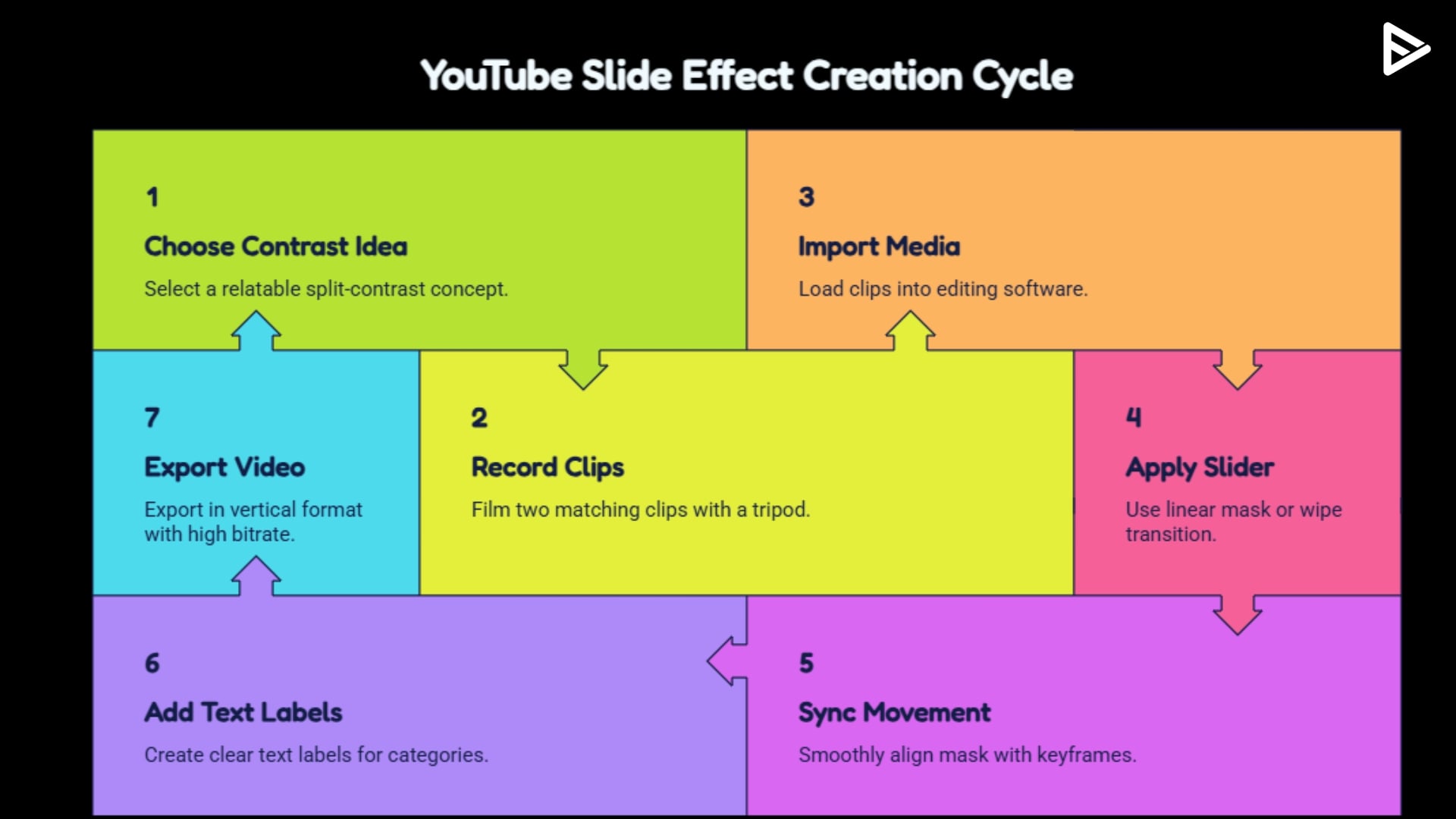
Step 1: Choose a Strong Contrast Idea: Before touching your camera gear, you must map out a highly relatable, split-contrast concept. The two identities or eras you choose must feature immediate, obvious differences in style, color, or props.
Step 2: Record Two Matching Clips: Lock your camera to a tripod. The frame cannot shift between takes. Record your first identity performance (Old Soul), then record your secondary performance (New Gen) while staying in the same position.
Step 3: Import into Your Editing Tool: Open your editing software and import both media files. Place your main clip on Video Track 1. Stack your second comparison clip directly above it on Video Track 2, aligning the files so your movements match frame-for-frame.
Step 4: Apply the Slider: Go to your app’s crop or mask settings. Select the Linear Mask filter, or choose a standard Linear Wipe transition preset, and place it directly on your Video Track 2 layer.
Step 5: Sync Movement Smoothly with Keyframes: Move the playhead to the exact frame where your visual transition should begin. Set a position keyframe on your linear mask’s X-axis. Advance the timeline by 12 to 20 frames, slide the mask boundary across the canvas to open the second clip layer, and set a second keyframe.
Step 6: Add Clear Text Labels: Create clear text labels on opposite sides of your split-screen. Choose bold, easy-to-read sans-serif typefaces to present your categories clearly to the viewer.
Step 7: Export in Vertical Format (9:16): Export the project as an MP4 file with a native 1080×1920 vertical resolution, using a high bitrate to prevent blocky compression artifacts.
Best Tools for Creating a YouTube Slide Effect
You do not need to purchase enterprise-grade post-production workstations to position yourself as an authority in this space. The modern creative landscape offers highly intuitive software options for rapid mobile layouts. Here are the top tools to utilize as an aspiring YouTube Shorts effect maker:
- CapCut (Mobile & Desktop): This tool is undisputed as the fastest, most accessible path for beginners. It features intuitive, one-click linear mask filters, automated split-screen mode, and simplified keyframe-tracking templates that let you deploy a finished trend asset within minutes.
- Adobe Premiere Pro (Desktop): The definitive industry standard for creators seeking absolute control over multi-layer video nesting, frame-accurate motion curves, and highly detailed edge feathering configurations. It allows you to sync audio-visual assets with absolute mathematical precision.
- DaVinci Resolve (Desktop): An elite post-production suite that features advanced node-based masking workflows. It excels at preserving razor-sharp visual clarity and perfect color reproduction across large Connected TV displays, making it ideal for high-equity brand channels.
How to Make Slide Effect Perform Better on YouTube Shorts
Use these core optimization principles to maximize your video performance:
- Deliver the Hook Within 2 Seconds: Open your timeline mid-action with the slider line already visibly moving or vibrating across the frame. The viewer must confront immediate visual conflict, the exact millisecond your asset autoplays on their feed.
- Build a Highly Relatable Concept Core: Select topics that trigger immediate emotional familiarity or nostalgic debate, forcing viewers to pause their scroll, review both sides of the divider line, and click into the comment section to share their personal preference.
- Construct an Infinite Loop Ending: Structure your final frames so your closing movement or sentence structure connects directly into your opening frame. If the visual transition is completely invisible, the muted mobile viewer will naturally watch the initial sequence again before realizing the video has reset.
- Avoid Weak Visual Contrast and Saturated Clutter: If your Old Soul” persona wears a grey shirt and your “New Gen” setup features a charcoal shirt, the separation is too muddy. The stylistic and color contrast must be intense, bold, and immediate to pop on tiny smartphone screens.
- Don’t Drag Slider Transitions: Allowing your mask line to creep lazily across the timeline. Short-form audiences demand rapid visual gratification; any lag in pacing gives the thumb an immediate excuse to swipe down to another channel.
- Avoid Complete Over-Reliance on Audio Tracking: Design a script where the timeline shift makes sense only if the user hears a specific sound effect. Your video must remain 100% understandable even when consumed on a completely muted mobile app feed.
- Clear Central Message: Packing too many ideas or confusing metaphors into a single 15-second clip. Keep your premise streamlined: one single comparison, two clean visual layers, and clear, bold text labels.
Content Ideas for Old Soul vs New Gen Videos
If you need immediate inspiration to launch this format, here’s your guide to it:
- The Music Taste Duel: Use a custom audio mix to switch between classic vinyl acoustic blues tracks on the left side of the moving mask and hyper-modern synthetic electronic trap beats on the right.
- Daily Technology Habits: Display a parallel comparison of manually checking off tasks inside a vintage leather notebook planner versus scheduling automated smart alerts on a sleek smartwatch face.
- The Fashion Evolution: Move the slider to wipe away a retro, oversized 90s streetwear silhouette and replace it instantly with a tailored, modern minimalist outfit.
- The Content Workspace Contrast: Contrast a classic mechanical typewriter and a cup of black coffee against a dual-monitor RGB setup with an energy drink.
Final Thoughts
The effect grabs attention, but the idea keeps viewers watching. Use advanced tools to build crisp visual contrasts, keep your pacing fast, design clean loops, and add your authentic YouTube brand voice to the narrative. When you pair creative visual frameworks with strategic distribution networks, you build permanent community authority that scales your channel.
Frequently Asked Questions
Q1. What app is best for YouTube slide effects?
Desktop suites like Adobe Premiere Pro or DaVinci Resolve are the industry standards. For professional creators seeking absolute control over multi-layer video nesting and custom lighting grading.
Q2. Can beginners successfully create this effect?
Yes, by placing camera on a stable tripod to record two distinct character personas. Further, design styles without moving the camera base. A beginner can easily blend the two clips using any basic editor with standard split-mask transition filters.
Q3. Why do slide effects work well on Shorts?
Slide effects work exceptionally well because they serve as immediate visual pattern interrupts on fast-moving mobile feeds.
Q4. How do you make Shorts go viral using trends?
To make trend-based Shorts go viral, deliver a strong visual hook, maintain conceptual clarity, and keep your visual cuts fast.
