


Key Takeaways:
- To use YouTube’s Reimagine feature, open YouTube Shorts on the mobile app, tap the Remix button, and select Reimagine.
- Choose a core reference frame and upload up to 2 option photos to add your likeness. Further, input a custom text prompt detailing your changes, and let the AI generate a new 8-second clip.
- Preview the final video asset, perform finishing edits, and publish. Availability depends on your region and account access.
- Transform existing content with generative AI. Learn how to use YouTube’s Reimagine feature to remix Shorts.
What Is YouTube’s Reimagine Feature?
The YouTube Reimagine feature is an AI tool integrated into the existing YouTube Shorts Remix menu interface. It is a step-up from the basic cropping filter, it uses Google’s text-to-video generation model, Veo. Further, it uses its Gemini Omni, to systematically reconstruct a video scene from scratch.
When you tap the YouTube reimagine sequence, it doesn’t just layer an edit over the original file. Instead, it takes one single frame from the selected video. The AI model reviews your image frame, and the prompt associated with it, and creates a new 8-second video, along with AI sound effects track matches the newly created theme.
The distinctive part of this tool is that it’s build directly into the app. You do not need to download costly third-party software or manually clip frames. The entire process takes place on YouTube.
Who Can Use the YouTube Reimagine Feature?
Because processing AI video generation models requires immense computational resources, the platform is rolling out the Reimagine suite across a multi-stage distribution sequence. Here’s where the accessibility lies:
- The feature is currently being rolled out in phases. It is currently available in select countries, however it will be slowly available worldwide.
- As of 2026 the feature is available in the scope of English language and English text prompts only. If you attempt to enter characters or regional phrases outside English in the creation field, the engine will trigger a processing error.
- Your account to be fully verified. Creators must be 18 years of age or older to utilize the likeness tool sets.
- If an original creator enters their YouTube Studio dashboard and opts out of allowing visual remixing on their video, the Reimagine button will automatically be hidden from that Short for all users.
How to Use YouTube’s Reimagine Feature (Step-by-Step)
To get high-quality visual outputs and ensure your clip remains error-free, follow these steps:
- Step 1: Open the Short you want to try the reimagine feature on.
- Step 2: Tap the Remix Button located at the right side panel on your screen
- Step 3: From the slide-out configurations menu, select the Reimagine option.
- Step 4: Pick the exact frame you want to change. The tool will display a tracker of the video clip.
- Step 5: Upload optional reference photos. The tool lets you upload up to 2 reference photos from your phone’s camera roll to integrate your likeness directly into the AI render.
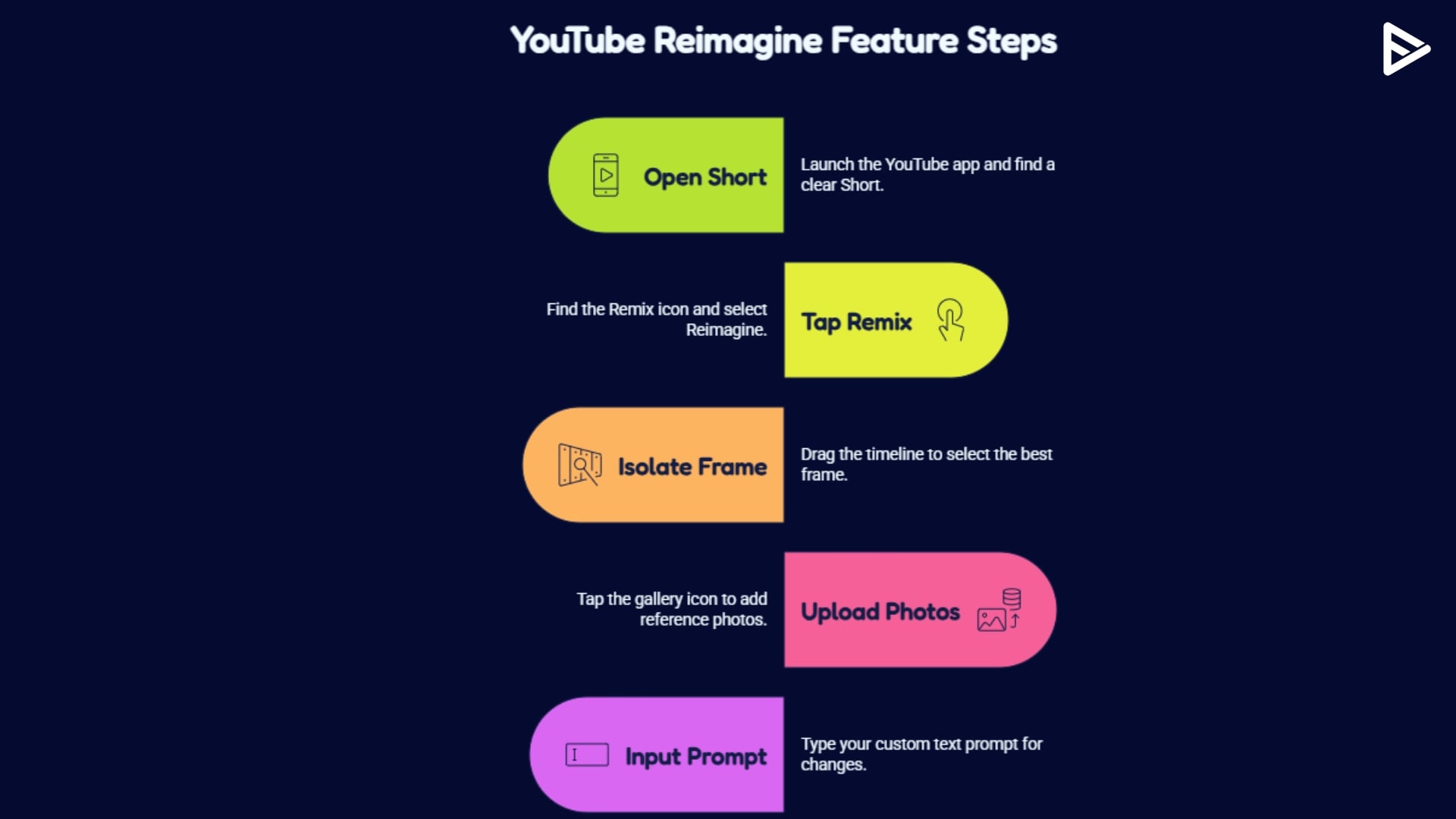
- Step 6: Input your custom text prompt. You can pick a ready-made suggestion or tap your own instructions.
- Step 7: Generate and preview the AI video. Google’s Veo model will rebuild the scene, producing an entirely new, algorithm-ready 8-second video clip with matching contextual audio. Review the playback preview frame-by-frame.
- Step 8: Apply final edits and publish. Further you use interactive stickers and sound effects.
What Can You Do With the YouTube Reimagine Feature?
The reimagine YouTube Shorts feature is truly more than simple visual color corrections tools out there. With the right ideas, you can use it to it’s full capability. Here are couple of ideas to start with:
- Change the subject out of a plain bedroom and place them on a cyber-punk city street.
- Tweak the art and animation styles, convert a standard live-action clip into a 80s vintage aesthetic.
- Instruct wardrobe and character clothing for subjects in the scene.
- Change the atmospheric weather and lighting.
Best Prompt Ideas for Quality AI Results
The prompts and instructions that you instruct the feature, directly plays a hand in the output. If you input a vague, single-word phrase like cool style, the AI will output a generic, messy render. You must provide clear descriptive instructions. Use this prompt-writing cheat sheet to maximize your visual accuracy:
Visual Style Prompts
- “Convert this scene into a vibrant, highly detailed 1990s anime style with bold ink outlines and cell-shaded colors.”
- “Transform this entire video into a classic stop-motion claymation aesthetic, making the character models look handmade.”
Environmental Transformation Prompts
- “Change the background into a cinematic, futuristic neon cyberpunk city alleyway at midnight during a heavy downpour.”
- “Place the subject inside an ancient, abandoned stone castle courtyard with dynamic sunlight rays filtering through overgrown ivy vines.”
Mood and Weather Prompts
- “Alter the mood of this video to match an intense, high-stakes cinematic thriller, shifting the palette to deep emerald greens and dark shadows.”
- “Modify the weather conditions to a heavy, serene winter snowstorm, ensuring snow accumulates naturally on top of the objects in the frame.”
Limitations of the YouTube Reimagine Feature
While this YouTube Shorts AI framework offers incredible production speed, high-authority creators must maintain a realistic understanding of the tool’s structural boundaries:
- The feature is strictly limited to a maximum output duration of 8 seconds per remix sequence. You cannot use it to generate long-form narrative pieces natively.
- Since this is AI, complicated hand moments or body gestures may come off as glitchy.
- The content published through the Reimagine feature automatically includes digital watermarks pointing back to the source creator.
- It is an asset for YouTube Shorts remixes, which are good for safety but limit their use for highly sensitive, corporate-branded campaigns.
Final Thoughts
The rollout of YouTube’s Reimagine tool has permanently shifted the relationship between media consumption and video production. By using advanced AI directly within the remix pipeline, you can capture existing platform momentum, transform cultural concepts instantly, and experiment with visual formats at ten times your traditional speed.
Frequently Asked Questions
Q1. When Should You Use Reimagine?
You can use YouTube’s reimagine feature when you want to take complex historical videos and use Reimagine to visually. Further, to transform real-world clips into stylized and hyper-realistic video game graphics environments.
Q2. How do you use the Reimagine feature?
Open the YouTube mobile app, go to an eligible Short, tap the Remix button, and select Reimagine. Choose your baseline reference scene frame, upload up to two photos to add your likeness, type out a detailed descriptive text prompt, and tap generate to preview and publish the asset.
Q3. Is YouTube Reimagine available to everyone?
No, the feature is rolling out across a multi-stage distribution sequence based on account history, device compatibility, and regional server readiness. Currently, the tool requires a verified account, users aged 18 or older, and supports English language text inputs only.
Q4. Can you edit AI-generated Shorts after using Reimagine?
Yes, once the Veo video model finishes rendering your clip, the app drops the file into the standard Shorts editing layout. Further, it allows you to layer in native music tracks, drop down text captions, or trim the timeline before publishing.
Q5. Do Reimagined Shorts give credit to the original creator?
Yes, platform policy guarantees absolute attribution. Every video created using the Reimagine tool automatically embeds a clear digital watermark. Moreover, a permanent, clickable backlink on the player screen that directs traffic straight back to the source video.
