


Key takeaways:
- YouTube Music statistics are personalized metrics that compile core metrics.
- You can check your rolling stats year-round directly on your YouTube Studio.
- Reviewing your stats lets you spot shifts in your tastes, further, see how your content curation habits evolve over the years.
- There is no standalone section for music stats in YouTube Studio. YouTube combines your music data directly into your existing Analytics tab.
- You can separate and view music-only statistics using the platform’s built-in sub-tabs and filters.
How to Check Your YouTube Music Statistics in Easy Steps?
As of 2026, YouTube Music has reached 125 million paid subscribers. The vast audience makes it essential for creators to track how much traffic they bring in. To find this data, you can simply check your analytics in 5 steps. Here’s what to follow:
- Step 1: Open your YouTube Studio on your desktop browser. Mobile users can also download the YouTube Studio application.
- Step 2: Log in from a specific Google account tied to your YouTube account.
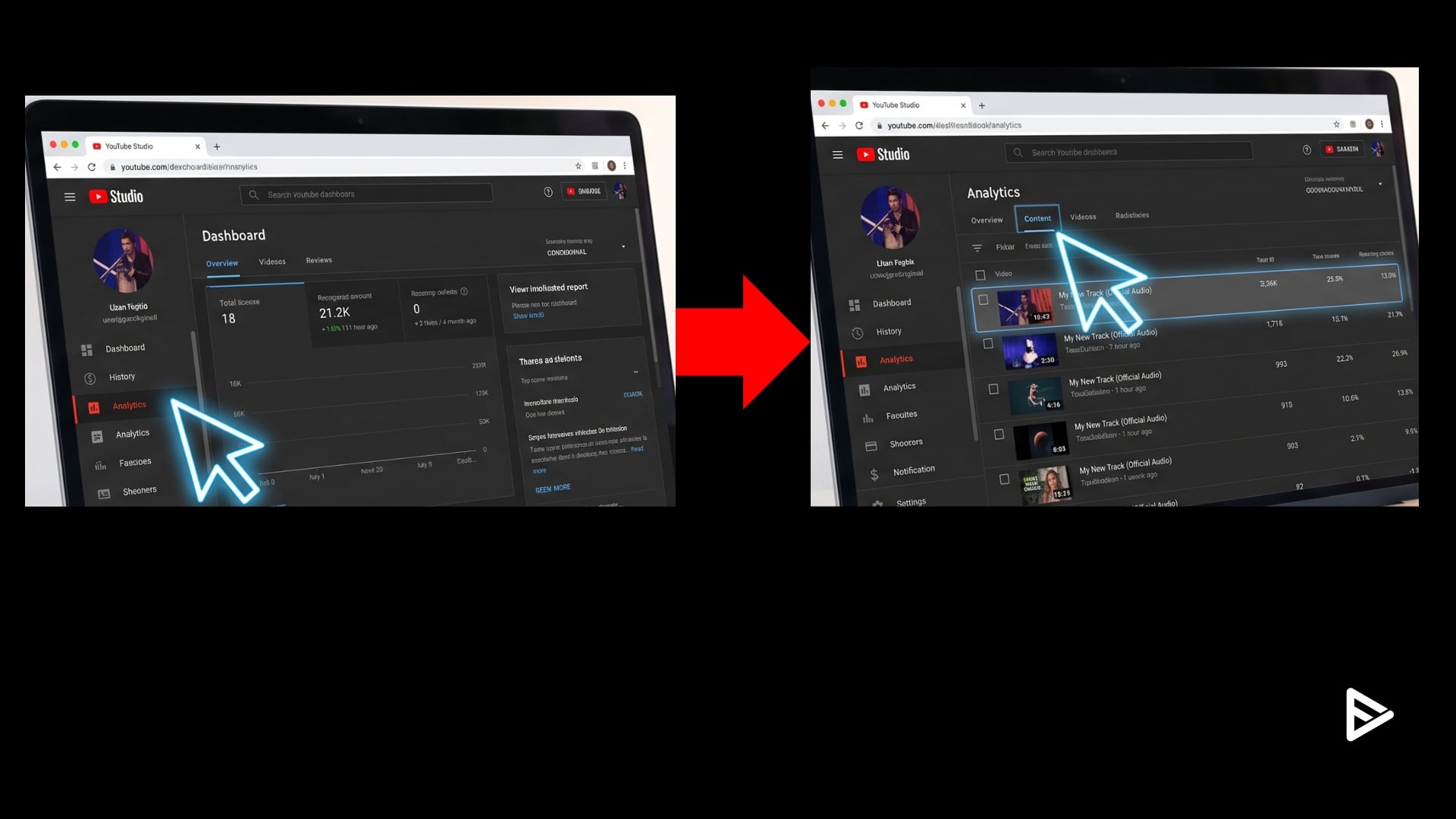
- Step 3: Search for the analytics tab; it is present on the left side of the dashboard. You will find Analytics.
- Step 4: Click the Content tab on the Analytics page. Further, choose the song video you want to track performance and stats for.
- Step 5: Check core metrics, analyze, and incorporate them into the content.
What Are the Most Important Music Metrics to Track?
YouTube Studio provides creators with an in-depth breakdown of all the core metrics they can evaluate. Here are the top 10 stats creators need to check while tracking performance:
- Watch Time: You need to check how many times your video was consumed and how long the tracks were played.
- Traffic Sources: A proper breakdown of how viewers found your music.
- Click-Through Rate (CTR): A healthy CTR falls between 4% and 6%. Hence, you need to be aware of the percentage of viewers who found your video appealing enough to click.
- Geographic Distribution: 2.7 billion active users worldwide consume YouTube content. As a creator, you need to see it for yourself which part of the world your listeners are coming from, so you can tailor content accordingly.
- Age Demographics: YouTube’s demographic is 95% between the ages of 18 and 29. Age brackets help you understand how to market your content.
- Subscriber Growth: The stat aids in checking how many subscribers you gained from the date of your upload
- Shorts & Remix Data: YouTube Shorts get over 200 million views daily. Creators need to be aware of the exact number of remixes that were made from their audio.
- Estimated Revenue: Projected earnings from the uploaded content
- Average View Duration: Creators need to maintain at least 50% as a baseline for their videos. Therefore, it’s important to check whether viewers are staying on your videos.
- Interactions: Likes, comments, and shares can also be tracked in the analytics.
Why Should You Track Your Music Statistics as a Creator?
Understanding your YouTube music statistics helps immensely in the creative process. Here are the top reasons to check your analytics right now:
- Discover New Content Opportunities: Routinely review your stats to find new storytelling ideas and creative directions.
- Build Better Playlists: Understanding your demographics can help you create niche playlists that will help your content reach them effectively.
- Supports Brand Identity: Understanding the styles and genres you naturally lean towards can help you create content with a recognizable mood and aesthetic, making your channel more memorable to viewers.
- Reflect Creative Journey: Reviewing analytics shows how your musical preferences have evolved alongside your content, offering a unique perspective on your growth as a creator.
- Study Your Creative Influences: Looking back at your listening patterns can help you recognize recurring themes, moods, or genres that influence your editing style and overall brand identity.
Final Thoughts
Curating music without data is just a guessing game. Moreover, in 2026, creators making music on YouTube need to look at the numbers to optimize their content to the finest degree. In the end, the platform is made for people who will contribute something new to it, and to do that, you need to understand your audience better.
Frequently Asked Questions
Q1. How often are my YouTube Music statistics updated?
Stats for YouTube music are updated Daily, your channel statistics are updated based on your recent activity.
Q2. Are my music channel statistics visible to my viewers?
No, your music channel statistics are completely private by default.
Q3. How do I safely share my YouTube analytics with brands?
You can safely share your metrics without giving away account passwords in YouTube Studio. Further, you can explicitly grant viewer permissions via Studio’s Permissions tab, allowing brand representatives to inspect your data logs natively without requiring access edits.
Q4.Why can’t I see deep analytics for other YouTube channels?
YouTube strictly restricts YouTube music listening stats visibility to authenticated channel owners, verified managers, and connected multi-channel networks.
Q5.What are the latest YouTube Studio updates for music creators
The platform has launched major updates, including YouTube Ask Studio, a conversational AI chat assistant that lets viewers find Creator Music with much more ease.
