


If you spend enough time on the internet, you will notice it takes one moment to go viral. These tiny moments can turn any YouTube channel into a thriving space. Best of all, if you know the fastest way to get these moments to the audience, like using GIFs. In 2026, creators are leaning towards a GIF maker for YouTube videos to fuel the algorithm.
While several tools claim to be the easiest and fastest ways to make GIFs, here is a list of the top tools for repurposing content into a visibility tool.
Why Do YouTube Creators Need Gifs in 2026?
YouTube is now an ecosystem that speaks directly to viewers through its creators. If you want to turn the best seconds of your video into something people actually share, you need GIFs. For creators, GIFs automatically mean faster reach because they travel faster than long videos. You will also be better promoted, since the duration acts as a teaser for your videos.
Further, repurposing content doesnt take much effort. A single moment from your YouTube video can be reused across multiple platforms with minimal editing.
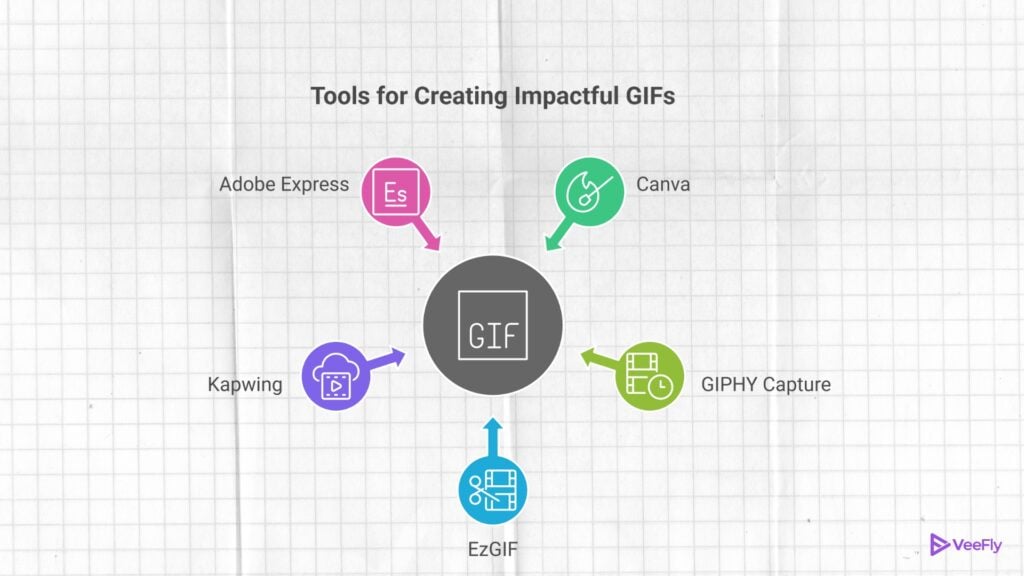
5 GIF Maker for YouTube Video Creators Need to Use
Turn your GIFs into a strategic tool with an intense call-to-action, click-through rates, and brand recall value with these 5 tools:
1)Canva
Arguably one of the best tools for design and animation at the moment, which is free and beginner-friendly. All you have to do is open Canva, find the GIF section, and pick a template. You can choose a clip from your video to add text, stickers, and branding elements. Once you have completed the video, download it. Canva is best for creators who want aesthetic GIFs.
2)GIPHY Capture
If you want to repurpose your content quickly, GIPHY Capture is the one for you. Its templates are hassle-free with a user-friendly interface. You can download it to your desktop, drag the recording clip onto the screen, and hit record. GIFs’ duration can be trimmed as per purpose. Further, exporting the GIFs takes less than a minute. GIPHY Capture is ideal for creators who rely on speed.
3)EzGIF
To turn your YouTube moments into reaction-style GIFs, use EzGIF. It’s a no-nonsense editing app that trims, resizes, and compresses videos into share-worthy GIFs. If you are a creator who wants to take complete control of this bite-sized content, this app should be your go-to. Choose a video from your library, paste its URL, edit it as you like, and save it. You can record a video and make a GIF too. Use Cloudapp. it’s amongst the best screen recording software.
4)Kapwing
One of the best tools for adding subtitles, animations, and elements. Kapwing is a cloud-based tool that helps creators convert videos into high-quality GIFs. You can use the timeline to trim to the exact moment and add text. It also has one of the cleanest exports.
5)Adobe Express
To find clean, professional-looking GIFs, head to Adobe Express. For creators who want a professional touch, upload your clip to the tool and adjust its speed, size, and simple overlays. Then download it for a polished GIF. Adobe Express offers professional editing while keeping the interface simple to use.
Conclusion
GIFs are no longer limited to fun reaction moments. They are micro-promotional YouTube tools for 2026 creators. Whether you want to tease a new upload, highlight a key moment or boost your video discoverability. With a powerful GIF tool you can get viewers to stop scrolling and head to your channel. It’s one of the best ways to keep your viewers hooked to your videos. Each tool listed above will help you with a specific purpose. All you want is your GIF to lead you back to your content. Hence, start creating content that helps you grow smarter.
Frequently Asked Questions
Q1)How to Create a GIF to Promote YouTube Videos?
To create a GIF from a YouTube video for promotion, simply download the video, trim it to 2-6 seconds, and share it in your community.
Q2)How to Make GIFs From YouTube Videos?
You can copy your YouTube video URL, paste it into the GIF tools, select the moment you want, and upload it manually.
Q3)How to Turn a Video to GIF With High Quality?
Use editors that support HD GIF export from Adobe Express. Keep the duration short and reduce the number of colour drops. Use clean exports for high quality.
Q4)Are GIFs Allowed on YouTube?
You can’t upload GIFs to YouTube videos; however, you can turn YouTube videos into GIFs for the fueling algorithm.
Q5)Do GIFs Reduce YouTube Video Quality?
Yes, GIFs naturally compress frames so that they won’t look as sharp as video. However, you can use high-quality GIF tools like Canva and Adobe Express for high-quality frames.
