



Key Takeaways
- Stop writing JSON-LD by hand; instead, leverage automation tools to fetch the metadata from YouTube.
- Using schema markup can get your videos to display with thumbnails and video lengths directly in Google search engine results.
- Google search engines prefer using structured data like JSON-LD to understand the content of the embedded videos.
- It is always important to validate your code using the Google Rich Results Test tool.
- While the techniques are specifically geared towards optimizing videos for YouTube, they can also be used for videos on other platforms like Vimeo and self-hosted videos.
Why Video Schema Matters?
Think of Google as a very fast reader who doesn’t really “watch” videos. If you have a YouTube link embedded on your website, Google sees a frame, but doesn’t really know the duration of the video, the date it was uploaded, or which specific thumbnail you want to use.
By providing a video schema example in the form of JSON-LD code, you are essentially providing Google with a “cheat sheet” that helps ensure that coveted “Rich Snippet” search result with the video play button and duration on the search engine results page.
We’re going to look at how to generate video schema, some examples for it, and discuss the importance of using video schema markup, and then walk you through the process of generating the video schema markup without having to know a single line of code.
The Problem with Doing it Manually
Before we get to the “automatic” part, let’s talk about the hard way, i.e., the problem with doing it manually. The problem with manually creating schema markup for YouTube videos is that it is a sure-fire way of getting a headache, as you have to:
- Convert the duration of the video into ISO 8601 notation (e.g., PT4M10S).
- Copy-paste the upload date.
- Find the high-res thumbnail URL, which is buried somewhere in the YouTube source code.
- Make sure that the comma, curly bracket, etc, are in the right place.
Make one little mistake, and the whole thing is ruined. This is a problem for busy creators, as it is a major time-sink. If you’re like me and pouring your heart and soul into your YouTube channel, then you know the struggle of trying to get those views to migrate from the platform over to your website or blog. You add the video, write a killer post, and then… nothing. No love from the Google search gods.
The secret sauce that you might be missing isn’t necessarily having the best thumbnail or the craziest hook. It’s actually using the schema markup on your YouTube videos.
Steps to Generate Video Schema Markup Automatically
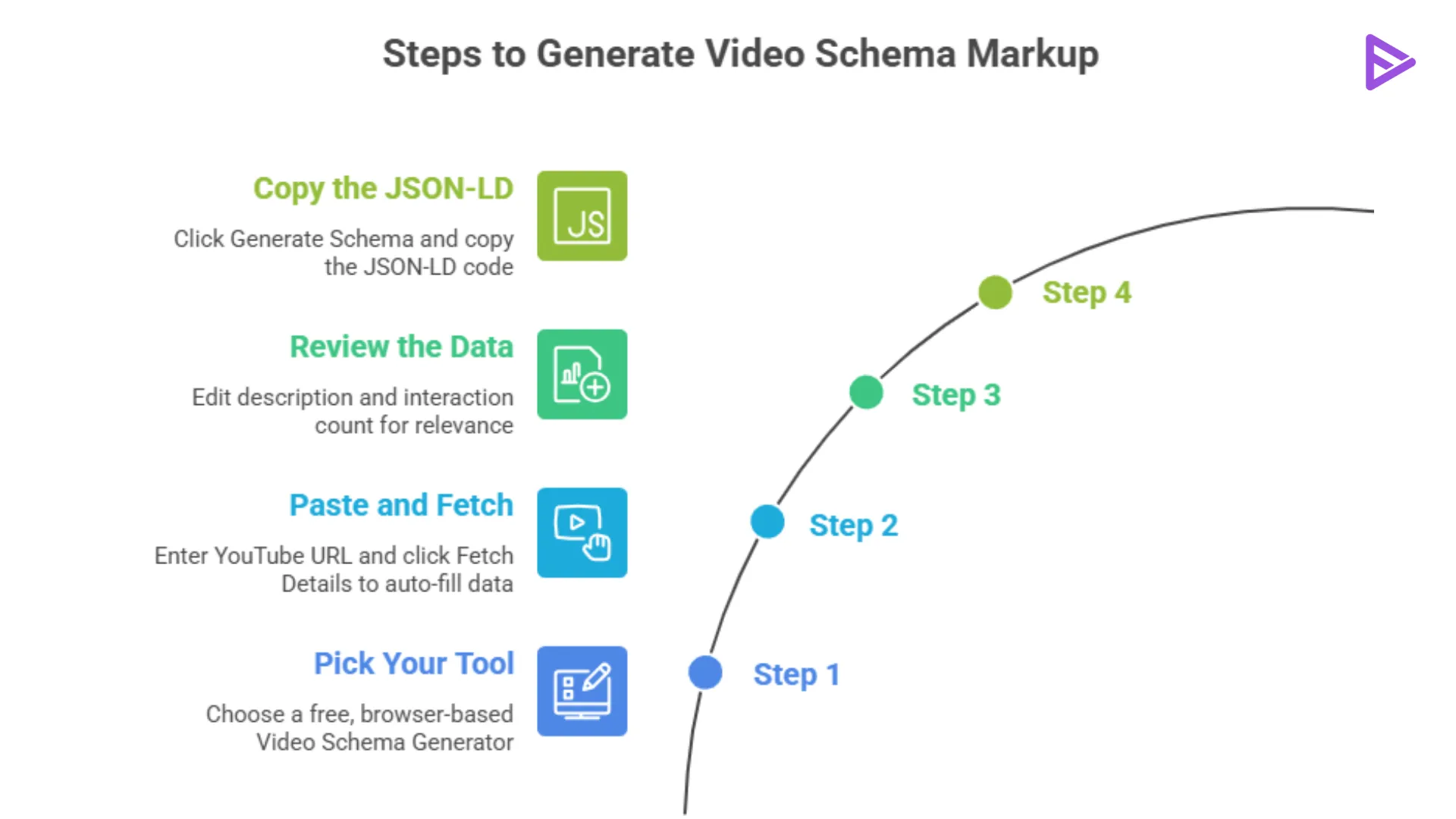
Now, let’s get into the good stuff. You don’t have to go through the hassle of manually entering the data by using a dedicated generator. The data is fetched directly from the YouTube API.
Step 1: Pick Your Tool
First, go to any Video Schema Generator. Choose a free, browser-based tool that has absolutely no technical requirements.
Step 2: Paste and Fetch
Enter the URL of your YouTube video into the “Automatic” field, then click Fetch Details. In the blink of an eye, the title, description, and annoying duration codes are filled in for you.
Step 3: Review the Data
Although the data is automatically fetched, you still have the ability to edit the data if needed. You can edit the description if you want to add certain keywords that pertain to your blog post, as well as the interaction count. This is a good spot to edit the video schema markup example to make sure it is relevant to your webpage.
Step 4: Copy the JSON-LD
Click “Generate Schema.” You’ll see a block of code that looks like this:
{
"@context": "https://schema.org",
"@type": "VideoObject",
"name": "How to Bake a Cake",
"description": "A simple guide to baking...",
"thumbnailUrl": "https://i.ytimg.com/vi/example/maxresdefault.jpg",
"uploadDate": "2024-03-18",
"duration": "PT5M30S",
"contentUrl": "https://www.youtube.com/watch?v=example",
"embedUrl": "https://www.youtube.com/embed/example"
}
How to Add the Code to Your Site
So, now that we know how to create this code, we need to know how to add it to our website.
- WordPress Users: If you’re using WordPress, then you can use plugins like Rank Math or Yoast. These plugins will have a “Custom Schema” or “Code” tab, and you can just add this JSON-LD code there. Alternatively, you can use a “Custom HTML” block just below your video embed.
- Wix/Squarespace: Look for “Header Code Injection” or “Embed” settings on that specific page.
- Hard-coded HTML: Paste the script anywhere in the <body> or <head> of your page.
- Self-Coded HTML: Paste the script anywhere in the <body> or <head> of your page.
Comparison Table: Automatic vs Schema Generation
| Feature | Manual | Automatic |
| Speed | 10-15 Minutes | 10 Seconds |
| Accuracy | high risk of syntax errors | validated & precise |
| Technical Skill | Requires JSON knowledge | None |
| Duration Format | Manual calculation | Automatic ISO 8601 |
Validate with Rich Results Test!
Once you’ve created your schema markup for the YouTube videos, the next step is to ensure that Google is actually able to see the schema markup that you’ve created. The best way to do this is by utilizing the Google Rich Results Test. All you have to do is input the URL, and if you see a green checkmark next to “Videos,” then you know everything is good!
Final Thoughts
As a creator, your time is best spent creating, not coding! By utilizing a video schema template and the automated process, you’re allowing yourself the benefits of high-end websites without the hassle. By learning the key to automatically creating video schema markup, you’re giving your YouTube videos the best possible chance at ranking on the first page of Google!
Frequently Asked Questions
1. What is one typical video schema example for YouTube?
A typical video schema example includes the VideoObject type with properties such as the video name, description, video duration, and thumbnail URL.
2. Is schema markup for YouTube videos necessary?
Schema markup is not mandatory but is highly recommended for videos on YouTube. It gives search engines more information about the content of your videos.
3. How can I generate video schema markup for free?
You can generate schema markup using free tools such as the Sanishtech Video Schema Generator. All you need to do is add the link to your video on YouTube.
4. Can I use this tool to generate schema markup for videos not hosted on YouTube?
Yes, you can definitely use this tool to generate schema markup for videos not hosted on YouTube. While the automatic feature of the tool can only be used with videos on YouTube, the manual feature can be used to generate schema markup for videos on other platforms, such as Vimeo or self-hosted videos using the MP4 format.