



Key Takeaways
- Access subscribers through YouTube Studio by opening the dashboard and checking the subscriber list.
- As a YouTube creator, you get the YouTube Studio dashboard to keep track of your YouTube channel’s performance. With YouTube Studio, it becomes easy to see your subscribers on YouTube.
- Understand the privacy limits properly and check the analytics for growth.
- You can only see your YouTube subscribers if they haven’t kept their subscription information private.
- Except for the subscriber update delay, since YouTube reflects it on the dashboard periodically.
Gaining new subscribers on YouTube is a sign of achievement for any YouTube creator. So, constantly seeing the number of subscribers added to the list can be exciting. So, if you are wondering: ‘How do I see my subscribers on YouTube? ‘ let’s get to it.
How To See My Subscribers On YouTube?
Want to see who these new people who subscribed to you are? Follow these steps to know how to see who your subscribers are on YouTube:
On a Computer
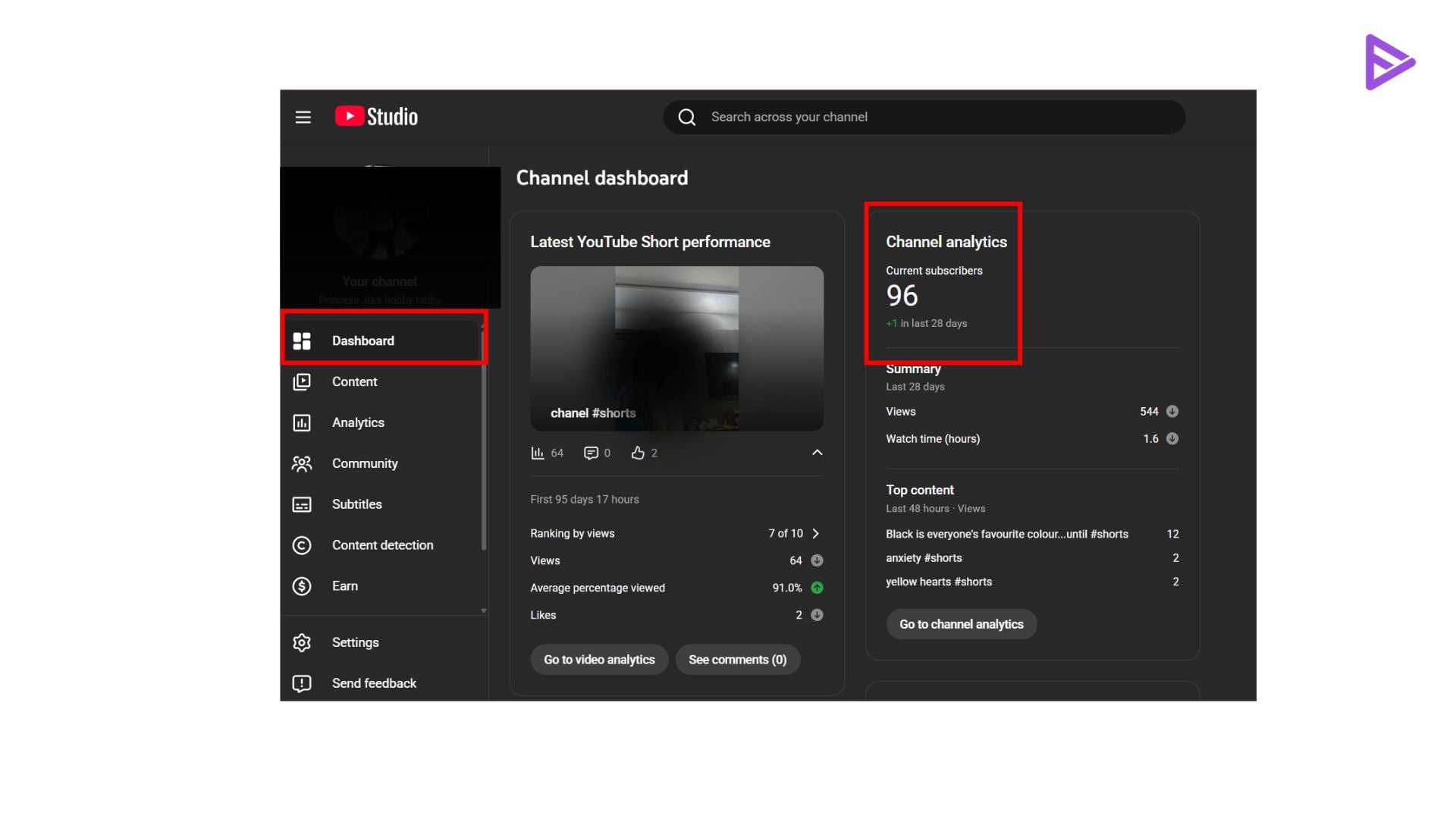
- Step 1: Open YouTube and click on your profile picture.
- Step 2: Select ‘YouTube Studio,’ then click the ‘Recent subscribers’ tab.
- Step 3: Click ‘See all’ to see all your subscribers who do not hide their subscriptions in a list.
YouTube mobile app
Now, to see your subscribers on YouTube in the mobile app, follow these steps:
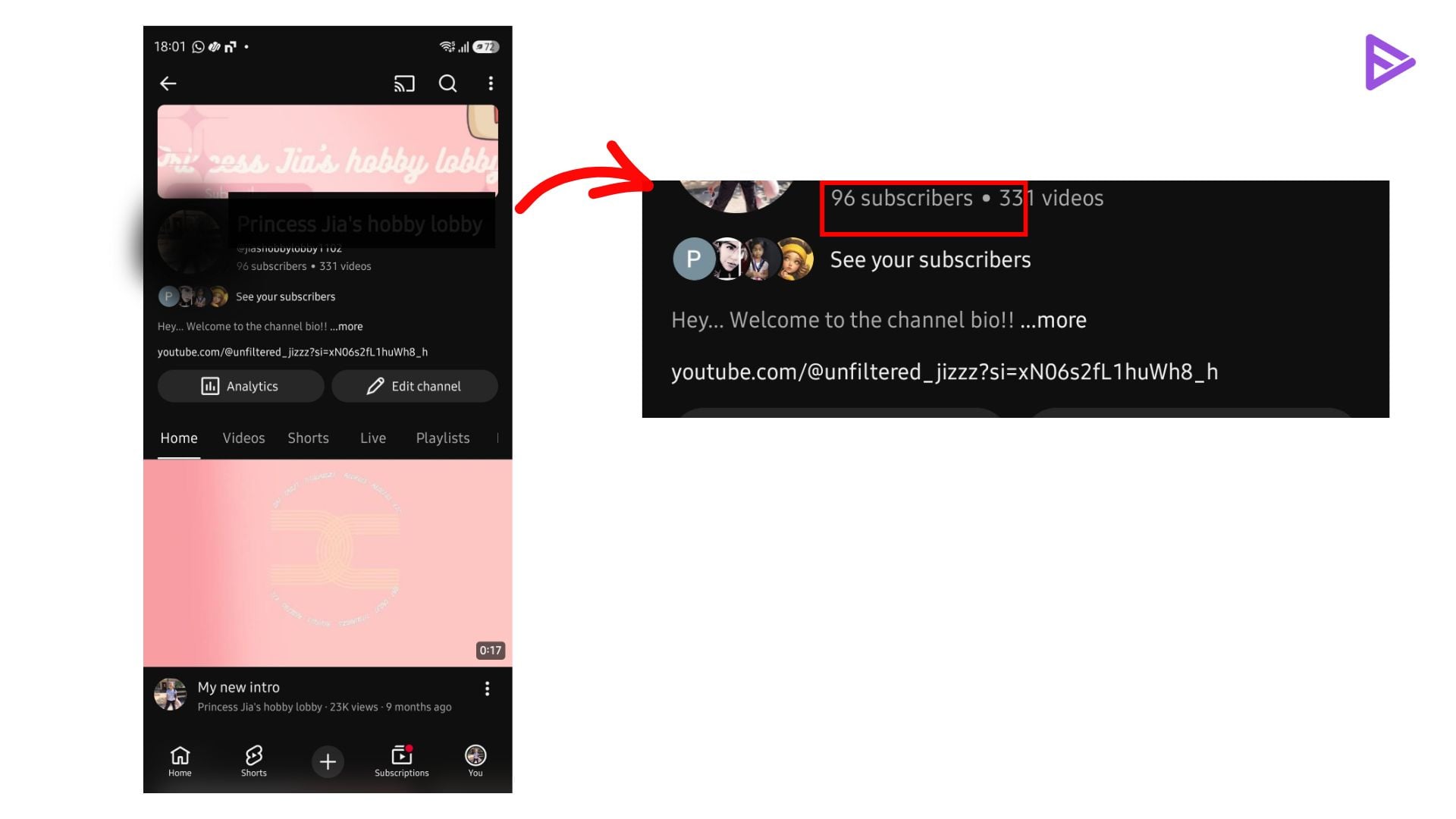
- Step 1: Open the YouTube mobile app and log in to your account.
- Step 2: Tap your profile icon and select your channel.
- Step 3: You can view the subscriber count under the channel’s name.
Even YouTubers who have made their profiles private won’t appear on this list. The number of subscribers will give you an idea of how well you can promote videos on YouTube.
One pro tip we would like to share is to increase your channel’s subscriber base; consider using freely available AI tools online. The most significant advantage of using these tools is that they improve the discoverability of your videos and save a lot of time.
Final Thoughts
How do I see my subscribers on YouTube? We’ve shown two simple ways you can check your subscriber list on YouTube: on mobile and on a Computer.
The YouTube Studio dashboard is the most helpful thing for YouTube creators. It shows creators all the vital analytics that can help a new YouTuber immensely. For example, seeing who subscribes to your YouTube channel can give you an idea of the audience your channel is attracting. Then, if the audience watching your videos differs from the one you had in mind, you can tweak your videos to ensure they reach the right audience.
You can get YouTube subscribers by consistently engaging with your community, paying attention to what your audience wants to see, and maintaining the quality of your content. So, for those wondering how to see their subscribers on YouTube, you can only see them in YT Studio on desktop. Also, you cannot see your subscribers on the mobile app.
Frequently Asked Questions
Q1. How to see your first subscribers on YouTube?
To see your first subscriber viewer on YouTube, head to YouTube Studio’s dashboard, locate Recent Subscribers, and filter by preferences to see all your subscribers. Based on the date, you can identify the first subscriber.
Q2. How often does the subscriber list update on YouTube?
YouTube Studio lists updates within hours, but the public count is reflected periodically.
Q3. Why is my subscriber count different from YouTube Analytics?
YouTube subscriber count may differ from YouTube analytics because YouTube reviews for bot and spam activity before the final count. Further, the public subscriber count is not updated in real time and takes time to reflect.
Q4. Does YouTube notify creators about new subscribers?
Yes, YouTube notifies creators about new subscribers, but not always in real time.
Q5. Can I see who unsubscribed from my channel?
No, as of 2026, you can’t be notified when someone unsubscribes from your channel. YouTube creators can track analytics to identify patterns.
