


Overview on YouTube Algorithm: Quick Summary
- The early version of YouTube was based on ranked video content according to the number of clicks.
- Since 2012, the algorithm has focused on watch time and user interest.
- The algorithm employs machine learning to create personalization based on user behavior.
- Key ranking factors include watch time, CTR, engagement metrics like likes, comments, and shares, and audience behavior.
- Creators can also grow by improving their descriptions, posting frequently, and targeting successful topics while steering clear of harmful borderline content.
How the YouTube Algorithm Started?
In 2005, one video was uploaded on YouTube. Today around 300 hours of videos are being uploaded every minute on the world’s largest online video-sharing platform.
Back then, YouTube prioritized the videos that got the most clicks rather than what actually interested users. This led to an increase in clickbait; users would click on deceptive and misleading titles and thumbnails that would turn out to be the opposite, leaving the users annoyed and feeling tricked. They would leave the video halfway, which affected the user experience badly.
Learning from this experience, YouTube updated its platform in 2012, changing its priority to what a user would like to watch. This time around, it gave more importance to videos that:
- Caught the user’s attention.
- Were so intriguing that they had more watch time.
Now, using the YouTube algorithm for views is not encouraged. Marketers and creators need to focus on what the users want rather than on baseless claims to drive clicks.
YouTube Algorithm Insights for Creators
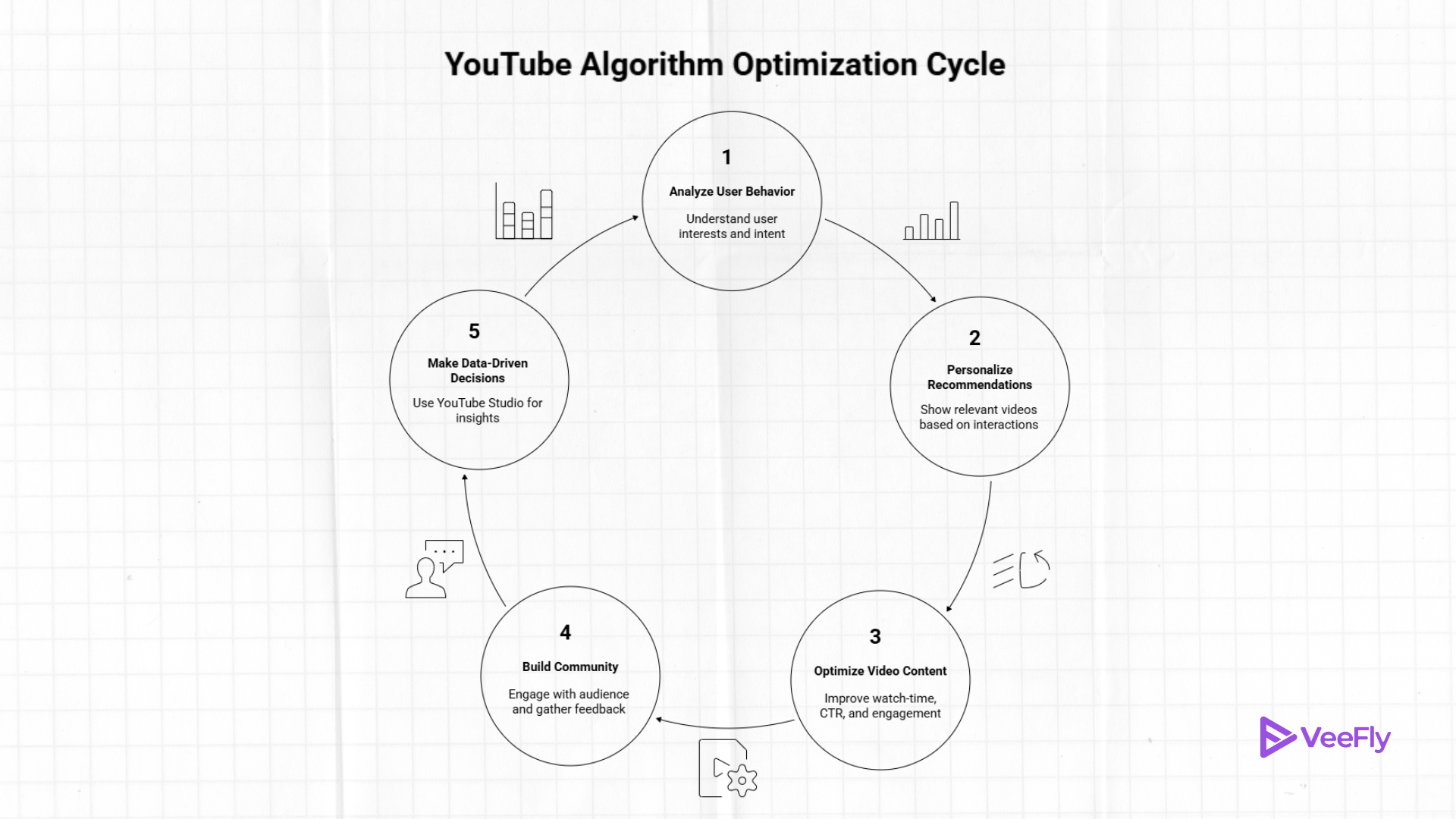
YouTube algorithm details are analyzed by machine learning technologies that understand users behaviour and provide the best experience to users by analyzing their interests and intent.
The principles of the YouTube algorithm
- Viewer first: The YouTube algorithm works to satisfy the viewers interests rather than promote creators in respective areas.
- Personalised recommendation: The algorithm shows results and recommendations based on users previous interactions. Such as likes and shared videos, watch time, and saved or watch later videos.
- AI & Machine Learning: Since a single user interaction generates a vast amount of data, the YouTube algorithm is complex yet reliable at predicting the right outcome.
Video Ranking Signals (Metrics)
- Watch-time: Your videos should hold viewers longer and retain them longer by increasing session time and playlist/channel optimization with metadata.
- CTR: When you hold on to your video or hover over the thumbnail, it gets an impression. However, viewers should click on videos, helping the channel in its ranking. Thus impression-to-CTR should be strong.
- Engagement metrics: Likes, comments, subscriptions, shares, saves, etc, show viewers are engaging with content. Telling the algorithm that the content is of quality.
- Audience Behaviour: The content should be for your audience, not the algorithm. As discussed, YouTube is viewers first.
How content is recommended
- Homepage: The main areas where videos are recommended. The page is a personalized feed based on the user’s viewing habits.
- YouTube search results: videos are suggested based on the search query, user interactions, and content. Additionally, viewers can narrow down their search using advanced YouTube search filters.
- Suggestion: To keep the session going, related content is suggested while the video is playing.
Content Insights
- Impress Audience: A common saying among YouTubers is that the algorithm will follow.
- Clickable thumbnails and titles: Increase CTR by understanding the audience’s interests.
- YouTube Studio: Make data-driven decisions using Studio Analytics, Inspiration Tab, and Ask Studio AI.
- Community Building: Participate with your audience to enhance communication and gather feedback to deliver what they want.
How to Get Organic Reach on YouTube?
If you want to know how to beat the YouTube algorithm then you need to focus on getting organic reach on YouTube.
Optimizing YouTube Video Description
While writing a description for your video, keep in mind to use clear and focused keywords so that YouTube knows what your video is all about. Don’t simply link your social media handles. Use this opportunity to make your video known not only to users but also to the algorithm. Write in layman’s language and to the point. Beating around the bush will only confuse the algorithm about the concept and content of your video. You can also use tools like Tube Buddy to look for SEO-optimized descriptions.
To know more about how to use Tube Buddy and its benefits to a YouTuber, click here.
Refine And Repeat
When you upload a video on a specific topic and get incredible engagement from users, creators usually jump onto something new. Often, videos made on similar topics work well. This is where the refine and repeat part comes in. For example, if you have created a DIY video on carpentry or making household chores easy, if your subscribers like such videos, stick to making similar videos on different items or chores rather than jumping into a new genre altogether. As mentioned above, the algorithm suggests videos based on a user’s search history, and so this step will help you reach that user over and over.
Create A Schedule To Post Your YouTube Videos
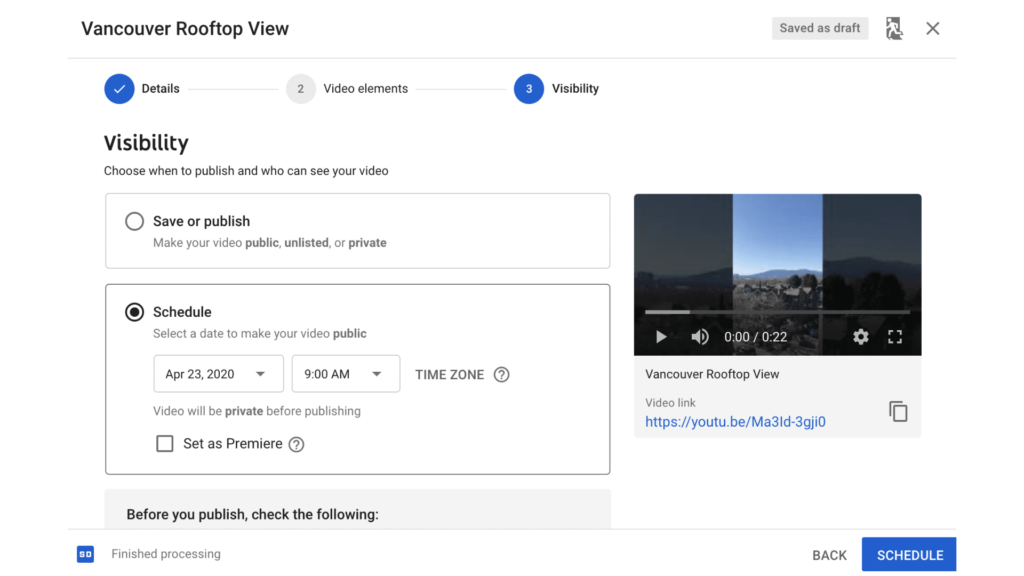
This step is vital in becoming a successful YouTuber. Imagine a user coming to your channel and realizing that the videos uploaded have a gap of a year or more. The user won’t stay and engage. Your channel’s inactivity will push the user to another channel. Using tools like Tube Buddy, you can now schedule posts to be uploaded to your channel in a timely manner.
Avoid Borderline Content
Borderline content has been taking the front seat since 2016 and has skyrocketed since the start of the pandemic. What is borderline content? Borderline content is content that doesn’t go against YouTube’s community guideline rules but is still harmful to the audience, sometimes even deadly. YouTube has started demonetizing such videos or channels that produce false news, especially related to the pandemic.
For example, in the beginning, stages, videos of people being healed by consuming sanitizers were uploaded. YouTube immediately demonetized the channels uploading such videos. The CEO made it very clear that such videos that can cost users their lives won’t be taken lightly, especially on their platform.
Conclusion
The YouTube algorithm is what every creator tries to understand when they start their YouTube journey. Nonetheless, the YouTube audience is a priority for the YouTube algorithm. In the blog, we have seen how the algorithm works, how it ranks content, what metrics are important, and how to fix YouTube algorithm so that the channel performs well. Additionally, discussed what you can do to make the content algorithm ready while keeping the target audience as a priority.
Frequently Asked Questions
Q1. How to trigger the YouTube algorithm?
The YT algorithm triggers are high CTR, watch time, audience engagement, etc. The triggers rank the video while satisfying the user’s search intent.
Q2. Can understanding the algorithm help grow my channel?
Yes, understanding the algorithm helps you decode signals and optimize content to make your videos visible to your target audience.
Q3. Can older videos still perform well in the algorithm?
Yes, older videos perform if they are relevant for a longer time. Which keeps the video’s CTR, watch time, and engagement high.
Q4. How often does YouTube update its algorithm?
YouTube algorithm updates are frequent, such as daily adjustments and the rollout of new features, to improve the platform. You can follow creator Insider, the official YouTube news and blog website, and the Google support page to know any updates.
