


If you find your comments cringy on videos when you reread them after a specific period, don’t worry, you have the option to delete them from the video. However, to do that, you need to know how to view your YouTube comment history.
Remembering each comment you have left is impossible. However, you can still see YouTube comment history on mobile to recall them. This blog will guide you through the complete process of viewing and deleting your YouTube comment history, so you can feel more at ease.
Reasons to Check your YouTube Comment History
You should review your YouTube comments once a while. Let’s say you have mentioned something, shared an opinion, want to join the ongoing conversation, or given a response. That’s why you should review your YouTube comment history.
View all YouTube comments by a user perspective. This ensures your online reputation is being maintained. You must have commented that doesn’t align with your values. This will give you a chance to retain your personal and channel reputation.
How To See Your YouTube Comment History And Delete It? (Desktop)
You might want to delete comments that you think are no longer relevant, offensive, rude, or disrespectful. You can manage your comments using your desktop version of YouTube. Here’s how to see your YouTube comment history.
- Sign in to your Google account.
- Click on the hamburger icon.
- Choose the history option.
- Choose comments.
This is a quick way to view your YouTube history. However, if you are still unsure about the process, the following steps are illustrated with images.
1. Sign up for your YouTube account
First, open your web version of YouTube and sign in with your Google account.
2. Navigate to comment history
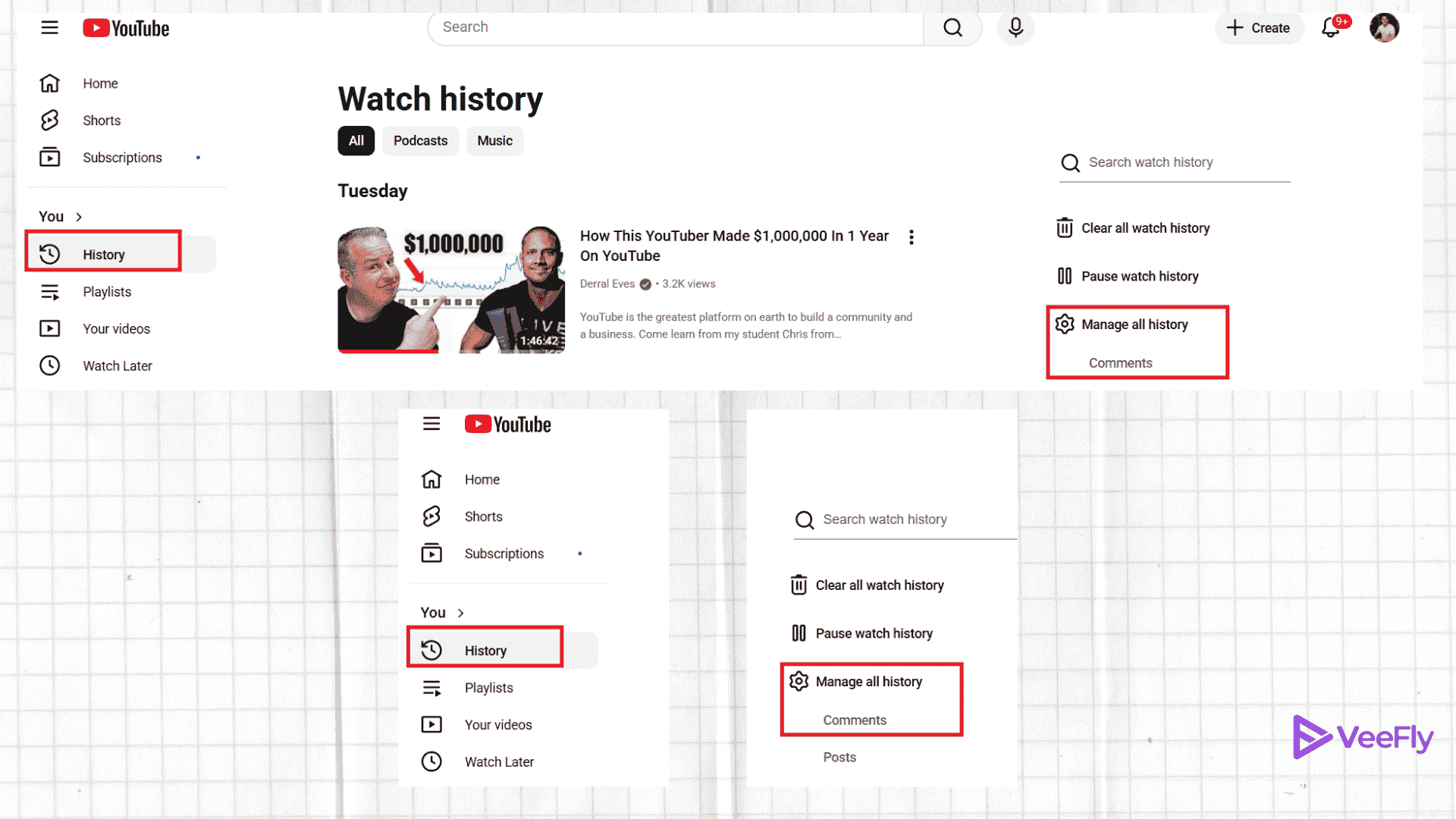
Click on the History option on the left panel. Click on the dropdown at the top left if you can’t see the left panel on the screen.
3. See and delete comment history
Once you click manage all history of comments. You will be directed to comment history YouTube page. All comments will appear on the screen on that page. Click on the comment you want to delete.

- Now to delete the comment history on YouTube Mobile, click on the video link.
- You will see your comment highlighted. Hover over the comment and click on the three dots icon.
- Choose the delete option. A pop-up will ask you to confirm your decision. Click on the delete option again.
There is also another way to check the YouTube comment history through the browser.
- Open YouTube and tap on your profile picture
- From the drop-down menu, select Your Data in YouTube
- Tap on Manage Your YouTube Watch History
- Tap on Interactions
- Select Comment and replies.
Checking your comment History on Mobile
Now that we have seen how to find comment history on YouTube. Let’s see how you can access it from your mobile device.
Open your YouTube app on your phone. Make sure you are logged in from the YouTube channel account.
- Open app
- Channel Icon (You)
- Settings (Top right corner)
- Manage all history
- Choose the Interactions tab
- Comments and replies
You will see the YT comment history you have done over the years. Now that we know how to check YouTube comment history on a phone, let’s see how to erase one.
How to Delete Your Old Comment History?
Follow these steps to delete your old comment history:
- Open the YouTube app
- Tap on settings
- Tap on history and privacy
- Select Manage all activity
- From the interactions tab, select the comments on YouTube section
- Tap on View comments
- Here, all the comments will be displayed.
- Browse or search for the comment you want to delete.
- Click on the three dots next to the comment
- Select delete.
How To Manage Your YouTube History?
To manage your YouTube history easily, the following steps can be helpful:
- From your YouTube homepage on the app, tap on your profile picture.
- Go to Settings
- Tap on Manage History
- Here, you will have access to more privacy controls over your YouTube history.
Deleting YouTube Comments As a Creator
YouTube gives you complete power to manage your comment section as a creator for your channel. If you want to delete an unwanted or abusive comment, here are the steps that will help you:
- Click on your profile picture
- Open YouTube Studio
- Go to the comments tab from the left sidebar
- Look for the comment you want to delete
- Click on the three-dot menu next to it and select remove.
How to Report a YouTube Comment?
If you come across a comment that violates YouTube’s community guidelines, you can report it to YouTube:
- Head over to the comments
- Click on the three-dot menu next to it.
- Select report and choose the reason
- Submit your report.
Conclusion
YouTube provides a feature called History that lets you view your comments from years ago. Now you also know how to view YouTube comment history on both mobile and desktop, and delete your old comments in just a second.
Frequently Asked Questions
Q1. Can you find a specific comment on YouTube?
Yes, you can use a third-party tool, such as a YouTube comment finder, to search for a comment by keywords or name. Creators can use YouTube Studio to filter and search through comments on their own videos using keywords and other filters.
Q2. Can I find a list of my YouTube comments?
Yes, you can. YouTube allows you to find all the YouTube comments under the comment history section and see the list of all the public comments on your videos and other channels as well.
Q3. Why can’t I see my comments on YouTube?
Your comments might not appear for a variety of reasons. There may be a technical glitch, or the comments might be deleted or marked as spam due to a policy violation. Ensure that you are logged in to your channel to access the comments history.
Q4. How do I find my top comments on YouTube?
You cannot find the top comments on YouTube. However, you can check your comment history to view past comments and manually verify the highest number of likes received.
Q5. Where can I find saved comments on YouTube?
To access the saved comments on YouTube, open the YouTube app on your smartphone, tap the + Create icon, and then look for the comments icon in the Shorts creation tool. Here, you can view all the saved comments.
