


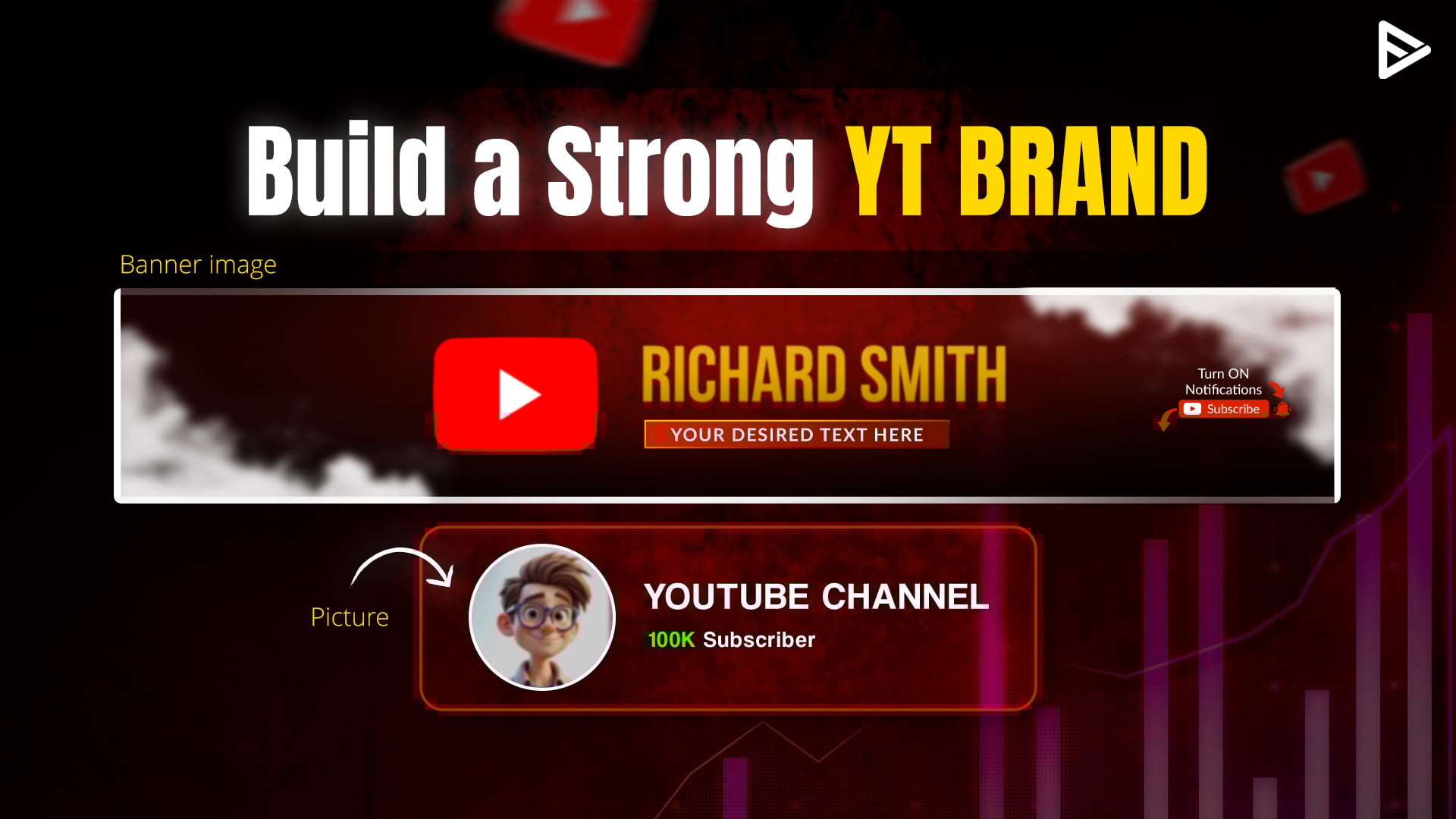
Many YouTubers wonder how YouTube channel branding works. YouTube is the world’s largest video-sharing platform, so the competition to make your channel stand out is tremendous. Is YouTube channel branding important? It definitely is.
YouTube allows you to create a unique identity for yourself through your channel. You can showcase your skills and follow your passion with millions of users watching your video content. To do so, you must learn what goes into customizing your YT channel.
To manage your YouTube brand account effectively, we’ve covered the complete steps to update your profile picture, channel art, trailer, and other key branding elements. These visual changes make it easier to manage your YouTube channel’s look and feel while keeping your branding consistent.
When you manage your channel branding the right way, you can build a strong YouTube brand account, stand out in your niche, attract the right viewers, and open doors to brand deals and long-term growth.
How YouTube Channel Branding Works?
Here, YouTube branding guidelines involve 4 things that will help you understand how branding works for your YT channel. When you manage your YouTube brand account, branding elements help viewers instantly recognize and trust your channel. YouTube allows creators to manage channel branding directly through YouTube Studio on both mobile and desktop. These core elements define how your channel looks and feels.
1. Profile icon
Your profile picture is a direct portrayal of you. It is a signature image that will appear almost everywhere on your channel. According to YouTube Help, your profile icon must follow its community guidelines. The guidelines state that your profile icon should be in JPG, GIF, BMP, and PNG formats. It should be 800 px by 800 px and less than 4 MB.
How do you change your YouTube profile icon?
On Desktop:
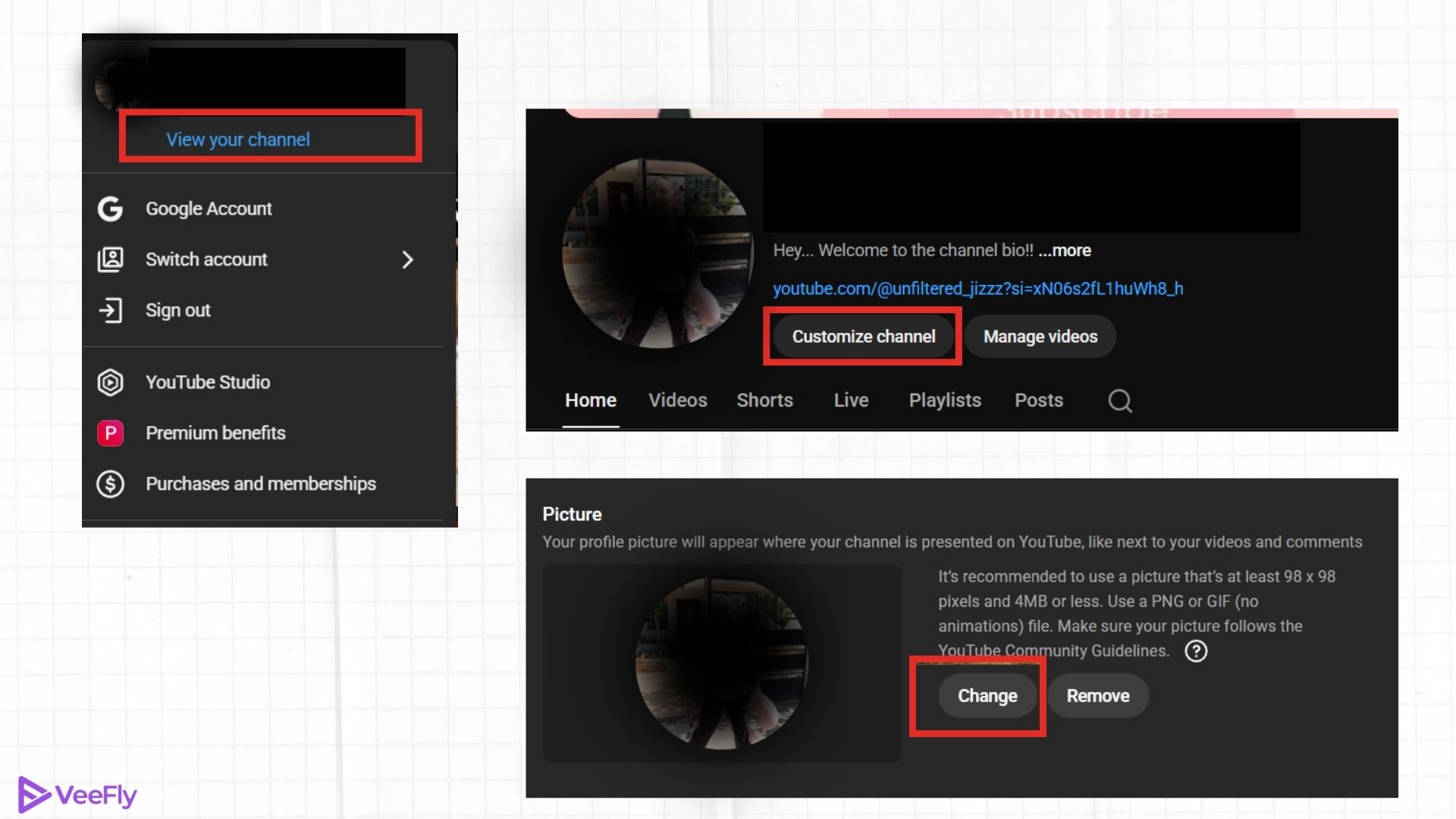
- Click on your profile icon.
- Select “Your Channel”
- Tap on “Customize Channel.”
- Under Channel Customization, click the “change” option under the profile picture, then save.
On Mobile:
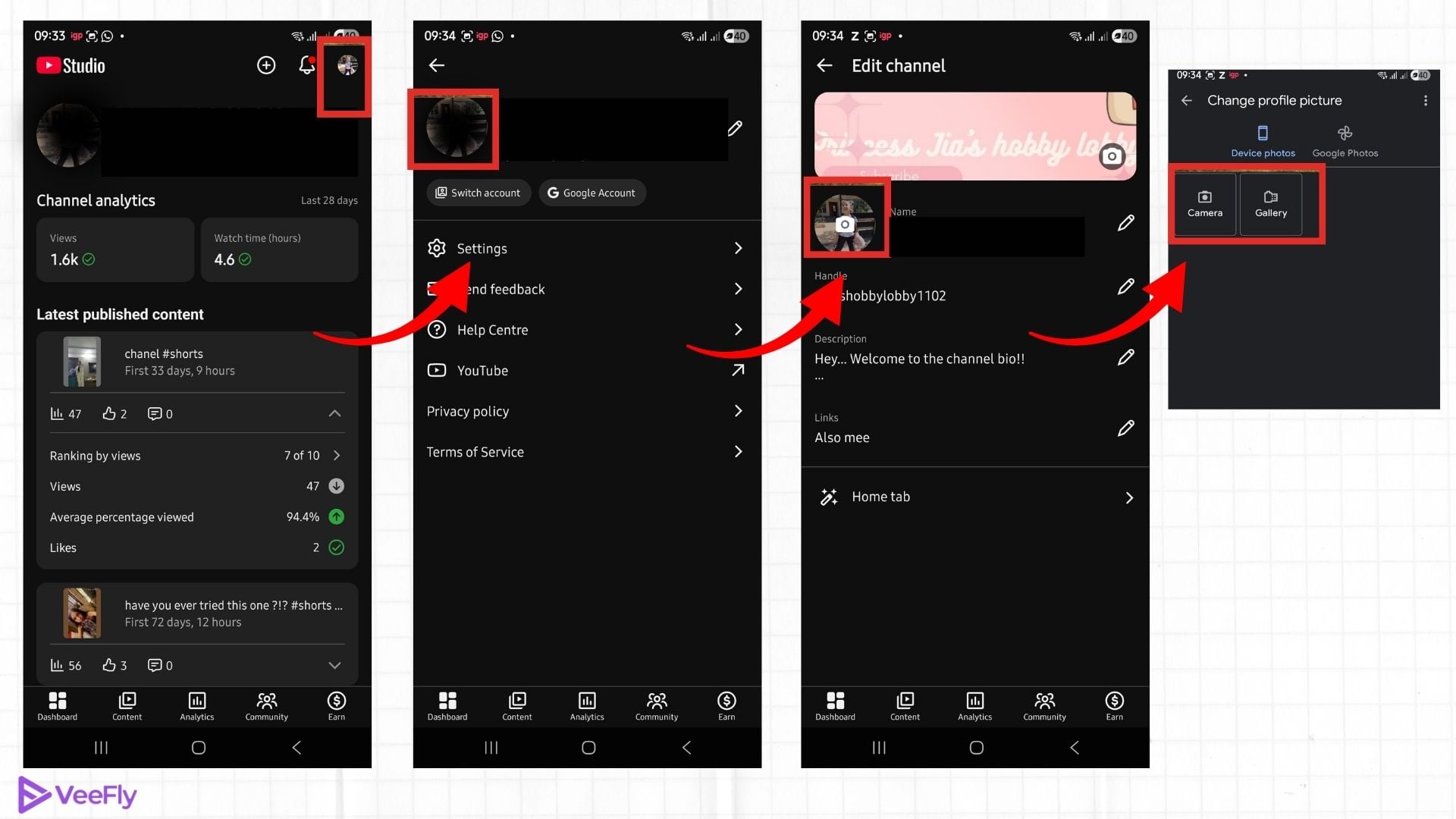
- Open the YouTube Studio app
- Tap your profile icon
- Select Edit channel profile
- Tap the profile image and upload a new one
- Save changes
2. Channel art
Channel art is a banner image that appears on your YouTube channel’s homepage. The recommended banner is 3048 x 1152 with an aspect ratio of 16:9. The image file should be less than 6 MB. As a creator, you can showcase an image of any upcoming videos and build hype through your channel art.
How do you change your YouTube channel art?
On Desktop:
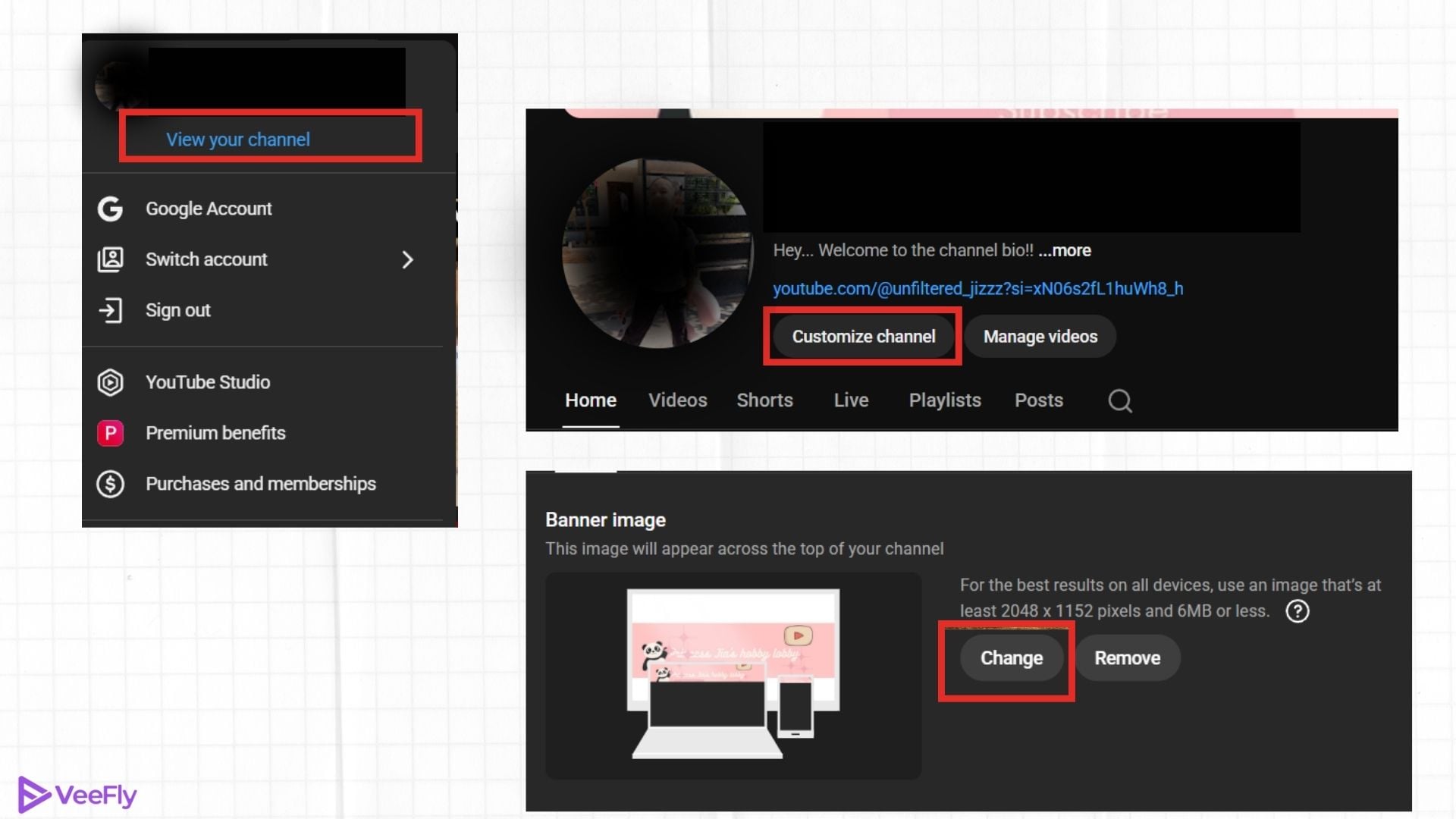
- Click on your profile icon.
- Select “Your Channel”
- Tap on “Customize Channel,” then click on “banner image” under Channel Customization.
- Click on the “change” option under the banner image and save.
On Mobile:
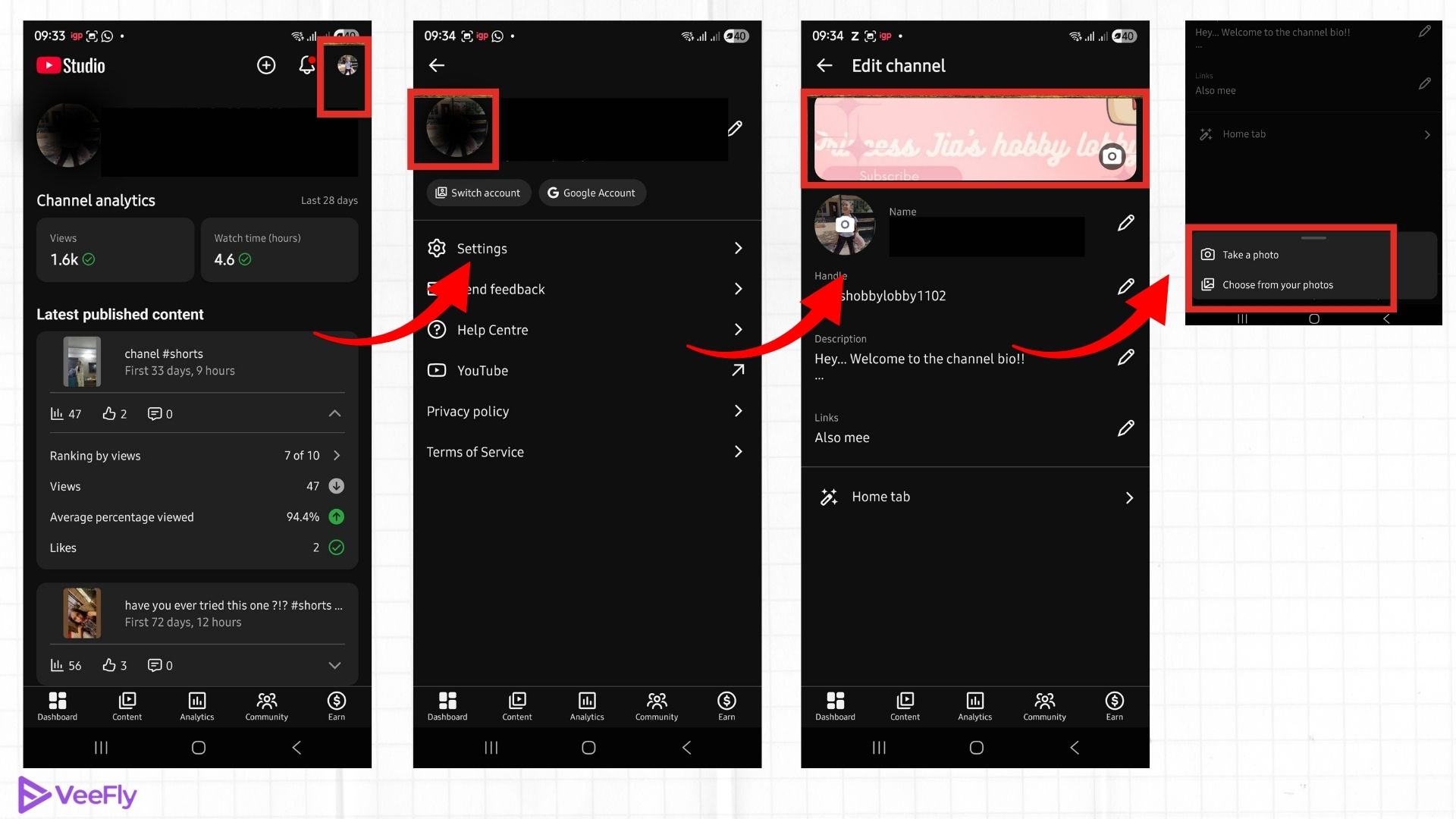
- Open the YouTube Studio app
- Tap Edit channel profile
- Select Banner image
- Upload your design and save
Updating your banner regularly helps you manage YouTube channel visibility and branding clarity.
3. Video watermark
Your channel’s video watermark enhances your brand identity and encourages users to subscribe to your YouTube channel. The watermark appears on the right-hand cover of your video. You can customize it to appear at the start, end, or throughout the video. Your watermark image file must be 150 x 150 px and less than 1 MB in size.
How do you change your YouTube video watermark?
- Click on your profile icon.
- Select “Your Channel”
- Tap on Customize Channel.
- Under Channel Customization, scroll down and look for the Video Watermark option.
- Then, click on the “change” option under the video watermark.
- Select “display time” and click on save.
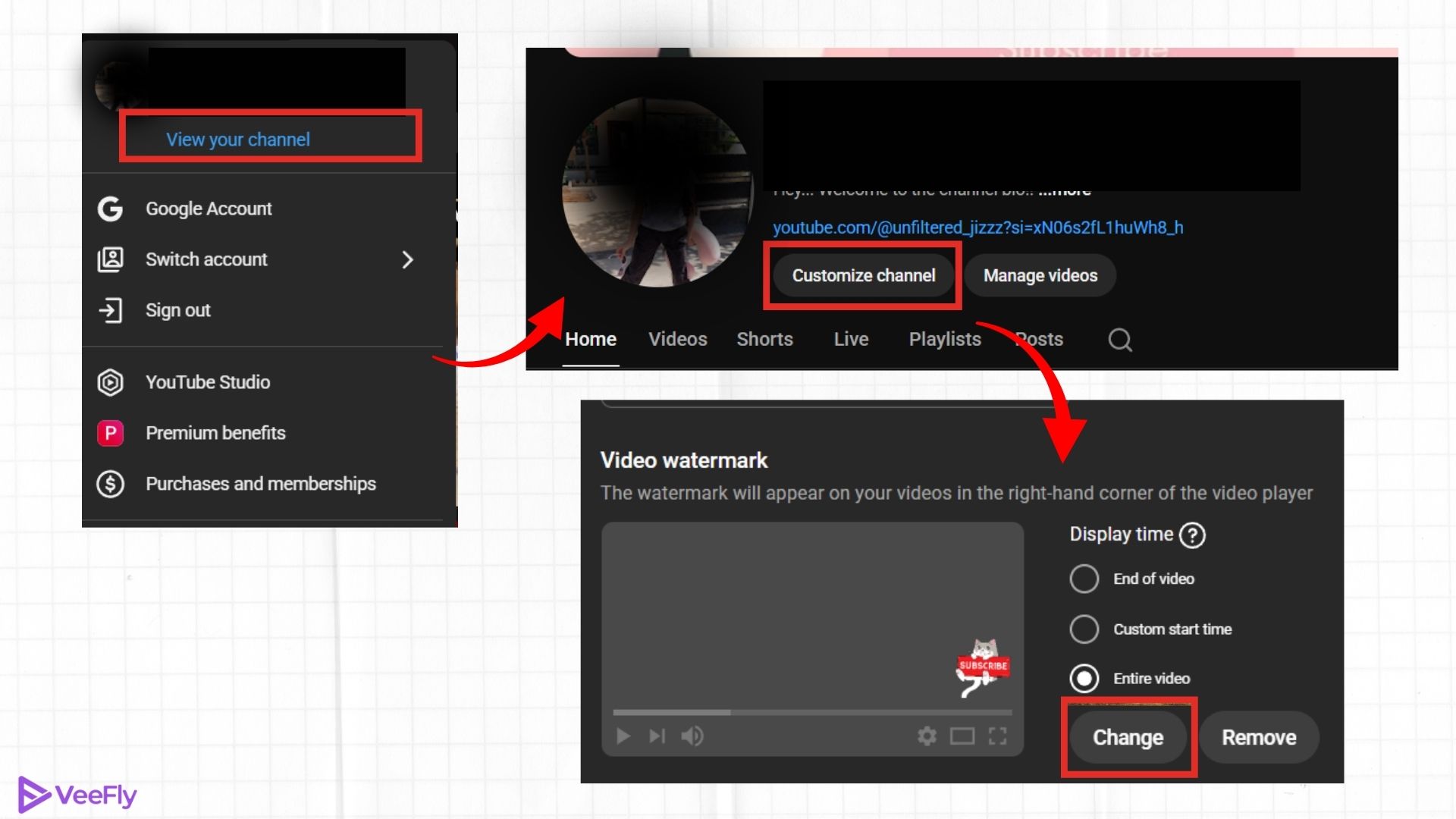
Video watermark updates are currently not available on mobile.
You must use the desktop version to manage brand account YouTube watermark settings.
4. Channel trailer
A channel trailer is a preview of viewers who haven’t subscribed to your channel yet to make them do so. You can choose your best-performing video from your YouTube channel.
How do you change your YouTube channel trailer?
On Desktop:
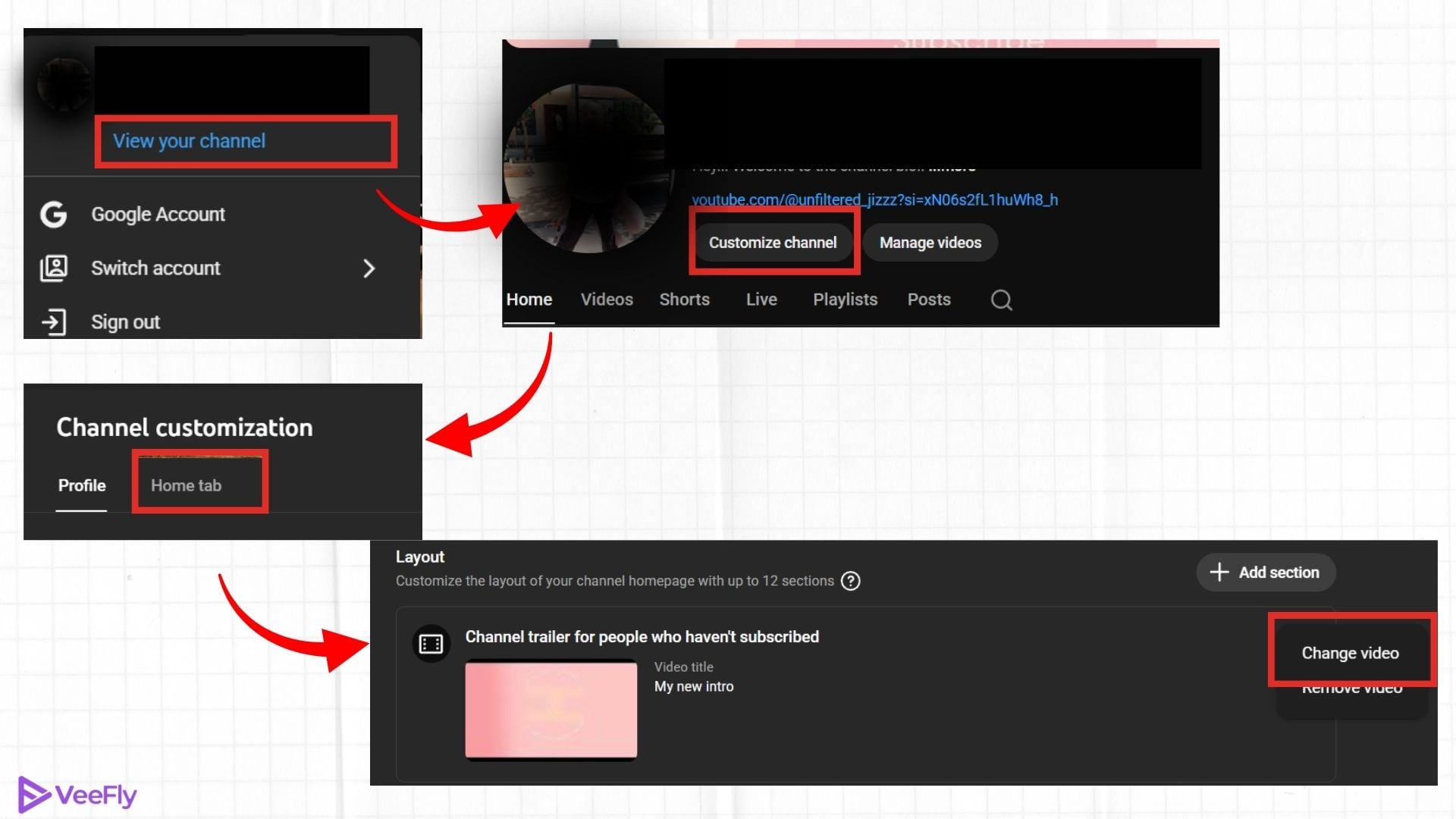
- Click on your profile icon.
- Select “Your Channel”
- Tap “Customize Channel.”
- Select the “Home tab” and then click “Layout” under Channel Customization.
- Then, click on Change video
- Select the “Add” option under the video spotlight, then save.
On Mobile:
You will need to access the desktop version of YouTube Studio on your mobile device in a browser. To do so, you must follow these steps:
- Open the Chrome Browser
- Open the YouTube Studio App by typing studio.youtube.com
- From the browser settings, tap on Request Desktop site
- Then follow the steps as usual on the desktop to change the Channel trailer.
YouTube channel branding plays a vital role in attracting more views to your channel. YouTubers often struggle to gain views on their videos and try to increase them by creating high-quality content or promoting their videos through online platforms. You can choose either option or both.
Setting the right trailer helps creators manage their YouTube brand account more effectively by converting visitors into subscribers.
Importance Of Branding For Your YouTube Channel
Branding means building a well-established YouTube channel that viewers can not forget. It creates a memorable identity for your YouTube channel that stays in viewers’ minds even when they don’t want it to. Look at some of the benefits that you must know about.
- Branding helps in attracting your target audience through your videos.
- It makes your channel memorable and remarkable to the audience.
- If the YouTube channel branding is done right, it impressively makes your brand stand out.
- Well-established branding also builds relationships with customers and creates a loyal community.
Most Useful Practices For Branding Your YT Channel
YouTube channel branding requires crucial steps that ensure you are on the right path. These four practices are vital YouTube branding guidelines that will address the concern.
1. Stay Committed
Consistency is a must when you want to create a remarkable image of your brand. The cohesive feel you add to your YouTube channel ensures your viewers remember the brand even in a crowd. Always promote your videos on other platforms to maintain uniformity in color, language, and video layout.
2. Keep The Information Relevant
Information on your video is like the nameplate of your house. Like they tell the visitor whose house it is, the information incorporated into your videos conveys the concept of the video to viewers and the algorithm. YouTube’s algorithm works differently. Adding information along with the right, relevant keywords ensures that the algorithm understands what your video is about and ranks it on YouTube’s SERP whenever a similar query is searched.
3. Choose A Niche & Stick To It
Many creators and companies are trying to create videos on everything they can on YouTube. Yes, it can also help get fewer clicks and engagement on the YouTube channel. However, for long-term growth, it isn’t a good practice. You need to focus on creating content that interests your viewers and keeps them subscribed. For example, create videos concerning skincare issues rather than fashion if you have a skincare brand.
4. Hire An Expert
As you have just begun your business on YouTube, focusing on content creation while branding could be overwhelming. To keep things organized and error-free, you can hire an expert, such as a brand manager, and give your full attention to a single task.
Conclusion
If you started your business on YouTube with half-knowledge, don’t worry. Strong YouTube channel branding helps you amplify your success on YouTube. Use the information provided to access YouTube’s branding guidelines and create a remarkable brand identity among your competitors.
Frequently Asked Questions
Q1. Can I monetize my YouTube Brand Account?
Yes, you can monetize your YouTube brand account once you meet the YPP eligibility criteria and adhere to YouTube policies.
Q2. How do I customize my YouTube channel?
Customizing your channel is one way to build your YouTube channel brand. You can customize your YouTube channel by personalizing the channel profile picture, banner, trailer, sections, YT thumbnails, titles, and descriptions. You can also use AI tools like a title generator for YouTube videos to drive maximum clicks.
Q3. Can I convert my YouTube channel to a Brand Account?
Yes, you can convert your existing YouTube channel into a brand account to improve management and collaboration.
Q4. How do I add a brand manager to my YouTube channel?
Once you have a brand account, you can easily add a brand manager to your YouTube channel. You need to navigate through YouTube Studio and complete the process.
